> For the complete documentation index, see [llms.txt](https://docs.prismacloud.io/llms.txt). Markdown versions of documentation pages are available by appending `.md` to page URLs; this page is available as [Markdown](https://docs.prismacloud.io/admin-guide/32/audit/audit-admin-activity.md).
# Admin activity
All Prisma Cloud administrative activities are logged.
Changes to any settings (including previous and new values), changes to any rules (create, modify, or delete), changes to the credentials (create,modify, or delete), and all logon activity (success and failure) are logged. For every event, both the user name and source IP are captured.
Audit records for App-Embedded runtime audits, Trust audits, Container network firewall audits, and Host network firewall audits are retained for up to 25,000 entries or 50 MB, whichever limit is met first.
For login activity, the following events are captured:
* Every login attempt from the login page, including failures.
* Every failed attempt to authenticate to the API. Successfully authenticated calls to the API are not recorded.
The full set of log data is available to anyone with a [user role](/admin-guide/32/authentication/user-roles.md) of auditor or higher.
To view the administrative history, open Console, then go to **Manage > Logs > History**.
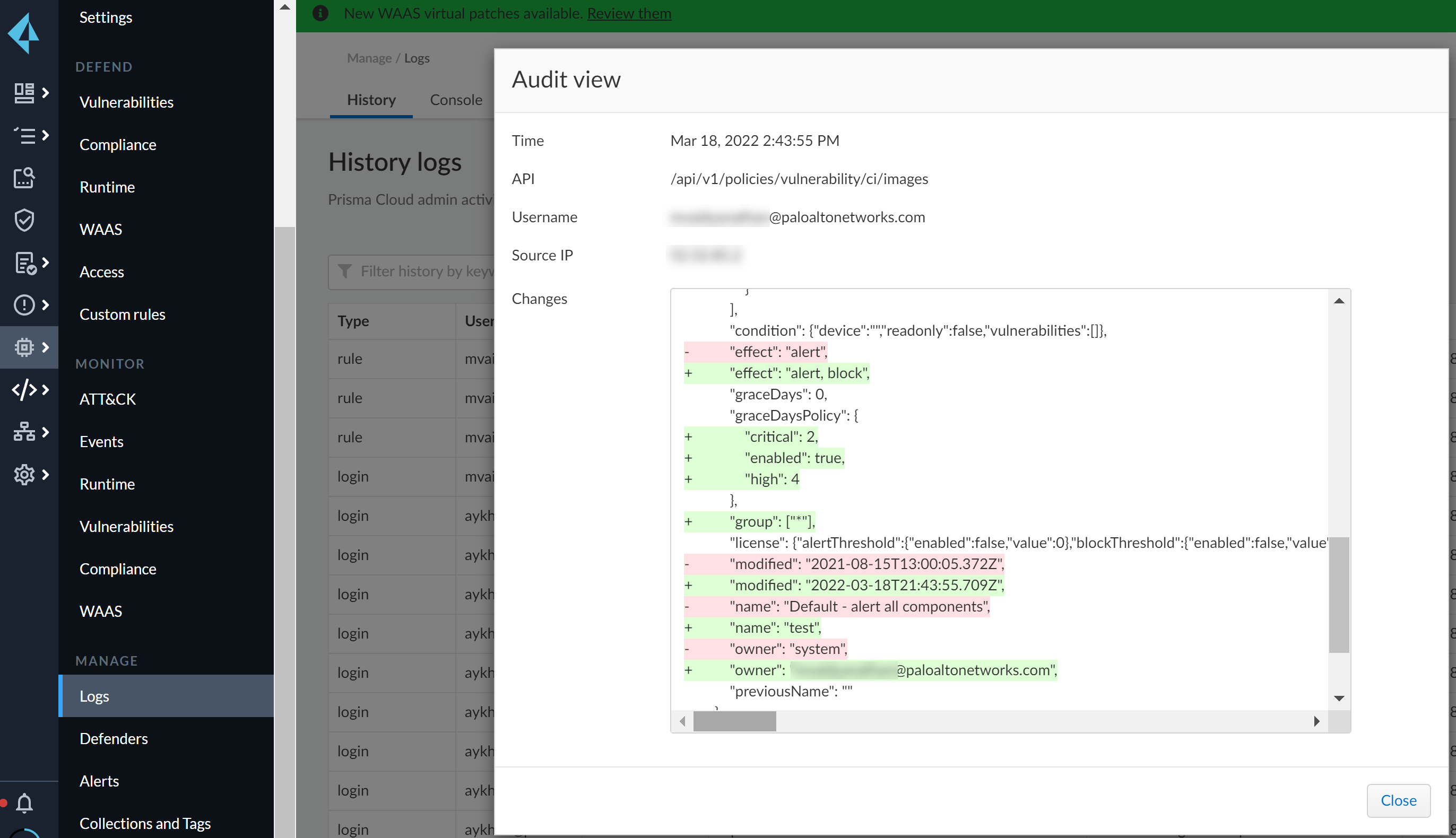
Settings, credentials, and rule events show how a configuration has changed. You can review the API endpoint, and a diff of the previous and current JSON objects. The following screenshot shows the changes to a vulnerability management rule:
Use the [API reference](https://pan.dev/compute/api/get-policies-vulnerability-ci-images/) to view information on the API endpoint. The `/api/22.01/policies/vulnerability/ci/images` endpoint creates and modifies vulnerability rules for images scanned in the CI process. In this case, user `name obscured` has changed the threshold for the grace period for fixing Critical and High severity CVEs to 2 days and 4 days respectively after the vulnerability was published or disclosed.
---
# Agent Instructions
This documentation is published with GitBook. GitBook is the documentation platform designed so that both humans and AI agents can read, navigate, and reason over technical content effectively. Learn more at gitbook.com.
## Querying This Documentation
If you need additional information that is not directly available in this page, you can query the documentation by asking a question.
Perform an HTTP GET request on the following URL with the `ask` and `goal` query parameters:
```
GET https://docs.prismacloud.io/admin-guide/32/audit/audit-admin-activity.md?ask=&goal=
```
`ask` is the immediate question: it should be specific, self-contained, and written in natural language.
`goal` is what the user is ultimately trying to achieve, the reason they need the answer. Sharing it helps GitBook give you a better, more relevant answer. A goal is most helpful when it describes the outcome the user wants rather than restating the question. For example, with `ask=how do I create an API token`, a goal like `automate deployments from our CI pipeline` lets GitBook tailor the answer to that use case.
The response will contain a direct answer to the question and relevant excerpts and sources from the documentation.
Use this mechanism when the answer is not explicitly present in the current page, you need clarification or additional context, or you want to retrieve related documentation sections.