> For the complete documentation index, see [llms.txt](https://docs.prismacloud.io/llms.txt). Markdown versions of documentation pages are available by appending `.md` to page URLs; this page is available as [Markdown](https://docs.prismacloud.io/admin-guide/32/compliance/windows.md).
# Windows compliance checks
Windows compliance checks were developed by Prisma Cloud Labs. They can be enabled in your host compliance policy.
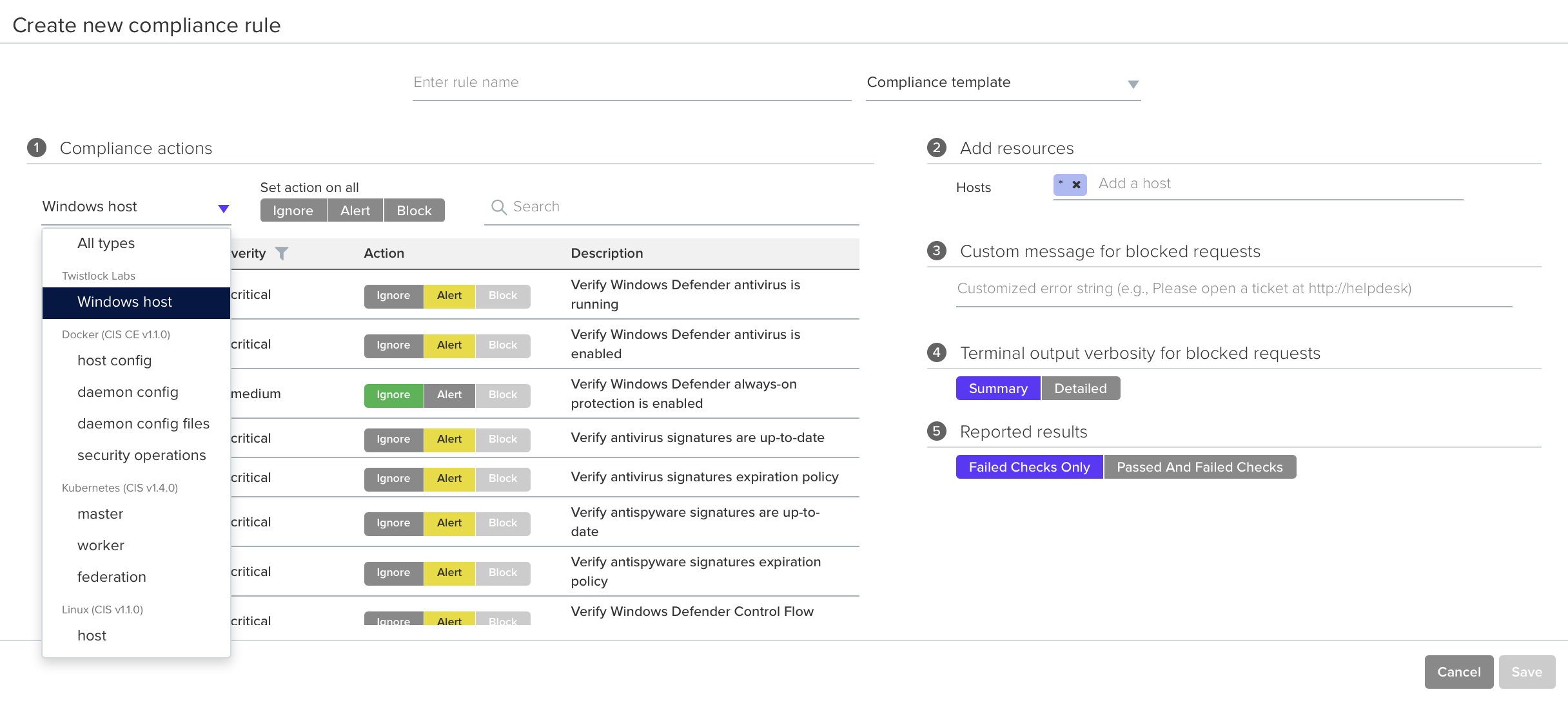
Create Windows host compliance rules in **Defend > Compliance > Hosts**. In the new rule dialog, select **Windows host** from the **Types** drop-down list.
The following checks are supported:
**200001: Verify Windows Defender antivirus is running**\
Microsoft’s built in Windows Defender antivirus service is running.
**200002: Verify Windows Defender antivirus is enabled**\
Microsoft’s built in Windows Defender service antivirus, anti-malware, and anti-spyware features are enabled
**200003: Verify Windows Defender always-on protection is enabled**\
Always-on protection consists of real-time protection, behavior monitoring, and heuristics to identify malware based on known suspicious and malicious activities.
**200004: Verify antivirus signatures match defined frequency**\
Windows antivirus signatures are overdue based on your frequency policy.
**200005: Verify antivirus signatures are up-to-date**\
Windows antivirus signatures list must be updated within the last 14 days. If 14 days elapse without an update, signatures are stale. This interval is required to be effective against current threats.
**200006: Verify anti-spyware signatures match defined frequency**\
Windows anti-spyware signatures are overdue based on your frequency policy.
**200007: Verify anti-spyware signatures are up-to-date**\
Windows anti-spyware signatures list must be updated within the last 14 days. If 14 days elapse without an update, signatures are stale. This interval is required to be effective against current threats.
**200201: Verify Windows Defender Control Flow Guard (CFG) is enabled**\
Control Flow Guard (CFG) is a platform security feature that combats memory corruption vulnerabilities. By placing tight restrictions on where an application can execute code, CFS makes it harder for exploits to execute arbitrary code through vulnerabilities, such as buffer overflows. This check is applicable to Windows Server 2019 only.
**200202: Verify Windows Defender Data Execution Prevention (DEP) is enabled**\
Data Execution Prevention (DEP) monitors memory to stop malicious code from running. It monitors all processes and services and stops a program if it isn’t running correctly in memory. This check is applicable to Windows Server 2019 only.
**200203: Verify Windows Defender Address Space Layout Randomization (ASLR) is enabled**\
Address space layout randomization (ASLR) prevents exploitation of memory corruption vulnerabilities. It prevents an attacker from reliably jumping to an exploited function in memory by randomly arranging the position (address) of the stack, heap, and loaded libraries. This check is applicable to Windows Server 2019 only.
**200300: Verify Windows Firewall public profile is enabled**\
This setting is applied when a connection to a domain is made through a public network, such as at an airport, hotel, or coffee shop. Since the security of these networks is unknown and not really controlled by the user running the computer, it is suggested that the Public network profile of settings be more restrictive than either the Domain network or Private network.
**200400: Verify Windows Update is enabled**\
Windows Update is a service which automates downloading and installing Microsoft Windows software updates.
**200401: Verify Windows Update is set to automatically install**\
Verify that Windows is configured to automatically download and install updates at a regular interval.
* If Windows Defender antivirus is not installed or running, all Windows Defender related checks (200001, 200002, 200003, 200201, 200202, 200203) fail with the following cause: "Windows Defender antivirus service is not installed/running".
* Although checks 200004/5 and 200006/7 look similar, they clarify the root cause of the issue when assessed separately. Checks 200004/6 verify the update frequency policy, while 200005/7 verify that signatures are actually up-to-date. Checks 200004/6 show whether the defined frequency is suboptimal (greater than 14 days), while checks 200005/7 show if there was a failure to update the signatures according to the defined policy (whether it’s 14 days or some other interval).
* If no definition files (signatures) are available, checks 200004 and 200006 fail with the following cause: "Windows Defender definition files are not available". Definitions can be removed with the following command:
```
"%ProgramFiles%\Windows Defender\MpCmdRun.exe" -removedefinitions
```
---
# Agent Instructions
This documentation is published with GitBook. GitBook is the documentation platform designed so that both humans and AI agents can read, navigate, and reason over technical content effectively. Learn more at gitbook.com.
## Querying This Documentation
If you need additional information that is not directly available in this page, you can query the documentation by asking a question.
Perform an HTTP GET request on the following URL with the `ask` and `goal` query parameters:
```
GET https://docs.prismacloud.io/admin-guide/32/compliance/windows.md?ask=&goal=
```
`ask` is the immediate question: it should be specific, self-contained, and written in natural language.
`goal` is what the user is ultimately trying to achieve, the reason they need the answer. Sharing it helps GitBook give you a better, more relevant answer. A goal is most helpful when it describes the outcome the user wants rather than restating the question. For example, with `ask=how do I create an API token`, a goal like `automate deployments from our CI pipeline` lets GitBook tailor the answer to that use case.
The response will contain a direct answer to the question and relevant excerpts and sources from the documentation.
Use this mechanism when the answer is not explicitly present in the current page, you need clarification or additional context, or you want to retrieve related documentation sections.