> For the complete documentation index, see [llms.txt](https://docs.prismacloud.io/llms.txt). Markdown versions of documentation pages are available by appending `.md` to page URLs; this page is available as [Markdown](https://docs.prismacloud.io/admin-guide/32/runtime-defense/custom-runtime-rules.md).
# Custom runtime rules
Prisma Cloud models the runtime behavior with machine learning to scale runtime defense in big and fluid environments.
Machine learning reduces the effort required to manually create and maintain loads of rules to secure running software. When machine learning doesn’t fully capture the range of acceptable runtime behaviors, rules provide a way to declaratively augment models with exceptions and additions.
Custom rules offer an additional mechanism to protect running software. Custom rules are expressions that give you a precise way to describe and detect discrete runtime behaviors. Runtime sensors in your environment already detect processes, file systems, and network activity, then pass those events to Prisma Cloud for processing. Expressions let you examine various facets of an event programmatically, then take action when the expressions evaluate to true. Custom rules can be applied to both hosts and containers.
For example, the expression grammar supports the following logic:
```
"If user Jake runs binary `netcat` with parameter -l, log an alert".
```
## Rule library
Custom rules are stored in a central library, where they can be reused. Besides your own rules, Prisma Cloud Labs also distributes rules via the Intelligence Stream. These rules are shipped in a disabled state by default. You can review, and optionally apply them at any time. To create and manage custom rules go to **Defend > Custom Rules > Runtime**. Select **Add rule** to create a new custom rule.
There are four types of rules, but only three are relevant to runtime:
* Processes
* Networking-outgoing
* File system
## Expression grammar
Expressions let you examine the contents of the processes, file system, and network events.
For example, any time a process is forked on a host protected by Container Defender or Host Defender, a process event fires. The following very simple expression looks for processes named `netcat`:
```
proc.name = "netcat"
```
Expressions have the following grammar:
`expression: term (op term | in )*`
term\
integer | string | keyword | event | '(' expression ')' | unaryOp
op\
and | or | > | < | >= | ⇐ | = | !=
in\
'(' integer | string (',' integer | string)\*)?
unaryOp\
not
keyword (similar to wildcards)\
startswith | contains
string\
strings must be enclosed in double quotes
integer\
int
event\
process, file system, or network
### Expressions examples:
```
net.outgoing_ip = "169.254.169.254" or net.outgoing_ip = "169.254.170.2"
proc.pname in ("mysql", "sqlplus", "postgres") and proc.pname != proc.name
file.path startswith "/etc"
```
### Process events
Process events fire when new processes are forked. Expressions can examine the following attributes of a new process.
| Attribute | Type | Description |
| ---------------- | ------ | ----------------------------------------------------------------------- |
| proc.name | string | Process name. |
| proc.pname | string | Parent process name. |
| proc.path | string | Full path to the program. |
| proc.user | string | User to whom the process belongs. |
| proc.interactive | bool |
Interactive process.
Not supported in App-Embedded runtime
|
| proc.cmdline | string | Command line. |
| proc.service | string | Only for host rules. |
### File system events
Any write operation to a disk fires a file system event. All properties of the process with `write` operations are accessible from this context. Expressions can examine the following attributes of file system `write` activity.
| Attribute | Type | Description |
| --------- | ------ | ---------------------------------------------------------------------------------------------------------- |
| file.path | string | Path of the file being written. |
| file.dir | string | Directory of the file being written. |
| file.type | enum | File type. Supported types are: elf, secret, regular, and folder. |
| file.md5 | string | MD5 hash of the file. Supported only for ELF files. For other types of files, this property will be empty. |
### Networking events
Network events fire when a process tries to establish an outbound connection. Expressions can examine the following attributes when network events fire:
| Attribute | Type | Description |
| ------------------- | ------ | ---------------------------------------------------------------------------------------------------------------------------------------------------------------------- |
| proc.name | string | Name of process initiating the outbound network connection. |
| net.outgoing\_port | string | Outbound port. |
| net.outgoing\_ip | string | Outgoing IP address. The following expression looks for outbound connections to a range of IP addresses: net.outgoing\_ip ⇒ "1.1.1.1" and net.outgoing\_ip ⇐ "1.1.1.9" |
| net.private\_subnet | bool | Private subnet. |
### Example expressions
The Prisma Cloud Labs rules in the rule library are the best place to find examples of non-trivial expressions.
1. In Console, go to **Defend > Custom Rules > Runtime**.
2. Filter the rules based on **Type** as processes, filesystem, or network-outgoing.
3. Additionally, add another filter as **Owner: system**.
4. Select any rule to see its implementation.
## Activating custom rules
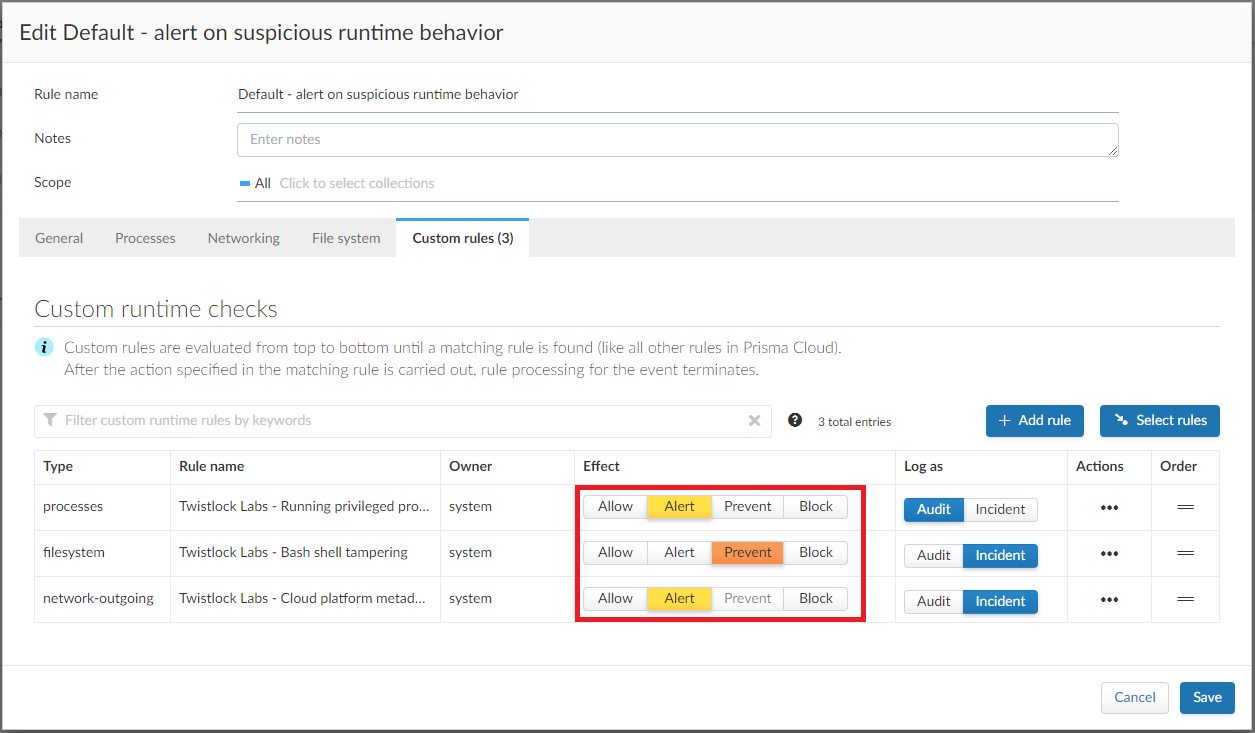
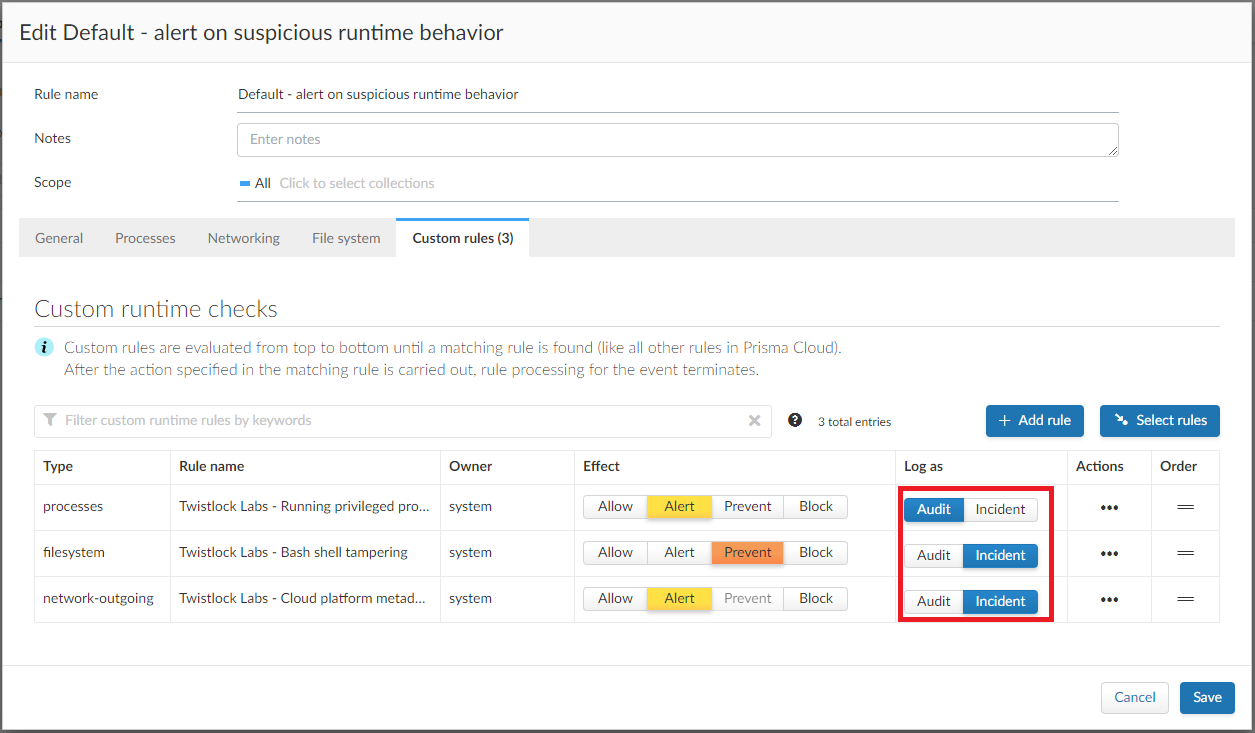
Your runtime policy is defined in **Defend > Runtime > {Container policy | Host policy | Serverless policy | App-Embedded Policy}**, and it’s made up of models and rules. Your expressions (custom rules) can be added to runtime rules, where you further specify what action to take when expressions evaluate to true. Depending on the event type, the following range of actions are supported: allow, alert, prevent, or block. Also, you can determine whether you want to log the raised event as an audit or as an incident.
Custom rules are processed like all other rules in Prisma Cloud: the policy is evaluated from top to bottom until a matching rule is found. After the action specified in the matching rule is performed, rule processing for the event terminates.
Within a runtime rule, custom rules are processed first, and take precedence over all other settings. Be sure that there is no conflict between your custom rules and other settings in your runtime rule, such as allow and deny lists.
However, in [host runtime defense rules](/admin-guide/32/runtime-defense/runtime-defense-hosts.md), some settings are evaluated before the custom rules:
The order of evaluation of each event type is as follows:
* Process events: **Activities > Host activity monitoring** → process types custom rules → **Anti-malware** settings.
* Filesystem events: Filesystem types custom rules → **Anti-malware** settings.
* Networking events (such as opening of a TCP listening port, outbound TCP connection, or DNS query events):
* IP connectivity: Network-outgoing type custom rules take precedence over the Outbound internet ports and Outbound IPs settings. Other networking settings are unaffected by custom rules.
1. Open Console, and go to **Defend > Runtime > {Container policy | Host policy | Serverless policy | App-Embedded policy}**.
2. Select **Add rule**.
3. Enter a **Rule name**.
4. Select the **Scope** of the rule on a set of collections.
5. Select **Custom Rules**.
6. Under **Select rules**, select the rules to add to the policy and select **Apply**.
7. Specify an **Effect** for each rule.
8. Specify how to log the event for each rule.
9. Select **Save**.
## Limitations
* The `proc.cmdline` and `file.type` fields are not supported in prevent mode. You’ll get an error if you try to attach a custom rule to a runtime rule with these fields and the action set to **Prevent**.
* Prisma Cloud cannot inspect command line arguments before a process starts to run. If you explicitly deny a process and set the effect to **Prevent** in the **Process** tab of a runtime rule, the process will never run, and Prisma Cloud cannot inspect it’s command line arguments. The same logic applies to custom rules that try to allow processes that are prevented by other policies. For example, consider process 'foo' that is explicitly denied by a runtime rule, with the effect set to **Prevent**. You cannot allow 'foo -bar' in a custom runtime rule by analyzing proc.cmdline for '-bar'.
* Prisma Cloud doesn’t support the action **Prevent** on `write` operations to existing files. For example, consider the following expression:
```
file.path = "/tmp/file"
```
If this expression is added to a runtime rule, and the effect is set to prevent, then Prisma Cloud will prevent the creation of such a file. If the file already exists, however, Prisma Cloud won’t prevent any write operation to it, but will raise an alert.
* App-Embedded custom rules support Processes and Outbound Connection rule types. The Block action is not supported, while Prevent is supported for both Processes and Outbound Connection rule types.
* The **Prevent** effect isn’t supported when using the `file.type` or `file.md5` properties in custom rules for App-Embedded Defenders.
---
# Agent Instructions
This documentation is published with GitBook. GitBook is the documentation platform designed so that both humans and AI agents can read, navigate, and reason over technical content effectively. Learn more at gitbook.com.
## Querying This Documentation
If you need additional information that is not directly available in this page, you can query the documentation by asking a question.
Perform an HTTP GET request on the following URL with the `ask` and `goal` query parameters:
```
GET https://docs.prismacloud.io/admin-guide/32/runtime-defense/custom-runtime-rules.md?ask=&goal=
```
`ask` is the immediate question: it should be specific, self-contained, and written in natural language.
`goal` is what the user is ultimately trying to achieve, the reason they need the answer. Sharing it helps GitBook give you a better, more relevant answer. A goal is most helpful when it describes the outcome the user wants rather than restating the question. For example, with `ask=how do I create an API token`, a goal like `automate deployments from our CI pipeline` lets GitBook tailor the answer to that use case.
The response will contain a direct answer to the question and relevant excerpts and sources from the documentation.
Use this mechanism when the answer is not explicitly present in the current page, you need clarification or additional context, or you want to retrieve related documentation sections.