> For the complete documentation index, see [llms.txt](https://docs.prismacloud.io/llms.txt). Markdown versions of documentation pages are available by appending `.md` to page URLs; this page is available as [Markdown](https://docs.prismacloud.io/admin-guide/32/web-application-and-api-security-waas/deploy-waas.md).
# Deploying WAAS
WAAS (Web-Application and API Security) can secure both containerized and non-containerized web applications. To deploy WAAS, create a new rule, and declare the entity to protect.
Although the deployment method varies slightly depending on the type of entity you’re protecting, the steps, in general, are:
1. Define rule resource.
2. Define application scope.
3. Enable relevant protections.
## Understanding WAAS rule resources and application scope
The WAAS rule engine is designed to let you tailor the best-suited protection for each part of your deployment. Each rule has two scopes:
* Rule resources.
* Application list.
### Rule Resources
This scope defines, for each type of deployment, a combination of one or more elements to which WAAS should attach itself to protect the web application:
* ***For containerized applications*** - Containers, images, namespaces, cloud account IDs, hosts.
* ***For non-containerized applications*** - Host on which the application is running.
* ***For containers protected with App-Embedded Defender*** - App ID.
* ***For serverless functions*** - Function name.
In the event of scope overlap (when multiple rules are applied to the same resource scope), the first rule by order will apply and all others will not apply. You can reorder rules via the `Order` column in WAAS rule tables by dragging and dropping rules.
### Application List
This scope defines the protected application’s endpoints within the deployment as a combination of one or more of the following:
* ***Port (Required)*** - For containerized applications, the internal port on which the application is listening. For all other types, the externally facing port.
* ***HTTP hostname*** - The default setting is set to `*` (wildcard indicating all hostnames)
* ***Base path*** - Lets you apply protection policy on certain paths of the application (e.g. "/admin", "/admin/\*", etc.)
* ***TLS*** - TLS certificate to be used when expecting encrypted inbound traffic.
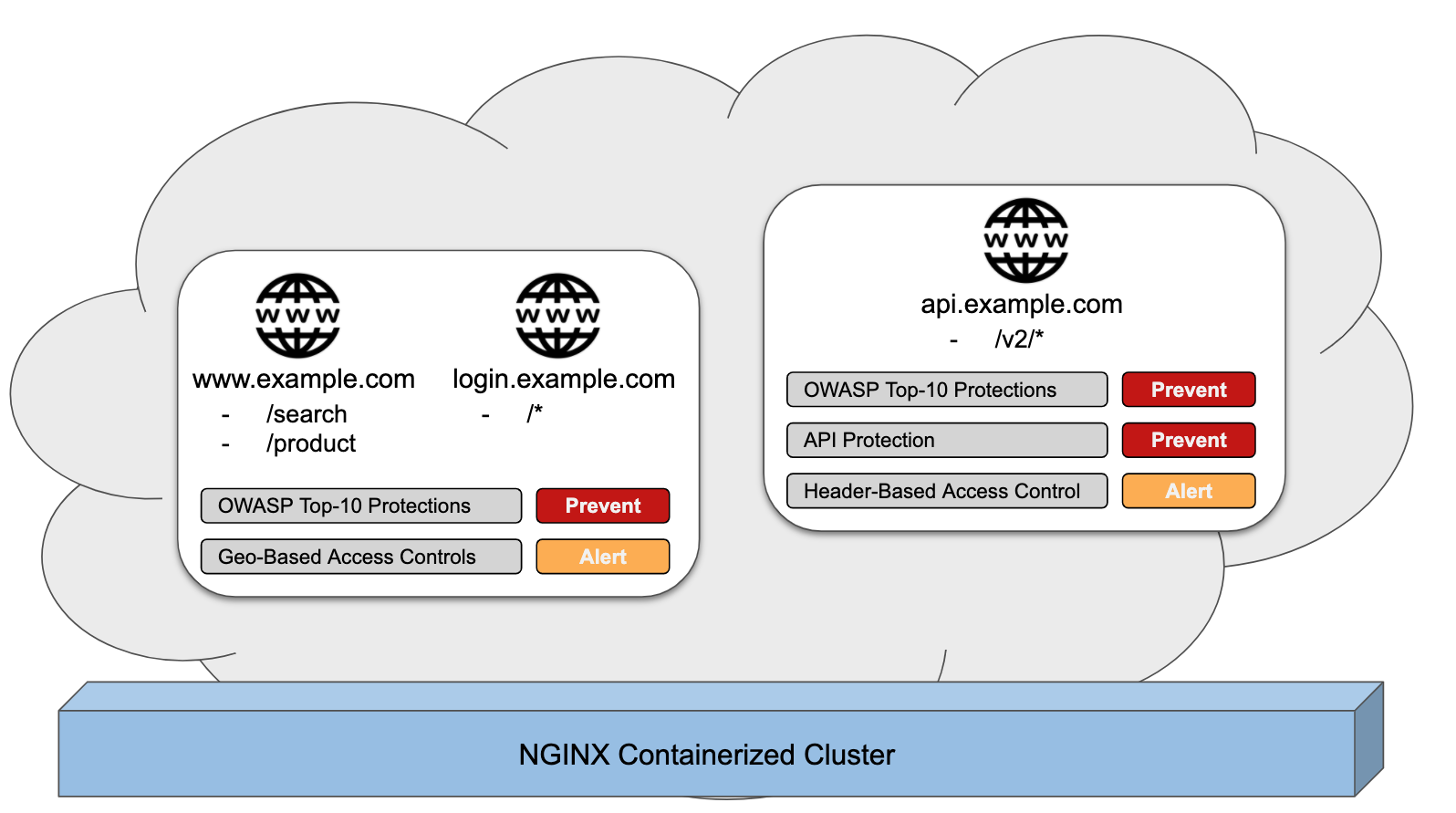
To better illustrate, consider the following deployment scenario for a web application running on top of an NGINX cluster:
In this example, different policies apply for different parts of the application. The steps for deploying a WAAS rule to protect the above-described web application would be as follows:
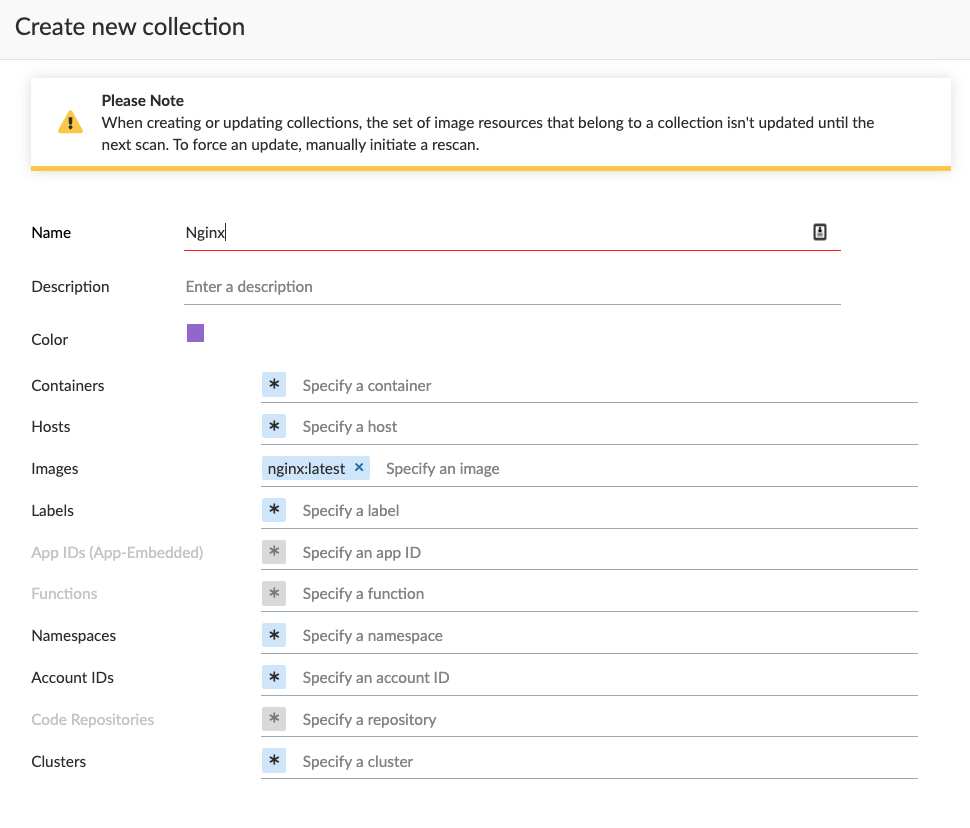
1. **Define rule resources** - Specify the resource collection the rule applies to. Collections are comprised of image names and one or more elements to which WAAS should attach itself to protect the web application. In the following example, the rule will apply to all containers created by the Nginx image.
2. **Define protection policy for 'login', 'search', and 'product' endpoints** - Set OWASP Top 10 protection to "Prevent" and geo-based access control to "Alert".
3. **Define protection policy for the application’s API endpoints** - Set OWASP Top 10 and API protection to "Prevent" and HTTP header-based access control to "Alert".
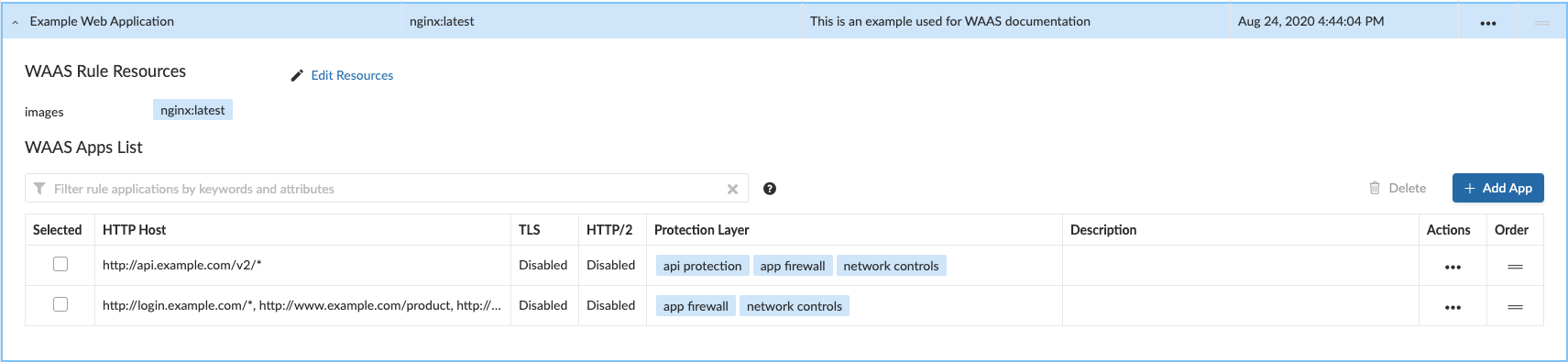
Once the policy is defined, the rule overview shows the following rule resource and application definitions:
* ***Rule Resources*** - Protection is applied to all NGINX images
* ***Apps List*** - We deployed two policies each covering a different endpoint in the application (defined by HTTP hostname, port, and path combinations).
### Protection evaluation flow
WAAS offers a range of protection targeted at different attack vectors. Requests inspected by WAAS will be inspected in the following order of protection:
* Bot protection
* App firewall (OWASP Top-10)
* API protection
* DoS protection
WAAS Inline proxy will continue to inspect a request until "Prevent" or "Ban" actions are triggered, at which point the request will be blocked, and the evaluation flow will be halted. In the case of WAAS Out-of-band, the requests will be inspected and alerts will be sent to the Console.
For example, in the WAAS Inline proxy setup, assume all protections in bot protection are set to "Prevent". An incoming request originating from a bot and containing a SQL injection payload would be blocked by the bot protection (since it precedes the app firewall in the evaluation flow), and the SQL injection payload will not be assessed by the app firewall.
In a different scenario, suppose that all bot protections are set to "Alert" and all app firewall protections are set to "Prevent". A request originating from a bot containing a command injection payload will generate an alert event by bot protection and will be blocked by the app firewall protection.
## Recommended WAAS Deployment Phases
It is recommended that WAAS is first deployed in non-production environments, and then promoted and implemented in production environments gradually. Below are the guidelines for each of the recommended phases and their prerequisites.
**Prerequisites:**
* A way to test the application before deploying WAAS and verify that it’s working properly, e.g., a working cURL command with the expected outcome.
* A certificate (public certificate and private key files in PEM format) is required if the application employs TLS.
* If you are planning to protect API endpoints, please provide API specification files if available (Swagger or OpenAPI 3)
1. Deploy WAAS in a test environment (preferably one that is as similar to production as possible).
All protections will be set to "Alert".
2. Allow WAAS to inspect traffic to the test environment for a few days, then regroup to examine triggers and findings. It is recommended to generate traffic to the test environment preferably requests that simulate real user messages.
The goal here is to fine-tune protections so that they correspond with the design of the protected application.
This would also be a good way to assess the performance impact introduced by WAAS and compare it to the performance of the application before the deployment of WAAS.
3. Following the successful completion of phases 1 and 2, deploy WAAS on a small portion of production with the same configuration that you tested in the test environment.
Next, examine the findings after a few days and make any necessary adjustments to the policies.
4. Deploy WAAS across the entire production deployment of the application.
---
# Agent Instructions
This documentation is published with GitBook. GitBook is the documentation platform designed so that both humans and AI agents can read, navigate, and reason over technical content effectively. Learn more at gitbook.com.
## Querying This Documentation
If you need additional information that is not directly available in this page, you can query the documentation by asking a question.
Perform an HTTP GET request on the following URL with the `ask` and `goal` query parameters:
```
GET https://docs.prismacloud.io/admin-guide/32/web-application-and-api-security-waas/deploy-waas.md?ask=&goal=
```
`ask` is the immediate question: it should be specific, self-contained, and written in natural language.
`goal` is what the user is ultimately trying to achieve, the reason they need the answer. Sharing it helps GitBook give you a better, more relevant answer. A goal is most helpful when it describes the outcome the user wants rather than restating the question. For example, with `ask=how do I create an API token`, a goal like `automate deployments from our CI pipeline` lets GitBook tailor the answer to that use case.
The response will contain a direct answer to the question and relevant excerpts and sources from the documentation.
Use this mechanism when the answer is not explicitly present in the current page, you need clarification or additional context, or you want to retrieve related documentation sections.