> For the complete documentation index, see [llms.txt](https://docs.prismacloud.io/llms.txt). Markdown versions of documentation pages are available by appending `.md` to page URLs; this page is available as [Markdown](https://docs.prismacloud.io/admin-guide/33/compliance/disa-stig-compliance-checks.md).
# DISA STIG compliance checks
Prisma Cloud supports the Docker Enterprise 2.x Linux/Unix STIG - Ver 2, Rel 1 and the Kubernetes STIG - Ver 1, Rel 2 compliance checks. Defense Information Systems Agency Security Technical Implementation Guides (DISA STIGs) contain technical guidance to lock down systems that might otherwise be vulnerable to attack. These STIGs help ensure your environments are properly secured, based on Department of Defense guidance. Prisma Cloud will continue to incorporate DISA STIG guidance as existing STIGs are updated and new STIGs are published.
For an overview of the STIG, see [here](https://github.com/clemenko/stig_blog/blob/master/U_Docker_Enterprise_2-x_Linux-UNIX_V1R1_Overview.pdf).
To download the STIGs, see [here](https://public.cyber.mil/stigs/downloads/).
## Checks
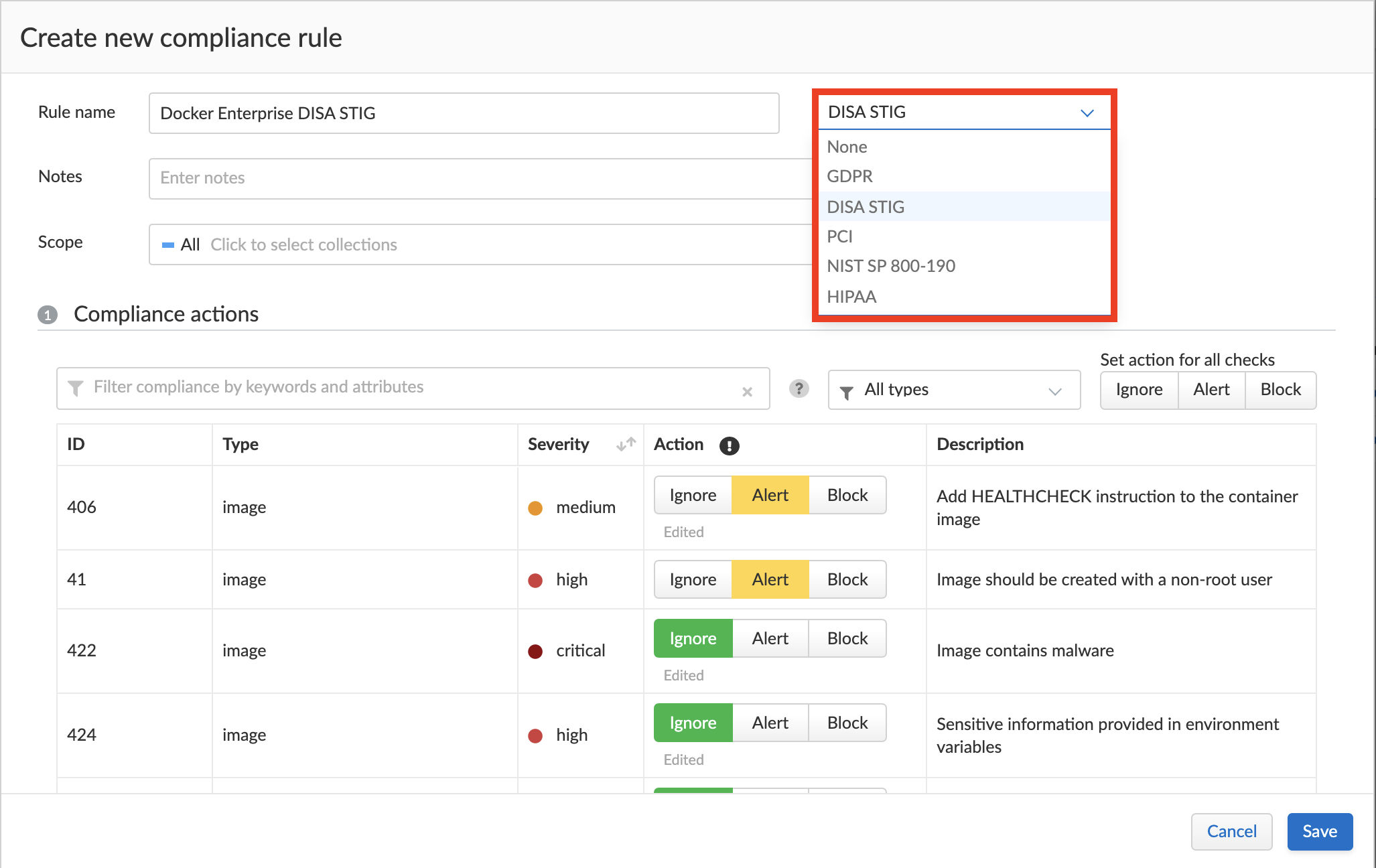
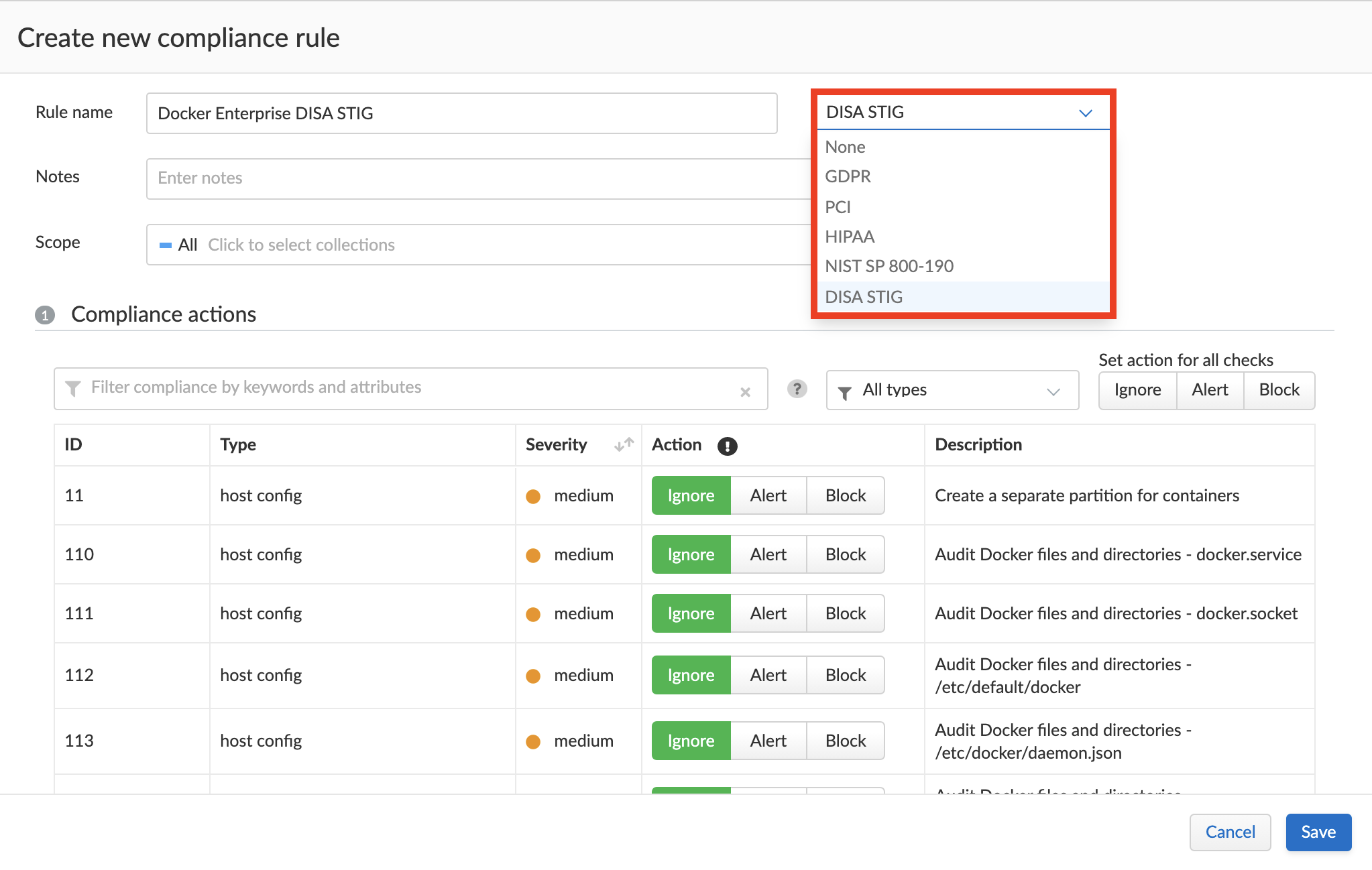
Prisma Cloud Compute has a compliance template "DISA STIG" for images, containers and hosts. This compliance template maps individual STIG rules to existing compliance checks within Compute. In some cases, we’ve implemented checks specifically to support the STIGs. When configuring your compliance policy, simply select the DISA STIG template to enable ("Alert") all relevant checks.
### CAT I
CAT I is a category code for any vulnerability, which when exploited, will *directly and immediately* result in loss of Confidentiality, Availability, or Integrity. These risks are the most severe.
The following table lists the CAT I checks implemented in Prisma Cloud, and how they map to existing Prisma Cloud checks. All CAT I checks, except DKER-EE-001070, map to CIS Docker Benchmark checks. A separate check has been implemented for DKER-EE-001070 to support the Docker Enterprise STIG.
| STIG ID | Prisma Cloud ID | Description |
| -------------- | --------------- | ----------------------------------------------------------------------------------------------------------------------------------------------------------------------------------------------------------------------------- |
| DKER-EE-001070 | N/A | FIPS mode must be enabled on all Docker Engine - Enterprise nodes. |
| DKER-EE-002000 | 59 | Docker Enterprise hosts network namespace must not be shared. |
| DKER-EE-002030 | 512 | All Docker Enterprise containers root filesystem must be mounted as read only. |
| DKER-EE-002040 | 517 | Docker Enterprise host devices must not be directly exposed to containers. |
| DKER-EE-002070 | 521 | The Docker Enterprise default seccomp profile must not be disabled. |
| DKER-EE-002080 | 224 | Docker Enterprise exec commands must not be used with privileged option. |
| DKER-EE-002110 | 525 | All Docker Enterprise containers must be restricted from acquiring additional privileges. |
| DKER-EE-002120 | 530 | The Docker Enterprise hosts user namespace must not be shared. |
| DKER-EE-002130 | 531 | The Docker Enterprise socket must not be mounted inside any containers. |
| DKER-EE-002150 | 57 | Docker Enterprise privileged ports must not be mapped within containers. |
| DKER-EE-005170 | 31 | Docker Enterprise docker.service file ownership must be set to root:root. |
| DKER-EE-005190 | 33 | Docker Enterprise docker.socket file ownership must be set to root:root. |
| DKER-EE-005210 | 35 | Docker Enterprise /etc/docker directory ownership must be set to root:root. |
| DKER-EE-005230 | 37 | Docker Enterprise registry certificate file ownership must be set to root:root. |
| DKER-EE-005250 | 39 | Docker TLS certificate authority (CA) certificate file ownership must be set to root:root |
| DKER-EE-005270 | 311 | Docker server certificate file ownership must be set to root:root |
| DKER-EE-005300 | 314 | Docker server certificate key file permissions must be set to 400 |
| DKER-EE-005310 | 315 | Docker Enterprise socket file ownership must be set to root:docker. |
| DKER-EE-005320 | 316 | Docker Enterprise socket file permissions must be set to 660 or more restrictive. |
| DKER-EE-005330 | 317 | Docker Enterprise daemon.json file ownership must be set to root:root. |
| DKER-EE-005340 | 318 | Docker Enterprise daemon.json file permissions must be set to 644 or more restrictive. |
| DKER-EE-005350 | 319 | Docker Enterprise /etc/default/docker file ownership must be set to root:root. |
| DKER-EE-005360 | 320 | Docker Enterprise /etc/default/docker file permissions must be set to 644 or more restrictive. |
| CNTR-K8-000220 | 8134 | The Kubernetes Controller Manager must create unique service accounts for each work payload. |
| CNTR-K8-000320 | 8117 | The Kubernetes API server must have the insecure port flag disabled. |
| CNTR-K8-000330 | 8215 | The Kubernetes Kubelet must have the read-only port flag disabled. |
| CNTR-K8-000340 | 8116 | The Kubernetes API server must have the insecure bind address not set. |
| CNTR-K8-000360 | 8112 | The Kubernetes API server must have anonymous authentication disabled. |
| CNTR-K8-000370 | 8212 | The Kubernetes Kubelet must have anonymous authentication disabled. |
| CNTR-K8-000380 | 8213 | The Kubernetes kubelet must enable explicit authorization. |
| CNTR-K8-001160 | 597 | Secrets in Kubernetes must not be stored as environment variables. |
| CNTR-K8-001620 | 8217 | Kubernetes Kubelet must enable kernel protection. |
| CNTR-K8-001990 | 81120 | Kubernetes must prevent non-privileged users from executing privileged functions to include disabling, circumventing, or altering implemented security safeguards/countermeasures or the installation of patches and updates. |
| CNTR-K8-002010 | 81125 | Kubernetes must have a pod security policy set. |
| CNTR-K8-002620 | 8113 | Kubernetes API Server must disable basic authentication to protect information in transit. |
### CAT II
CAT II is a category code for any vulnerability, which when exploited, *has a potential* to result in loss of Confidentiality, Availability, or Integrity.
The following table lists the CAT 1 checks implemented in Prisma Cloud, and how they map to existing checks. Some CAT 1 checks don’t map to any existing checks, and have been implemented specifically for this DISA STIG.
| STIG ID | Prisma Cloud ID | Description |
| -------------- | ----------------------------- | ------------------------------------------------------------------------------------------------------------------------------------------------------------------------------------------------------------------------------------------------------------------------------------------ |
| DKER-EE-001050 | 26 | TCP socket binding for all Docker Engine - Enterprise nodes in a Universal Control Plane (UCP) cluster must be disabled. |
| DKER-EE-001240 | 515 | The Docker Enterprise hosts process namespace must not be shared. |
| DKER-EE-001250 | 516 | The Docker Enterprise hosts IPC namespace must not be shared. |
| DKER-EE-001800 | 24 | The insecure registry capability in the Docker Engine - Enterprise component of Docker Enterprise must be disabled. |
| DKER-EE-001810 | 25 | On Linux, a non-AUFS storage driver in the Docker Engine - Enterprise component of Docker Enterprise must be used. |
| DKER-EE-001830 | 218 | The userland proxy capability in the Docker Engine - Enterprise component of Docker Enterprise must be disabled. |
| DKER-EE-001840 | 221 | Experimental features in the Docker Engine - Enterprise component of Docker Enterprise must be disabled. |
| DKER-EE-001930 | 51 | An appropriate AppArmor profile must be enabled on Ubuntu systems for Docker Enterprise. |
| DKER-EE-001940 | 52 | SELinux security options must be set on Red Hat or CentOS systems for Docker Enterprise. |
| DKER-EE-001950 | 53 | Linux Kernel capabilities must be restricted within containers as defined in the System Security Plan (SSP) for Docker Enterprise. |
| DKER-EE-001960 | 54 | Privileged Linux containers must not be used for Docker Enterprise. |
| DKER-EE-001970 | 56 | SSH must not run within Linux containers for Docker Enterprise. |
| DKER-EE-001990 | 58 | Only required ports must be open on the containers in Docker Enterprise. |
| DKER-EE-002010 | 510 | Memory usage for all containers must be limited in Docker Enterprise. |
| DKER-EE-002050 | 519 | Mount propagation mode must not set to shared in Docker Enterprise. |
| DKER-EE-002060 | 520 | The Docker Enterprise hosts UTS namespace must not be shared. |
| DKER-EE-002100 | 524 | cgroup usage must be confirmed in Docker Enterprise. |
| DKER-EE-002160 | 513 | Docker Enterprise incoming container traffic must be bound to a specific host interface. |
| DKER-EE-002400 | 223 | Docker Enterprise Swarm manager must be run in auto-lock mode. |
| DKER-EE-002770 | 406 | Docker Enterprise container health must be checked at runtime. |
| DKER-EE-002780 | 528 | PIDs cgroup limits must be used in Docker Enterprise. |
| DKER-EE-003200 | 41 | Docker Enterprise images must be built with the USER instruction to prevent containers from running as root. |
| DKER-EE-004030 | 514 | The on-failure container restart policy must be is set to 5 in Docker Enterprise. |
| DKER-EE-004040 | 518 | The Docker Enterprise default ulimit must not be overwritten at runtime unless approved in the System Security Plan (SSP). |
| DKER-EE-005180 | 32 | Docker Enterprise docker.service file permissions must be set to 644 or more restrictive. |
| DKER-EE-005200 | 34 | Docker Enterprise docker.socket file permissions must be set to 644 or more restrictive. |
| DKER-EE-005220 | 36 | Docker Enterprise /etc/docker directory permissions must be set to 755 or more restrictive. |
| DKER-EE-005240 | 38 | Docker Enterprise registry certificate file permissions must be set to 444 or more restrictive. |
| DKER-EE-005260 | 310 | Docker TLS certificate authority (CA) certificate file permissions must be set to 444 or more restrictive |
| DKER-EE-005280 | 312 | Docker server certificate file permissions must be set to 444 or more restrictive |
| DKER-EE-005290 | 313 | Docker server certificate key file ownership must be set to root:root |
| DKER-EE-006270 | 217 | Docker Enterprise Swarm services must be bound to a specific host interface. |
| CNTR-K8-000180 | 8153 | The Kubernetes etcd must use TLS to protect the confidentiality of sensitive data during electronic dissemination (--auto-tls argument is not set to true). |
| CNTR-K8-000190 | 8156 | The Kubernetes etcd must use TLS to protect the confidentiality of sensitive data during electronic dissemination. (--peer-auto-tls argument is not set to true). |
| CNTR-K8-000270 | 81141 & 81132 | The Kubernetes API Server must enable Node,RBAC as the authorization mode. |
| CNTR-K8-000300 | 8122 | The Kubernetes Scheduler must have secure binding. |
| CNTR-K8-000350 | 8118 | The Kubernetes API server must have the secure port set. |
| CNTR-K8-000850 | 82110 | Kubernetes Kubelet must deny hostname override. |
| CNTR-K8-000860 | 81418 & 8142 & 81424 & 81422 | The manifest files contain the runtime configuration of the API server, proxy, scheduler, controller, and etcd. If an attacker can gain access to these files, changes can be made to open vulnerabilities and bypass user authorizations inherit within Kubernetes with RBAC implemented. |
| CNTR-K8-000910 | 8132 | Kubernetes Controller Manager must disable profiling. |
| CNTR-K8-001400 | 605213 | The Kubernetes API server must use approved cipher suites. |
| CNTR-K8-001410 | 81122 | Kubernetes API Server must have the SSL Certificate Authority set. |
| CNTR-K8-001420 | 81130 & 8214 | Kubernetes Kubelet must have the SSL Certificate Authority set. |
| CNTR-K8-001430 | 8136 | Kubernetes Controller Manager must have the SSL Certificate Authority set. |
| CNTR-K8-001450 | 8152 | Kubernetes etcd must enable client authentication to secure service. |
| CNTR-K8-001460 | 82112 | Kubernetes Kubelet must enable tls-private-key-file for client authentication to secure service. |
| CNTR-K8-001480 | 8155 | Kubernetes etcd must enable client authentication to secure service. |
| CNTR-K8-001490 | 81127 | Kubernetes etcd must have a key file for secure communication. |
| CNTR-K8-001510 | 81131 | Kubernetes etcd must have the SSL Certificate Authority set. |
| CNTR-K8-001550 | 8154 | Kubernetes etcd must have a peer-key-file set for secure communication. |
| CNTR-K8-002600 | 81138 | Kubernetes API Server must configure timeouts to limit attack surface. |
| CNTR-K8-003120 | 81412 | The Kubernetes component etcd must be owned by etcd. |
| CNTR-K8-003130 | 81414 & 8145 | The Kubernetes conf files must be owned by root. |
| CNTR-K8-003140 | 8231 | The Kubernetes Kube Proxy must have file permissions set to 644 or more restrictive. |
| CNTR-K8-003150 | 8232 | The Kubernetes Kube Proxy must be owned by root. |
| CNTR-K8-003160 | 8227 | The Kubernetes Kubelet certificate authority file must have file permissions set to 644 or more restrictive. |
| CNTR-K8-003170 | 8228 | The Kubernetes Kubelet certificate authority must be owned by root. |
| CNTR-K8-003180 | 81427 | The Kubernetes component PKI must be owned by root. |
| CNTR-K8-003210 | 8230 | The Kubernetes kubeadm.conf must be owned by root. |
| CNTR-K8-003220 | 8229 | The Kubernetes kubeadm.conf must have file permissions set to 644 or more restrictive. |
| CNTR-K8-003230 | 8234 | The Kubernetes kubelet config must have file permissions set to 644 or more restrictive. |
| CNTR-K8-003240 | 8233 | The Kubernetes kubelet config must be owned by root. |
| CNTR-K8-003250 | 81419 & 81421 & 81423 & 81425 | The Kubernetes API Server must have file permissions set to 644 or more restrictive. |
| CNTR-K8-003260 | 81411 | The Kubernetes etcd must have file permissions set to 644 or more restrictive. |
| CNTR-K8-003270 | 81413 | The Kubernetes admin.conf must have file permissions set to 644 or more restrictive. |
| CNTR-K8-003290 | 81119 | The Kubernetes API Server must be set to audit log max size. |
| CNTR-K8-003290 | 81118 | The Kubernetes API Server must be set to audit log maximum backup. |
| CNTR-K8-003310 | 81117 | The Kubernetes API Server audit log retention must be set. |
| CNTR-K8-003320 | 81116 | The Kubernetes API Server audit log path must be set. |
| CNTR-K8-003330 | 81428 | The Kubernetes PKI CRT must have file permissions set to 644 or more restrictive. |
| CNTR-K8-003340 | 81429 | The Kubernetes PKI keys must have file permissions set to 600 or more restrictive. |
| CNTR-K8-002630 | 81121 | Kubernetes API Server must disable token authentication to protect information in transit. |
| CNTR-K8-002640 | 81123 | Kubernetes endpoints must use approved organizational certificate and key pair to protect information in transit. |
### CAT III
CAT III is a category code for any vulnerability, which when it exists, *degrades measures* to protect against loss of Confidentiality, Availability, or Integrity.
The following table lists the CAT III checks implemented in Prisma Cloud, and how they map to existing Prisma Cloud checks. All checks map to CIS Docker Benchmark checks.
| STIG ID | Prisma Cloud ID | Description |
| -------------- | --------------- | --------------------------------------------------------------------------- |
| DKER-EE-002020 | 511 | Docker Enterprise CPU priority must be set appropriately on all containers. |
## Enable DISA STIG for Docker Enterprise checks
DISA STIG for Docker Enterprise checks have been grouped into a template. Checks are relevant to containers, images, and hosts.
1. Log into Console.
2. Enable the container checks.
1. Go to **Defend > Compliance > Containers and images > {Deployed | CI}**.
2. Click **Add rule**.
3. Enter a rule name.
4. In the **Compliance template** drop-down, select **DISA STIG**.
5. Click **Save**.
3. Enable host checks.
1. Go to **Defend > Compliance > Hosts > {Running hosts | VM images}**.
2. Click **Add rule**.
3. Enter a rule name.
4. In the **Compliance template** drop-down, select **DISA STIG**.
5. Click **Save**.
---
# Agent Instructions
This documentation is published with GitBook. GitBook is the documentation platform designed so that both humans and AI agents can read, navigate, and reason over technical content effectively. Learn more at gitbook.com.
## Querying This Documentation
If you need additional information that is not directly available in this page, you can query the documentation by asking a question.
Perform an HTTP GET request on the following URL with the `ask` and `goal` query parameters:
```
GET https://docs.prismacloud.io/admin-guide/33/compliance/disa-stig-compliance-checks.md?ask=&goal=
```
`ask` is the immediate question: it should be specific, self-contained, and written in natural language.
`goal` is what the user is ultimately trying to achieve, the reason they need the answer. Sharing it helps GitBook give you a better, more relevant answer. A goal is most helpful when it describes the outcome the user wants rather than restating the question. For example, with `ask=how do I create an API token`, a goal like `automate deployments from our CI pipeline` lets GitBook tailor the answer to that use case.
The response will contain a direct answer to the question and relevant excerpts and sources from the documentation.
Use this mechanism when the answer is not explicitly present in the current page, you need clarification or additional context, or you want to retrieve related documentation sections.