> For the complete documentation index, see [llms.txt](https://docs.prismacloud.io/llms.txt). Markdown versions of documentation pages are available by appending `.md` to page URLs; this page is available as [Markdown](https://docs.prismacloud.io/admin-guide/33/tools/twistcli.md).
# twistcli
Prisma Cloud ships a command-line configuration and control tool known as *twistcli*. It is supported on Linux, macOS, and Windows.
## Installing twistcli
The *twistcli* tool is delivered with every Prisma Cloud release. It is statically compiled, so it does not have any external dependencies, and it can run on any Linux host. No special installation is required. To run it, simply copy it to a host, and give it executable permissions. You need `sudo` privileges to run the `twistcli` command.
The *twistcli* tool is available from the following sources.
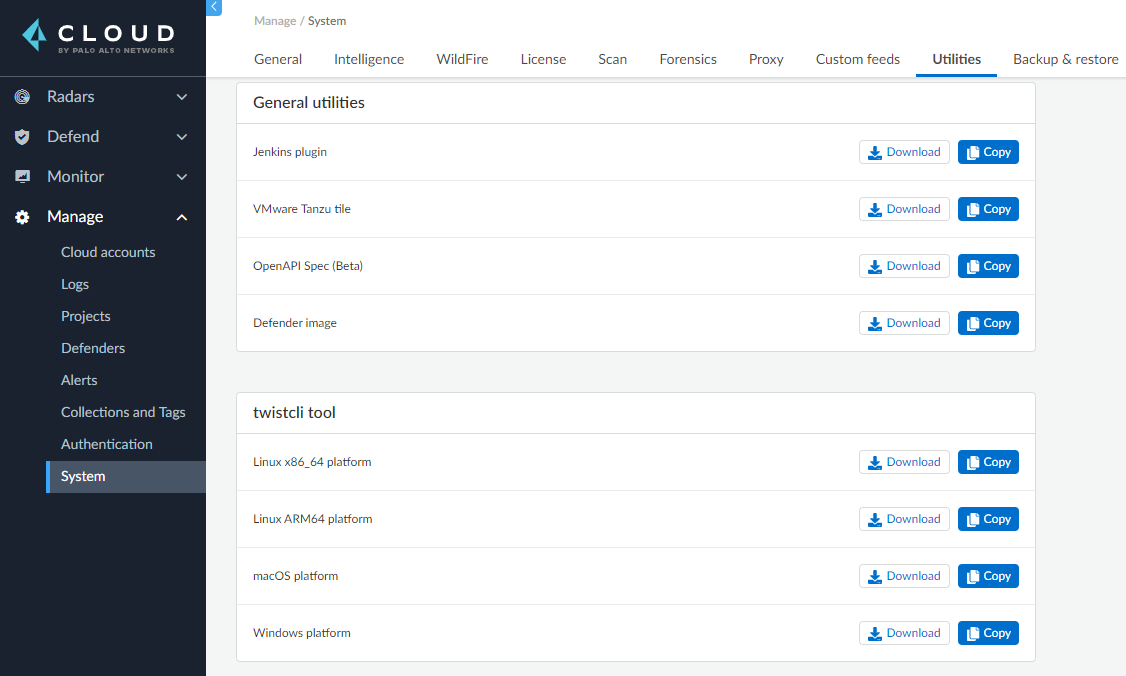
* You can download *twistcli* from the Prisma Cloud Console UI. Go to **Manage > System > Utilities**.
Choose the correct architecture and OS when downloading the `twistcli` command-line utility.
* You can download it from the API, which is a typical use case for automated workflows. For more information, see the `/api/v1/util` endpoint.
The requirements for running *twistcli* are:
* The host running *twistcli* must be able to connect to the Prisma Cloud Console over the network.
* For both image scanning and host scanning, Docker Engine must be installed on the executing machine.
## Connectivity to Console
Most *twistcli* functions require connectivity to Console. All example commands specify a variable called COMPUTE\_CONSOLE, which represents the address for your Console.
## Functions
The *twistcli* tool supports the following functions:
* *console* — Installs and uninstalls Console into a cluster. Kubernetes and OpenShift are supported. You can also export Kubernetes or OpenShift deployment files in YAML format.
* *defender* — Installs and uninstalls Defender into a cluster. Kubernetes and OpenShift are supported. Defender is installed as a daemon set (Kubernetes, OpenShift) which means one Defender is always automatically deployed to each node in the cluster. You can also export a Kubernetes or OpenShift deployment file in YAML format.
* *hosts* — Scans hosts for vulnerabilities and compliance issues.
* *images* — Scans container images for vulnerabilities and compliance issues. Because it runs from the command line, you can easily integrate Prisma Cloud’s scanning capabilities into your CI/CD pipeline.
* *intelligence* — Retrieves the latest threat data from the Prisma Cloud Intelligence Stream, and push those updates to a Prisma Cloud installation running in an air-gapped environment.
* *tas* — Scans VMware Tanzu droplets.
* *app-embedded* — Embed the App Embedded Defender into a Dockerfile.
* *restore* — Restore Console to the state stored in the specified backup file. An automated backup system (enabled by default) creates and maintains daily, weekly, and monthly backups. Additional backups can be made at any point in time from the Console UI.
* *serverless* — Scans serverless functions for vulnerabilities.
* *support* — Streamlines the process of collecting and sending debug information to Prisma Cloud’s support team. Collects log data from a node and uploads it to Prisma Cloud’s support area.
## Capabilities
The *twistcli* tool offers feature parity across all supported operating systems, with a few exceptions. The following table highlights where functions are disabled, or work differently, on a given platform.
| twistcli | Platform | | | | | |
| -------------- | -------------- | ----- | ----------- | --------------- | ----------- | --------------- |
| Command | Subcommand | Linux | Linux ARM64 | macOS | macOS ARM64 | Windows |
| `console` | `export` | Yes | No | Yes | Yes | Yes |
| `install` | Yes | No | No | No | No | |
| `uninstall` | Yes | No | No | No | No | |
| `defender` | `export` | Yes | Yes | Yes | Yes | Yes |
| `install` | Yes | Yes | No | No | No | |
| `uninstall` | Yes | Yes | No | No | No | |
| `hosts` | `scan` | Yes | Yes | No1 | No | No |
| `images` | `scan` | Yes | Yes | Yes2 | Yes | Yes3 |
| `intelligence` | `upload` | Yes | No | Yes | No | Yes |
| `download` | Yes | Yes | Yes | Yes | Yes | |
| `tas` | `scan` | Yes | No | No | No | No |
| `app-embedded` | `embed` | Yes | No | Yes | No | Yes |
| `restore` | | Yes | No | No | No | No |
| `serverless` | `scan` | Yes | No | Yes | No | Yes |
| `support` | `dump` | Yes | No | No4 | No | No4 |
| `upload` | Yes | Yes | Yes | Yes | Yes | |
| `tas` | `scan` | Yes | Yes | No | No | No |
| `waas` | `openapi-scan` | Yes | Yes | Yes | Yes | Yes |
1 Prisma Cloud doesn’t support deployment to macOS hosts, so there is no support for scanning macOS hosts.
2 Scans Linux images on macOS hosts. Docker for Mac must be installed.
3 Twistcli can scan Windows images on Windows Server 2016 and Windows Server 2019 hosts. To scan Linux images on Windows, install [Docker Machine on Windows](https://docs.docker.com/machine/overview/) with the Microsoft Hyper-V driver. Twistcli does not support scanning Linux images on Windows hosts with [Docker for Windows](https://docs.docker.com/docker-for-windows/).
4 The *support dump* function collects Console’s logs when Console malfunctions. Copy *twistcli* to host where Console runs, then execute *twistcli support dump*. Defender logs can be retrieved directly from the Console UI under **Manage > Defenders > Manage**.
For a comprehensive list of supported options for each subcommand, run:
```
$ twistcli --help
```
## Install support
Support for installing Console and Defender via *twistcli* is supported on several cluster types. The following table highlights the available support:
| twistcli | Platform | | | | | |
| ----------- | -------------- | ------------------------------- | -------------- | ------------- | -------------- | ----------- |
| **Command** | **Subcommand** | **Stand-alone****1** | **Kubernetes** | **OpenShift** | **Amazon ECS** | **Windows** |
| `console` | `export` | No | Yes | Yes | No | No |
| `install` | No | Yes | Yes | No | No | |
| `uninstall` | No | Yes | Yes | No | No | |
| `defender` | `export` | No | Yes | Yes | No | No |
| `install` | Yes | Yes | Yes | No | No | |
| `uninstall` | No | Yes | Yes | No | No | |
1 Stand-alone refers to installing an instance of Console or Defender onto a single host that isn’t part of a cluster. For stand-alone installations of Console, use the *twistlock.sh* script to install Onebox.
The *twistcli console install* command for Kubernetes and OpenShift combines two steps into a single command to simplify how Console is deployed. This command internally generates a YAML configuration file and then creates Console’s resources with *kubectl create* in a single shot. This command is only supported on Linux. Use it when you don’t need a copy of the YAML configuration file. Otherwise, use *twistcli console export*.
---
# Agent Instructions
This documentation is published with GitBook. GitBook is the documentation platform designed so that both humans and AI agents can read, navigate, and reason over technical content effectively. Learn more at gitbook.com.
## Querying This Documentation
If you need additional information that is not directly available in this page, you can query the documentation by asking a question.
Perform an HTTP GET request on the following URL with the `ask` and `goal` query parameters:
```
GET https://docs.prismacloud.io/admin-guide/33/tools/twistcli.md?ask=&goal=
```
`ask` is the immediate question: it should be specific, self-contained, and written in natural language.
`goal` is what the user is ultimately trying to achieve, the reason they need the answer. Sharing it helps GitBook give you a better, more relevant answer. A goal is most helpful when it describes the outcome the user wants rather than restating the question. For example, with `ask=how do I create an API token`, a goal like `automate deployments from our CI pipeline` lets GitBook tailor the answer to that use case.
The response will contain a direct answer to the question and relevant excerpts and sources from the documentation.
Use this mechanism when the answer is not explicitly present in the current page, you need clarification or additional context, or you want to retrieve related documentation sections.