> For the complete documentation index, see [llms.txt](https://docs.prismacloud.io/llms.txt). Markdown versions of documentation pages are available by appending `.md` to page URLs; this page is available as [Markdown](https://docs.prismacloud.io/admin-guide/alerts/servicenow-vr.md).
# ServiceNow Vulnerability Response
ServiceNow is a workflow management platform. It offers a number of security operations applications. You can configure Prisma Cloud to route alerts to ServiceNow’s Vulnerability Response application.
To integrate Prisma Cloud with ServiceNow, you’ll need to create a ServiceNow endpoint to consume findings from the Prisma Cloud scanner. The endpoint is created using ServiceNow’s Scripted REST API mechanism.
Each vulnerability found by the Prisma Cloud scanner is mapped to a ServiceNow [vulnerable item](https://docs.servicenow.com/bundle/orlando-security-management/page/product/vulnerability-response/reference/vulnerable-item-fields.html). Scanner data is mapped to vulnerable items as follows:
Vulnerable items contain all CVEs reported by the Prisma Cloud scanner only if the corresponding CVEs also exist in ServiceNow’s vuln DB. If a CVE doesn’t exist in ServiceNow, the **Vulnerability (Reference)** field won’t list it.
| ServiceNow vulnerability item field | Field description | Prisma Cloud scanner data |
| ----------------------------------- | ---------------------------------------------------------------------------------------------------------------------------------- | ------------------------------------------------------------------------------------------------------------------------------------------------------------------- |
| Source | The scanner that found this vulnerable item. | Prisma Cloud Compute |
| Vulnerability (Reference) | ID of the vulnerability associated with this vulnerable item. | Reference to CVE ID (if exists in ServiceNow’s vulnerabilities DB) |
| State | This field defaults to Open, but you can change it to Under Investigation if the vulnerability is ready for immediate remediation. | Open (automatically set by ServiceNow) |
| Assignment group | Group selected to work on this vulnerability group. | Assignment group set in the alert profile |
| Assigned to | Individual from the selected assignment group that works on this vulnerability. | Assignee set in the alert profile |
| Created | The date this vulnerable item was created in your instance. | Creation date of the vulnerable item (automatically set by ServiceNow) |
| Additional comments | Any relevant information. |
Vulnerabilities:
Image name
Severity
Package
Package version
Fix status
Project
Collections
|
## Configuring ServiceNow
Create a ServiceNow endpoint to collect findings from the Prisma Cloud scanner.
**Prerequisites:** Prisma Cloud Console is running.
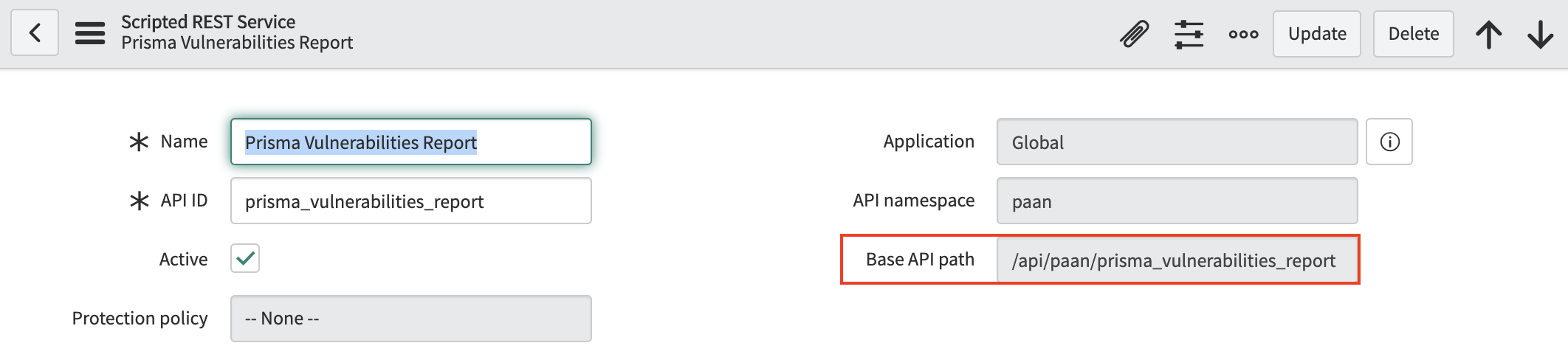
1. In ServiceNow, create a Scripted REST API. Name it **Prisma Vulnerabilities Report**.
For more information, see the official documentation [here](https://docs.servicenow.com/bundle/orlando-application-development/page/integrate/custom-web-services/task/t_CreateAScriptedRESTService.html).
2. Create a new resource in your scripted REST service.
3. In **Name**, enter **report\_findings**.
4. In **HTTP method**, select **POST**.
5. Download the script that implements the endpoint from Prisma Cloud Console.
1. Log into Prisma Cloud Console.
2. Go to **Manage > Alerts > Add Profile**.
3. Click **Add Profile**.
4. In **Provider**, select **ServiceNow**.
5. In **Application**, select **Vulnerability Response**.
6. In **Scripted REST API**, click **Copy**.
7. In ServiceNow, paste the script into **Script**.
6. Click **Submit** to create the resource.
7. Construct the URL for your resource (endpoint), then copy it, and set it aside. You’ll need when you configure Prisma Cloud to send findings to ServiceNow.
The format for the base URL is: `https:///`
For example: `https://ena03291.service-now.com/api/paan/prisma_vulnerabilities_report`
Where:
* SERVICENOW — URL for your ServiceNow instance.
* BASE\_API\_PATH — Path to the scripted API service you just created.
## Configuring alert frequency
You can configure the rate at which alerts are emitted. This is a global setting that controls the spamminess of the alert service. Alerts received during the specified period are aggregated into a single alert. For each alert profile, an alert is sent as soon as the first matching event is received. All subsequent alerts are sent once per period.
1. Open Console, and go to **Manage > Alerts**.
2. In **General settings**, select the default frequency for all alerts.
You can specify the following frequencies.
* **10 Minutes**
* **1 Hour**
* **1 Day**.
## Sending findings to ServiceNow
Alert profiles specify which events trigger the alert machinery, and to which channel alerts are sent. You can send alerts to any combination of channels by creating multiple alert profiles.
Alert profiles consist of two parts:
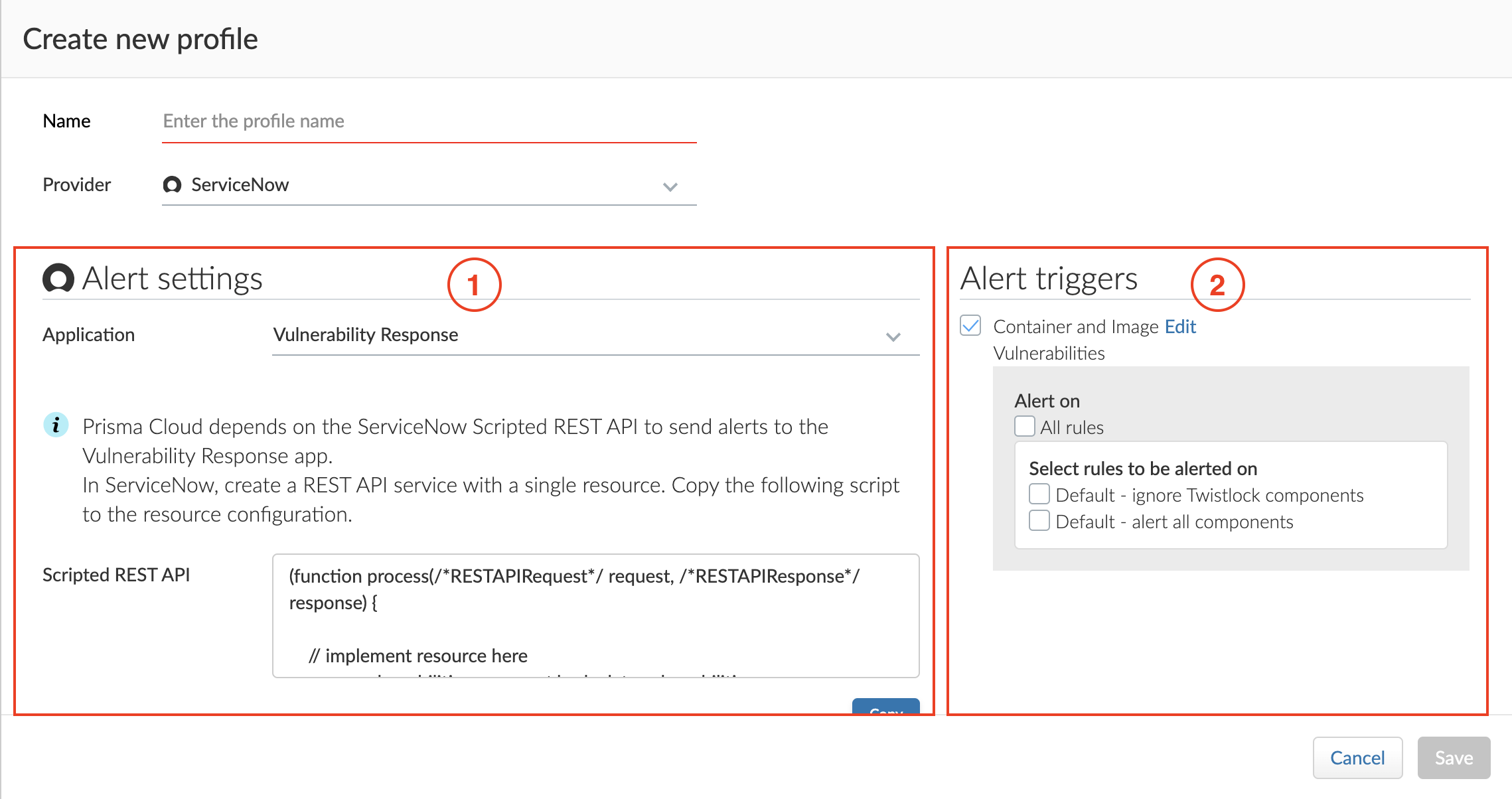
**(1) Alert settings — Who should get the alerts, and on what channel?** Configure Prisma Cloud to integrate with ServiceNow and specify the people or places where alerts should be sent. You can specify assignees and assignment groups.
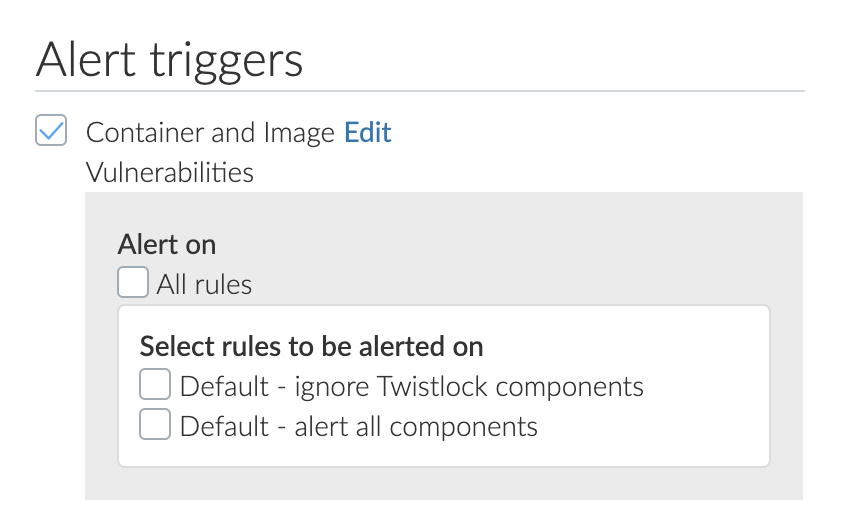
**(2) Alert triggers — Which events should trigger an alert to be sent?** Specify which of the rules that make up your overall policy should trigger alerts. For the Vulnerability Response application, you can send vulnerability and compliance alerts only.
## Create new alert profile
Create a new alert profile.
1. In **Manage > Alerts**, click **Add profile**.
2. Enter a name for your alert profile.
3. In **Provider**, select **ServiceNow**.
## Configure the channel
Configure Prisma Cloud to send alerts to ServiceNow, then validate the setup by sending a test alert.
**Prerequisites:** You’ve created a service account in ServiceNow with a base role of web\_service\_admin.
1. In **Application**, select **Vulnerability Response**.
2. In **Scripted API URL**, enter the url of the vulnerabilities reporting api defined in ServiceNow (see ServiceNow config above). e.g.
3. In **Credential**, click **Add New**.
1. In **Type**, select **Basic authentication**.
This is currently the only auth method supported.
2. Enter a username and password.
4. (Optional) In **Assignee**, enter the name of a user in ServiceNow that will be assigned the Vulnerable Items.
The assignee name isn’t case-sensitive.
5. (Optional) In **Assignment Group**, enter the name of a group in ServiceNow that will be assigned the Vulnerable Items.
6. (Optional) In **CA certificate**, enter a CA certificate in PEM format. Relevant only for on-premises deployments of ServiceNow.
7. Click **Send Test Alert**. If everything looks good, and you get an alert in ServiceNow, save the profile.
## Configure the triggers
1. In **Select triggers**, select the events that should trigger an alert to be sent.
2. To specify specific rules that should trigger an alert, deselect **All rules**, and then select any individual rules.
3. Click **Next**.
## Map Vulnerable Items to Configuration Items (optional)
Adjust your Scripted REST API to map each vulnerable item to its configuration item (CI) in ServiceNow’s CMDB.
1. Create a Discovery Source in ServiceNow for Prisma Cloud Compute:
1. Navigate to **System Definition > Fix Script**.
2. Click **New**.
3. Name your Fix Script appropriately.
4. Ensure **Run once** is selected .
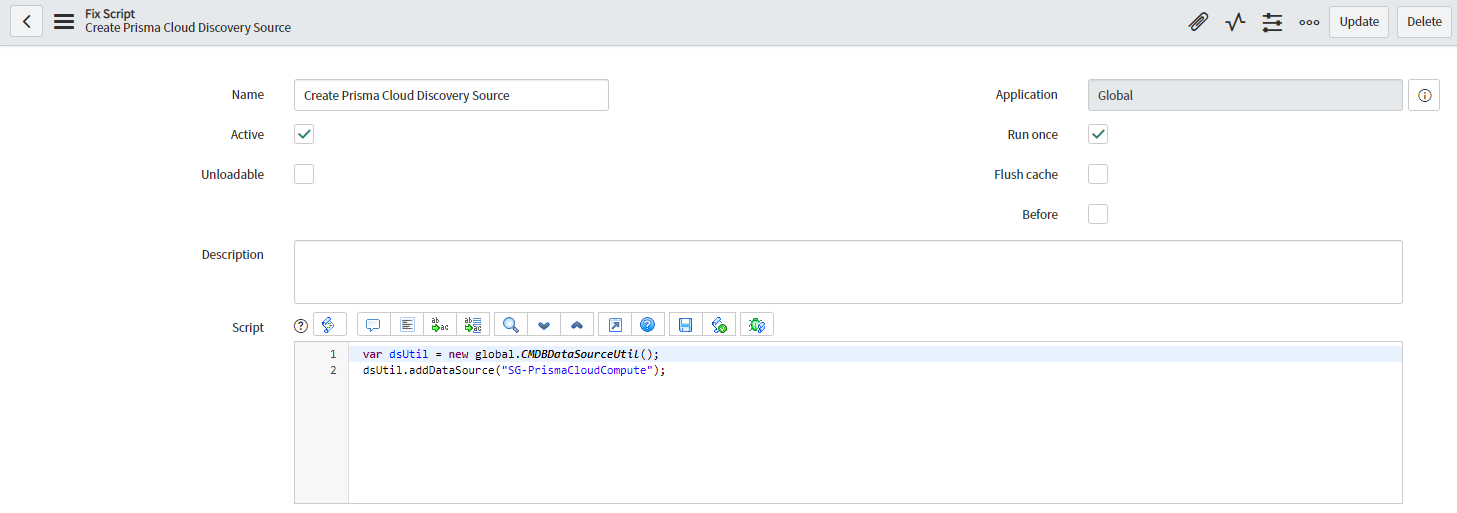
5. Execute the following code with the appropriate value for your Discovery Source name: “SG-PrismaCloudCompute”.
```
Source var dsUtil = new global.CMDBDataSourceUtil();
dsUtil.addDataSource("SG-PrismaCloudCompute");
```
6. Your fix script should look like this:
7. Ensure your discovery source has fewer than 40 characters.
8. After you have saved your fix script, navigate to it again and click **Run Fix Script**.
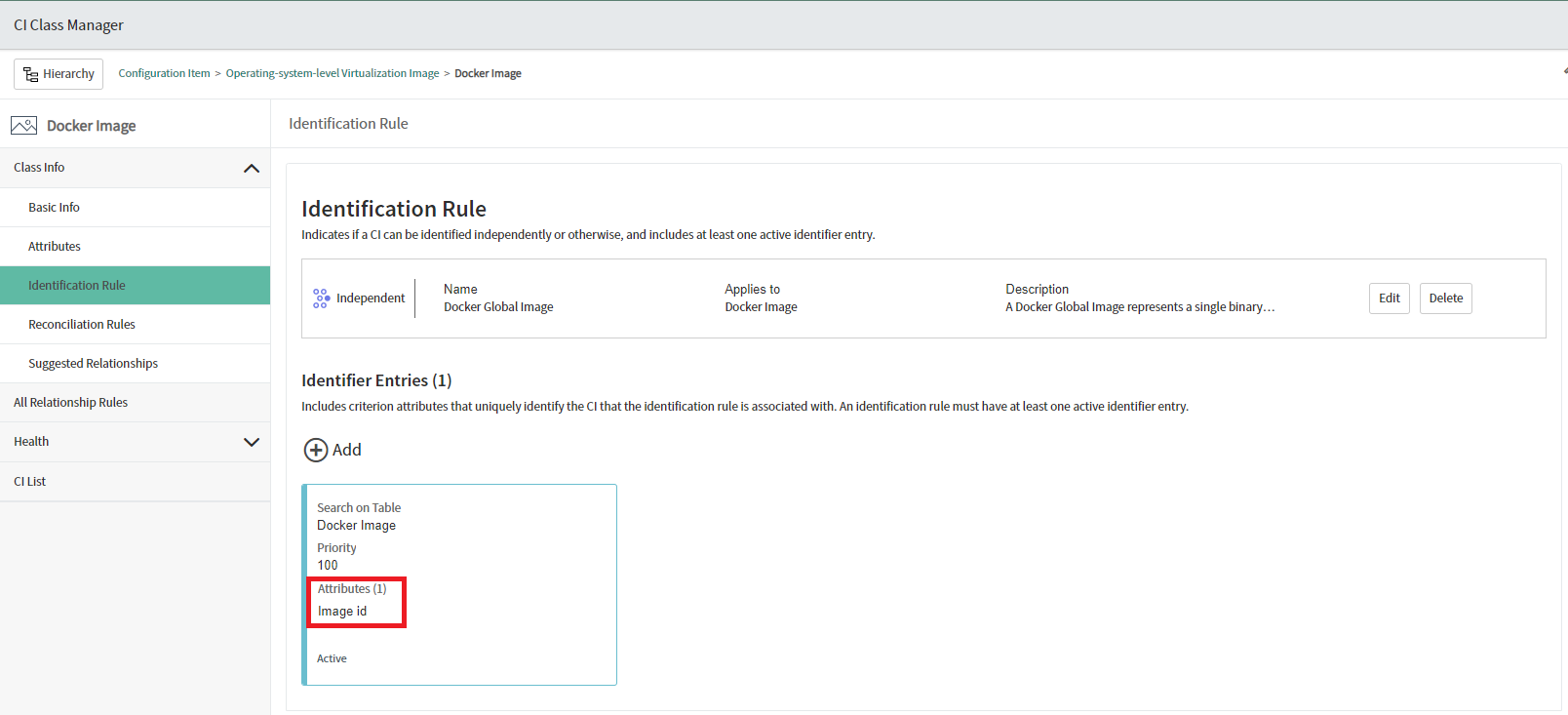
2. Create an Identification Rule in ServiceNow:
1. Navigate to **Configuration > CI Class Manager**.
2. In the CI Classes hierarchy, choose **Docker Image**.
3. Navigate to **Class Info > Identification Rule**.
4. Add an identification rule to identify the image by the **Image id** attribute.
3. Use the [enhanced script](#script) in place of the standard script you copy from Console when [setting up the Scripted REST API](#configuring-servicenow).
## Suggested script
The following script maps vulnerable items to configuration items. Use it in place of the script you copy from Console when setting up the Scripted REST API in [Configuring ServiceNow](#configuring-servicenow). To use the script, you must first set up a [discovery source and identification rule](#map-vuln-to-ci).
The script in this section extends the standard script to:
* Implement CI mapping — Finds the relevant CI (from type docker image), or creates one if it doesn’t exist, and references it in the Vulnerable Item.
* Create a vulnerability placeholder — Creates an empty vulnerability in ServiceNow’s vulnerabilities DB when the CVE ID sent by Prisma Cloud Compute can’t be found in ServiceNow.
The following listing shows the script in its entirety. Copy and use this listing when setting up the vulnerable item to configuration item mapping.
```
(function process( /*RESTAPIRequest*/ request, /*RESTAPIResponse*/ response) {
var vulnerabilities = request.body.data.vulnerabilities;
response.setContentType('application/JSON');
var writer = response.getStreamWriter();
for (var i in vulnerabilities) {
var vulnItemRecord = new GlideRecord('sn_vul_vulnerable_item');
var vulnEntryRecord = new GlideRecord('sn_vul_entry');
var userGroupsRecord = new GlideRecord('sys_user_group');
var vulnerability = vulnerabilities[i];
// the id field is the name (a string) of the cve
if (!vulnEntryRecord.get('id', vulnerability.cve)) {
// The following code inserts the placeholder vulnerability in sn_vul_nvd_entry. The other attributes will be filled once the NVD import run's
var nvd_entry = new GlideRecord("sn_vul_nvd_entry");
nvd_entry.initialize();
nvd_entry.setValue("id", vulnerability.cve);
var vulEntry = nvd_entry.insert();
vulnEntryRecord = new GlideRecord('sn_vul_entry');
vulnEntryRecord.get(vulEntry);
}
if (!userGroupsRecord.get('name', vulnerability.assignment_group)) {
userGroupsRecord.sys_id = "";
}
vulnItemRecord.initialize();
// The following block of code is to create a CI using IRE
if (vulnerability.imageName && vulnerability.imageID) {
// Step 1: construct the payload
// Step 2: Encode the payload as JSON
// Step 3: create CI using createOrUpdateCIEnhanced API. This API requires discovery source that needs to be created
var payload = {
"items": [{
"className": "cmdb_ci_docker_image", // update the cmdb unmatched class name here
"values": {
"image_id": vulnerability.imageID, // update the correct values that needs to be populated and any additional fields
"name": vulnerability.imageName
},
"sys_object_source_info": { // optional, used to optimize the fetch to get CIs from this specific source only
"source_native_key": vulnerability.imageID, // unique key/id for the item from the source
"source_name": "SG-PrismaCloudCompute" // The discovery source of the CI information
}
}]
};
var inputPayload = new JSON().encode(payload);
var cmdb = SNC.IdentificationEngineScriptableApi.createOrUpdateCI("SG-PrismaCloudCompute",inputPayload); // CMDB discovery source name
var output = JSON.parse(cmdb);
vulnItemRecord.cmdb_ci.setDisplayValue(output.items[0].sysId); // This will assign CMDB_ci item to vuln item.
} else if (vulnerability.imageName != "Prisma Test Alert") {
gs.log("missing image name or image id");
}
vulnItemRecord.Description = vulnerability.description;
vulnItemRecord.assigned_to = vulnerability.assigned_to;
// sys_id is the unique id of a record (like an internal service now GUID), used to link records in different tables
vulnItemRecord.assignment_group.setDisplayValue(userGroupsRecord.sys_id);
vulnItemRecord.source = vulnerability.source;
vulnItemRecord.vulnerability.setDisplayValue(vulnEntryRecord.sys_id);
vulnItemRecord.comments.setJournalEntry(vulnerability.comments);
vulnItemRecord.insert();
vulnItemRecord.query();
writer.writeString(JSON.stringify(vulnItemRecord));
}
response.setStatus(201);
})(request, response);
```
The following excerpt shows the part of the listing that implements the CI mapping:
```
// The following block of code is to create a CI using IRE
if (vulnerability.imageName && vulnerability.imageID) {
// Step 1: construct the payload
// Step 2: Encode the payload as JSON
// Step 3: create CI using createOrUpdateCIEnhanced API. This API requires discovery source that needs to be created
var payload = {
"items": [{
"className": "cmdb_ci_docker_image", // update the cmdb unmatched class name here
"values": {
"image_id": vulnerability.imageID, // update the correct values that needs to be populated and any additional fields
"name": vulnerability.imageName
},
"sys_object_source_info": { // optional, used to optimize the fetch to get CIs from this specific source only
"source_native_key": vulnerability.imageID, // unique key/id for the item from the source
"source_name": "SG-PrismaCloudCompute" // The discovery source of the CI information
}
}]
};
var inputPayload = new JSON().encode(payload);
var cmdb = SNC.IdentificationEngineScriptableApi.createOrUpdateCI("SG-PrismaCloudCompute",inputPayload); // CMDB discovery source name
var output = JSON.parse(cmdb);
vulnItemRecord.cmdb_ci.setDisplayValue(output.items[0].sysId); // This will assign CMDB_ci item to vuln item.
} else if (vulnerability.imageName != "Prisma Test Alert") {
gs.log("missing image name or image id");
}
```
The following excerpt shows the part of the listing that creates the vulnerability placeholder:
```
if (!vulnEntryRecord.get('id', vulnerability.cve)) {
// The following code inserts the placeholder vulnerability in sn_vul_nvd_entry. The other attributes will be filled once the NVD import run's
var nvd_entry = new GlideRecord("sn_vul_nvd_entry");
nvd_entry.initialize();
nvd_entry.setValue("id", vulnerability.cve);
var vulEntry = nvd_entry.insert();
vulnEntryRecord = new GlideRecord('sn_vul_entry');
vulnEntryRecord.get(vulEntry);
}
```
---
# Agent Instructions
This documentation is published with GitBook. GitBook is the documentation platform designed so that both humans and AI agents can read, navigate, and reason over technical content effectively. Learn more at gitbook.com.
## Querying This Documentation
If you need additional information that is not directly available in this page, you can query the documentation by asking a question.
Perform an HTTP GET request on the following URL with the `ask` and `goal` query parameters:
```
GET https://docs.prismacloud.io/admin-guide/alerts/servicenow-vr.md?ask=&goal=
```
`ask` is the immediate question: it should be specific, self-contained, and written in natural language.
`goal` is what the user is ultimately trying to achieve, the reason they need the answer. Sharing it helps GitBook give you a better, more relevant answer. A goal is most helpful when it describes the outcome the user wants rather than restating the question. For example, with `ask=how do I create an API token`, a goal like `automate deployments from our CI pipeline` lets GitBook tailor the answer to that use case.
The response will contain a direct answer to the question and relevant excerpts and sources from the documentation.
Use this mechanism when the answer is not explicitly present in the current page, you need clarification or additional context, or you want to retrieve related documentation sections.