> For the complete documentation index, see [llms.txt](https://docs.prismacloud.io/llms.txt). Markdown versions of documentation pages are available by appending `.md` to page URLs; this page is available as [Markdown](https://docs.prismacloud.io/admin-guide/authentication/credentials-store.md).
# Credentials Store
Prisma Cloud seamlessly integrates with multiple third-party services and cloud providers, ensuring robust security and operational efficiency.
To streamline credential management, the **Credentials Store** (accessible under **Manage > Authentication > Credentials Store**) serves as a secure repository for storing and managing authentication credentials used in integrations.
**Prisma Cloud makes a clear distinction between third-party integration credentials and cloud account credentials.**
* **Third-party credentials**—such as those used for scanning container registries, sending alerts, or managing Defender deployments—are securely stored and managed within the Credentials Store.
* **Cloud account credentials**, however, are handled separately. They are not stored in the Credentials Store but are instead onboarded through the **Manage > Cloud Accounts** page, where Prisma Cloud manages authentication and permissions required for cloud workload protection.
## Supported Integrations
The Credentials Store manages credentials used for:
* Scanning container registries, serverless functions, and other environments
* Sending alerts via third-party services (e.g., Slack, ServiceNow, email)
* Deploying and managing Defender DaemonSets
* Injecting secrets into running containers
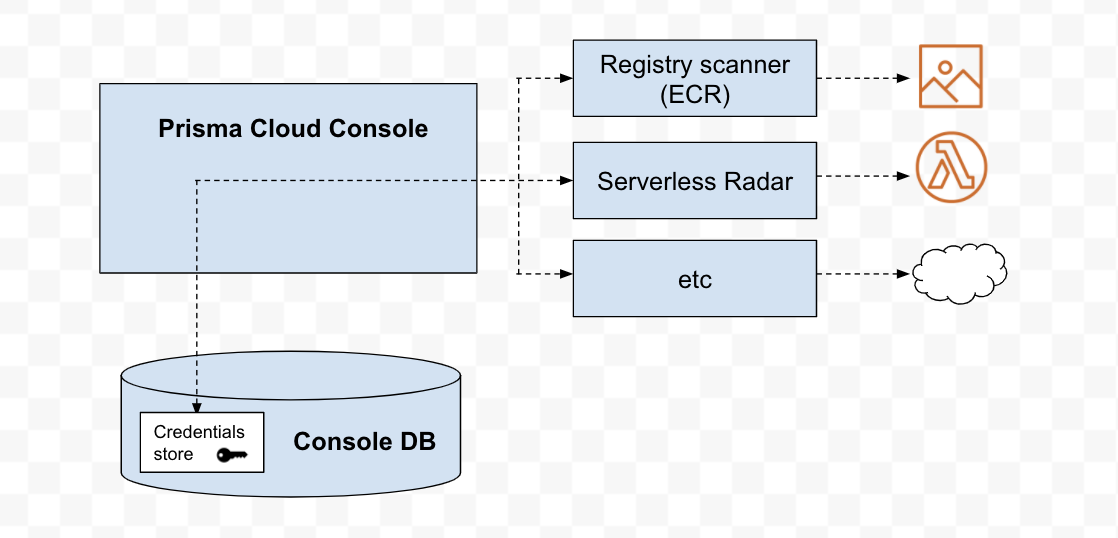
The following diagram shows the architecture of the the credentials store.
## Managing Third-Party Credentials in Credentials Store
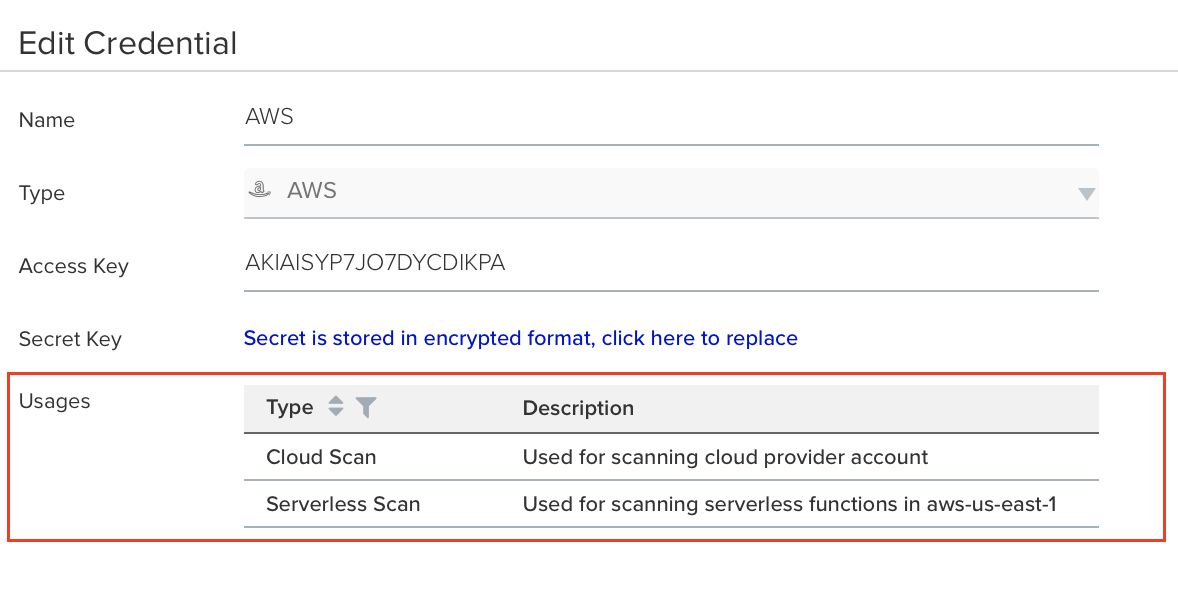
If a credential is actively in use, it cannot be deleted. To check its usage, select an entry from the credentials table and review the **Usages** list.
You can refresh a credential’s values without deleting and reconfiguring the integration. If an integration relies on a credential and you update its parameters (e.g., username, password), Prisma Cloud automatically propagates the new values across the relevant modules.
## Managing Cloud Account Credentials
To manage cloud account credentials, use the **Manage > Cloud Accounts** page under the **Runtime Security** component. This section handles the authentication and permissions required for cloud workload protection.
For information on onboarding cloud provider accounts, see the following topics:
* [Amazon Web Services](https://github.com/PaloAltoNetworks/pc-docs-md/tree/main/compute-edition/34/admin-guide/authentication/credentials-store/onboard-aws.md)
* [Microsoft Azure](https://github.com/PaloAltoNetworks/pc-docs-md/tree/main/compute-edition/34/admin-guide/authentication/credentials-store/onboard-azure.md)
* [Google Cloud Platform](https://github.com/PaloAltoNetworks/pc-docs-md/tree/main/compute-edition/34/admin-guide/authentication/credentials-store/onboard-gcp.md)
* [Oracle Cloud Infrastructure](https://github.com/PaloAltoNetworks/pc-docs-md/tree/main/compute-edition/34/admin-guide/authentication/credentials-store/onboard-oci.md)
---
# Agent Instructions
This documentation is published with GitBook. GitBook is the documentation platform designed so that both humans and AI agents can read, navigate, and reason over technical content effectively. Learn more at gitbook.com.
## Querying This Documentation
If you need additional information that is not directly available in this page, you can query the documentation by asking a question.
Perform an HTTP GET request on the following URL with the `ask` and `goal` query parameters:
```
GET https://docs.prismacloud.io/admin-guide/authentication/credentials-store.md?ask=&goal=
```
`ask` is the immediate question: it should be specific, self-contained, and written in natural language.
`goal` is what the user is ultimately trying to achieve, the reason they need the answer. Sharing it helps GitBook give you a better, more relevant answer. A goal is most helpful when it describes the outcome the user wants rather than restating the question. For example, with `ask=how do I create an API token`, a goal like `automate deployments from our CI pipeline` lets GitBook tailor the answer to that use case.
The response will contain a direct answer to the question and relevant excerpts and sources from the documentation.
Use this mechanism when the answer is not explicitly present in the current page, you need clarification or additional context, or you want to retrieve related documentation sections.