> For the complete documentation index, see [llms.txt](https://docs.prismacloud.io/llms.txt). Markdown versions of documentation pages are available by appending `.md` to page URLs; this page is available as [Markdown](https://docs.prismacloud.io/admin-guide/compliance/serverless.md).
# Serverless functions
Prisma Cloud Labs has developed compliance checks for serverless functions.
In AWS Lambda, every function has an execution role. Execution roles are identities with permission policies that control what functions can and cannot do in AWS. When you create a function, you specify an execution role. When the function is invoked, it assumes this role.
When Prisma Cloud scans the functions in your environment, it inspects the execution role for overly permissive access to AWS services and resources. Two fields are inspected: *resource* and *action*.
## Resource
Specifies the objects to which the permission policy applies. Resources are specified with ARNs. ARNs let you unambiguously specify a resource across all of AWS. ARNs have the following format:
```
arn:partition:service:region:account-id:resource
```
Where:
* `service` — Identifies the AWS product, such as Amazon S3, IAM, or CloudWatch Logs.
* `resource` — Identies the objects in the service. It often includes the resource type, followed by the resource name itself. For example, the following ARN uniquely identifies the user Francis in the IAM service:
```
arn:aws:iam::586975633310:user/Francis
```
## Action
Describes the tasks that can be performed on the service. For example, ec2:StartInstances, iam:ChangePassword, and s3:GetObject. Wildcards can be used to grant access to all the actions of a given AWS service. For example, s3:\* applies to all S3 actions.
## Types of issues
The following permission policy is tightly scoped. It grants read-write only access to the Books table. Prisma Cloud would not flag an execution role with this type of permissions policy.
```json
{
"Version": "2012-10-17",
"Statement": {
"Effect": "Allow",
"Action": [
"dynamodb:GetItem",
"dynamodb:BatchGetItem"
],
"Resource": "arn:aws:dynamodb:us-east-1:125643784111:table/Books"
}
}
```
The following permissions policy has been implemented carelessly. It allows all DyanmoDB operations on all tables owned by the AWS account in the current region, including dynamodb:DeleteTable, which has serious implications for the integrity and availability of your data. This type of configuration would raise compliance check 437 because the execution role permits all DyanmoDB operations, and it’s unlikely a function actually needs this range of capabilities.
```json
{
"Version": "2012-10-17",
"Statement": {
"Sid": "AllAPIActionsOnBooks",
"Effect": "Allow",
"Action": "dynamodb:*",
"Resource": "*"
}
}
```
## Compliance check details
The following checks are supported:
**434: Sensitive information provided in environment variables**\
Detects when functions contain environment variables (such as MYSQL\_PASSWORD) that expose sensitive information.
**435: Private keys stored in function**\
Detects private keys in functions.
**436: Unbounded service access**\
Detects functions with permission to run all actions on all services and their resources.
**437: Overly permissive service access**\
Detects functions with permission to run all actions on one or more services.
**438: Broad resource access**\
Detects functions that granted access to all resources in one or more services.
**439: Suspicious function actions**\
Detects functions with permission to run actions that are used in exploits and attacks. Includes things like cloudtrail:StopLogging, cloudtrail:UpdateTrail that allow disabling and changing the output of CloudTrail logging.
**440: Unused service API with information disclosure risk**\
Detects functions with permissions to unused APIs that could allow information disclosure.
**441: Unused service API with data leakage risk**\
Detects functions with permissions to unused APIs that could leak data.
**442: Unused service API with data tampering risk**\
Detects functions with permissions to unused APIs that could allow data tampering.
**443: Unused service API with lateral movement risk**\
Detects functions with permissions to unused APIs that could allow an attacker to move laterally.
**444: Unused service API with denial of service risk**\
Detects functions with permissions to unused APIs that could facilitate a denial of service attack.
**445: Unused service API with information exfiltration risk**\
Detects functions with permissions to unused APIs that could allow data exfiltration.
**446: Unused service API with persistent access risk**\
Detects functions with permissions to unused APIs that allow persistent access.
**447: Unused service API with privilege elevation risk**\
Detects functions with permissions to unused APIs that allow privilege elevation.
## Scanning serverless functions
Configure Prisma Cloud to periodically scan your serverless functions. Function scanning is handled by Console.
1. Open Console.
2. Go to **Defend > Compliance > Functions**.
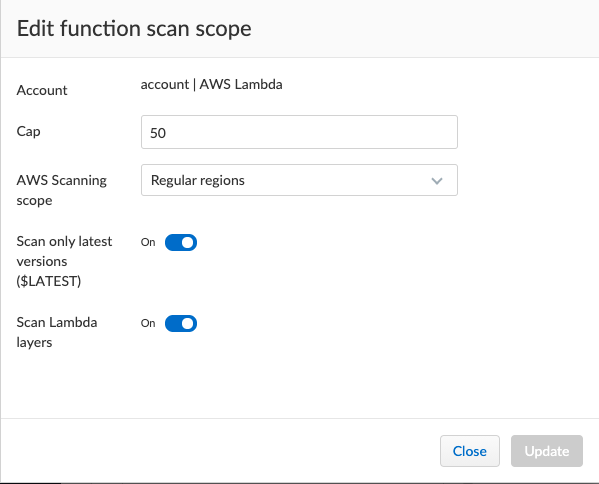
3. Click on **Add scope**. In the dialog, enter the following settings:
1. Specify a cap for the number of functions to scan.
Prisma Cloud scans the X most recent functions, where X is the cap value. Set this value to '0' to scan all functions.
2. (AWS only) Specify which regions to scan. By default, the scope is applied to **Regular regions**. Other options include **China regions** or **Government regions**.
3. (AWS only) Select **Scan only latest versions** to only scan the latest version of each function. Otherwise, the scanning will cover all versions of each function up to the specified **cap** value.
4. (AWS only) Select **Scan Lambda Layers** to enable scanning the function’s Layers as well.
5. Select the accounts to scan by credential. If you wish to add an account, click on **Add credential**.
6. Click **Add**.
4. Verify that you have assigned the [correct permissions](/admin-guide/vulnerability-management/serverless-functions.md#authenticating-with-aws) required to scan.
5. To view the scan report, go to **Monitor > Compliance > Functions**.
All compliance issues identified in the latest serverless scan report can be exported to a CSV file by clicking on the CSV button in the top right of the table.
## View AWS Lambda Layers scan report
Prisma Cloud can scan the AWS Lambda Layers code as part of the Lambda function’s code scanning. This capability can help you determine whether the Compliance checks are associated with the function or function Layers. Follow the steps below to view the Lambda Layers compliance scan results:
1. Open Console.
2. Make sure you selected the **Scan Lambda layers** in the Defend > Compliance > Functions > Functions > Serverless Accounts > **Function scan scope**
3. Go to **Monitor > Compliance > Functions > Scanned functions**.
4. Filter the table to include functions with the desired Layer by adding the **Layers** filter.
You can also filter the results by a specific layer name or postfix wildcards. Example: `Layers:* OR Layers:arn:aws:lambda:*`
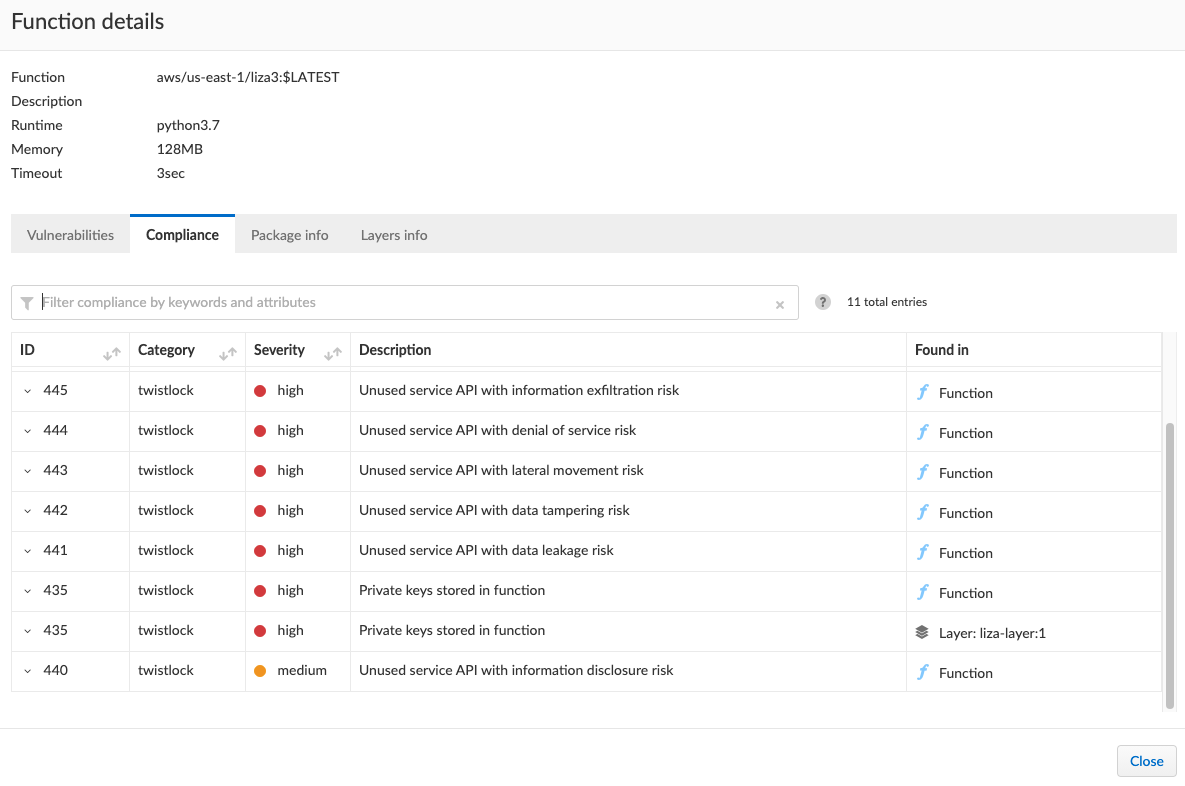
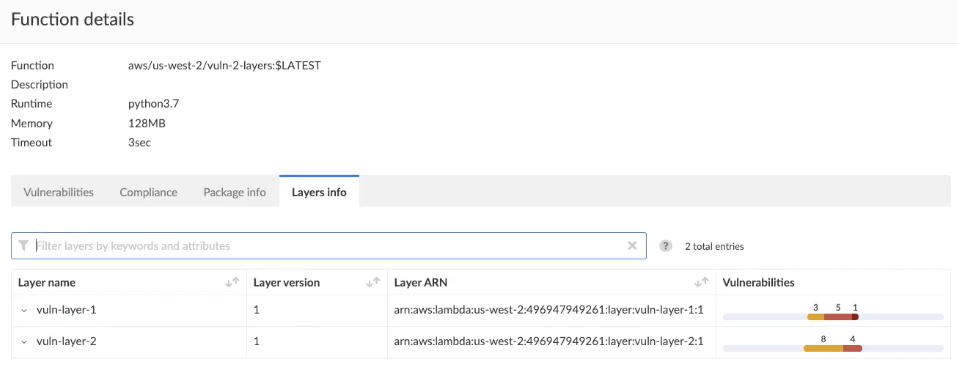
5. Open the **Function details** dialog to view the details about the Layers and the Compliance issues associated with them:
1. Click on a specific function
2. See the Function’s vulnerabilities, compliance issues and package info in the related tabs. Use the **Found in** column to determine if the component is associated with the Function or with the Function’s Layers.
3. Use the **Layers info** tab to see the full list of the function’s the Layers.
---
# Agent Instructions
This documentation is published with GitBook. GitBook is the documentation platform designed so that both humans and AI agents can read, navigate, and reason over technical content effectively. Learn more at gitbook.com.
## Querying This Documentation
If you need additional information that is not directly available in this page, you can query the documentation by asking a question.
Perform an HTTP GET request on the following URL with the `ask` and `goal` query parameters:
```
GET https://docs.prismacloud.io/admin-guide/compliance/serverless.md?ask=&goal=
```
`ask` is the immediate question: it should be specific, self-contained, and written in natural language.
`goal` is what the user is ultimately trying to achieve, the reason they need the answer. Sharing it helps GitBook give you a better, more relevant answer. A goal is most helpful when it describes the outcome the user wants rather than restating the question. For example, with `ask=how do I create an API token`, a goal like `automate deployments from our CI pipeline` lets GitBook tailor the answer to that use case.
The response will contain a direct answer to the question and relevant excerpts and sources from the documentation.
Use this mechanism when the answer is not explicitly present in the current page, you need clarification or additional context, or you want to retrieve related documentation sections.