> For the complete documentation index, see [llms.txt](https://docs.prismacloud.io/llms.txt). Markdown versions of documentation pages are available by appending `.md` to page URLs; this page is available as [Markdown](https://docs.prismacloud.io/admin-guide/install/cluster-context.md).
# Cluster Context
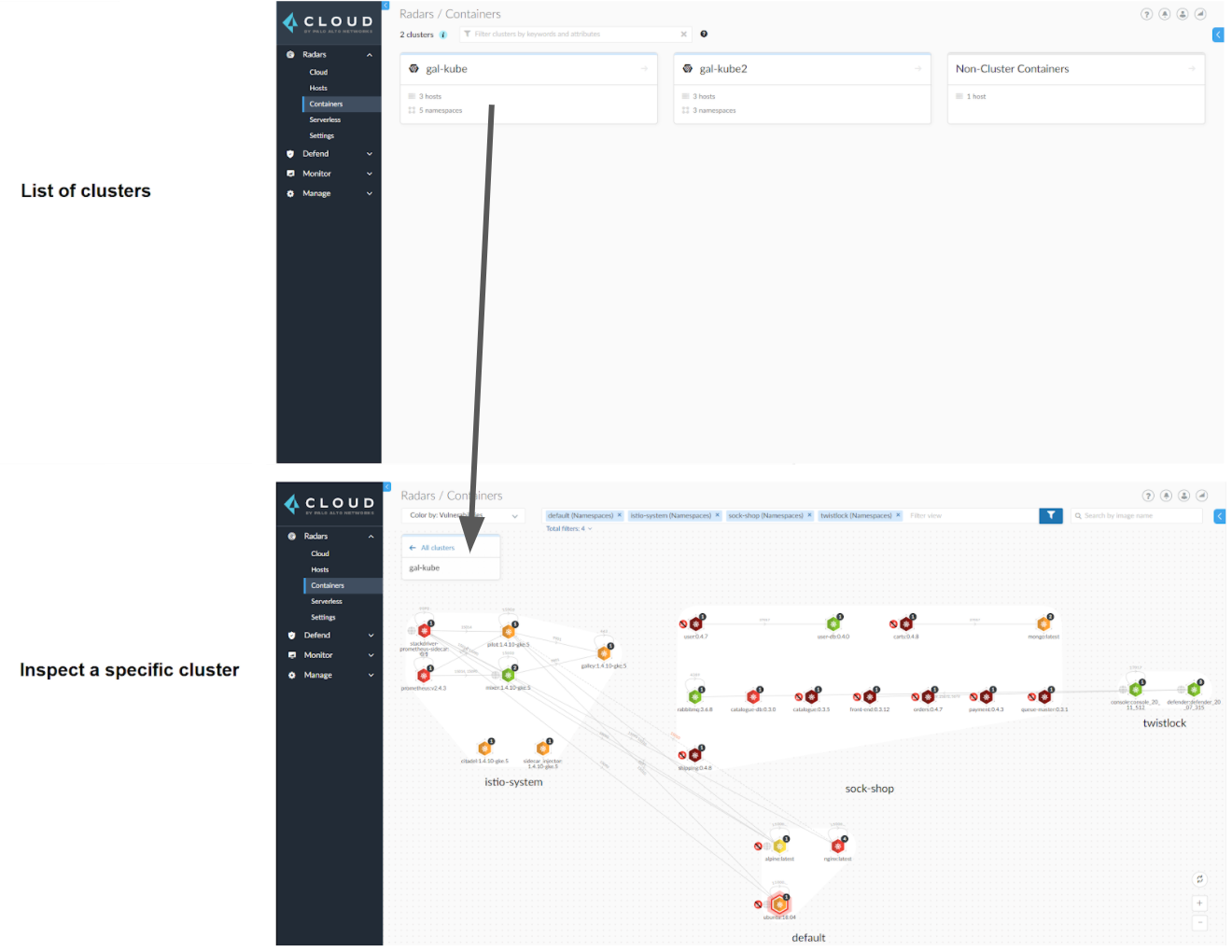
Prisma Cloud can segment your environment by cluster. For example, you might have three clusters: test, staging, and production. The cluster pivot in Prisma Cloud lets you inspect resources and administer security policy on a per-cluster basis.
## Cluster awareness across the product
Radar lets you explore your environment cluster-by-cluster. Various scan reports and audits include the relevant cluster name to provide environment context. You can also create stored filters (also known as [collections](/admin-guide/configure/collections.md)) based on cluster names. Finally, you can scope policy by cluster. Vulnerability and compliance rules for container images and hosts, runtime rules for container images, and trusted images rules can all be scoped by cluster name.
## Generating cluster names in Prisma Cloud
When two or more clusters share the same name, Prisma Cloud treats them as a single cluster. This can cause vulnerability information to be inaccurately reported for each cluster. The resulting data inconsistency might also lead to clean clusters being misrepresented as vulnerable ones.
To avoid cluster name conflicts when deploying a Defender DaemonSet, Prisma Cloud provides a **Cluster name resolving method** option that enables greater flexibility and accuracy in generating cluster names within Prisma Cloud.
**Cluster name resolving method** is added to the **Manage > Defenders > “Manual Deploy” > Orchestrator > “Orchestrator type = Kubernetes" > Advanced Settings** page.
**Cluster name resolving method** has the following options:
* **Default**: This option allows Prisma Cloud to automatically generate the name based on available information from the kubeconfig file (specifically from the server field), resource group information, and cloud provider metadata endpoints.
* **Manual**: This option allows for manually specifying a cluster name. This is particularly useful for self-managed clusters, such as those built with kops, or for Bottlerocket clusters which do not provide a cluster name by default. When you select this option, the **Specify a cluster name** box appears, allowing you to enter the desired name.
* **API Server**: This option enables Prisma Cloud to use the API server address from the kubeconfig file to generate a unique cluster name.
### Important Considerations
* **Google Cloud Platform (GCP) clusters**: For Google Cloud Platform, clusters with the same name in different projects are treated as a single cluster. Consider manually specifying different names for each cluster using **Cluster name resolving method**.
* **Manual naming limitations**: Manually specifying names isn’t supported in **Manage > Defenders > Defenders:Auto-Defend > DaemonSets**. For this deployment flow, cluster names are automatically retrieved from the cloud provider or the kubeconfig file.
### Changing cluster names for an existing deployment
To change the cluster name determined by Prisma Cloud Compute or the manually set name, you must redeploy the Defender DaemonSet and specify the new name. Historical records for audits and incidents will retain the original cluster name. The new cluster name will only apply to future reporting. Collections created with the old cluster name need to be manually updated with the new name.
---
# Agent Instructions
This documentation is published with GitBook. GitBook is the documentation platform designed so that both humans and AI agents can read, navigate, and reason over technical content effectively. Learn more at gitbook.com.
## Querying This Documentation
If you need additional information that is not directly available in this page, you can query the documentation by asking a question.
Perform an HTTP GET request on the following URL with the `ask` and `goal` query parameters:
```
GET https://docs.prismacloud.io/admin-guide/install/cluster-context.md?ask=&goal=
```
`ask` is the immediate question: it should be specific, self-contained, and written in natural language.
`goal` is what the user is ultimately trying to achieve, the reason they need the answer. Sharing it helps GitBook give you a better, more relevant answer. A goal is most helpful when it describes the outcome the user wants rather than restating the question. For example, with `ask=how do I create an API token`, a goal like `automate deployments from our CI pipeline` lets GitBook tailor the answer to that use case.
The response will contain a direct answer to the question and relevant excerpts and sources from the documentation.
Use this mechanism when the answer is not explicitly present in the current page, you need clarification or additional context, or you want to retrieve related documentation sections.