> For the complete documentation index, see [llms.txt](https://docs.prismacloud.io/llms.txt). Markdown versions of documentation pages are available by appending `.md` to page URLs; this page is available as [Markdown](https://docs.prismacloud.io/admin-guide/install/getting-started.md).
# Getting started
Console is Prisma Cloud’s management interface. It lets you define policy and monitor your environment.
Defender protects your environment according to the policies set in Console. There are a number of [Defender types](/admin-guide/install/deploy-defender/defender-types.md), each designed to protect a specific resource type.
The primary concern for most customers getting started with Prisma Cloud is securing their container environment. To do this, install Container Defender on every host that runs containers. Container orchestrators typically provide native capabilities for deploying an agent, such as Defender, to every node in the cluster. Prisma Cloud leverages these capabilities to install Defender. For example, Kubernetes and OpenShift, offer DaemonSets, which guarantee that an agent runs on every node in the cluster. Prisma Cloud Defender, therefore, is deployed in Kubernetes and OpenShift clusters as a DaemonSet.
In this section, you’ll find dedicated install guides for all popular container platforms. Each guide shows how to install Prisma Cloud for that given platform.
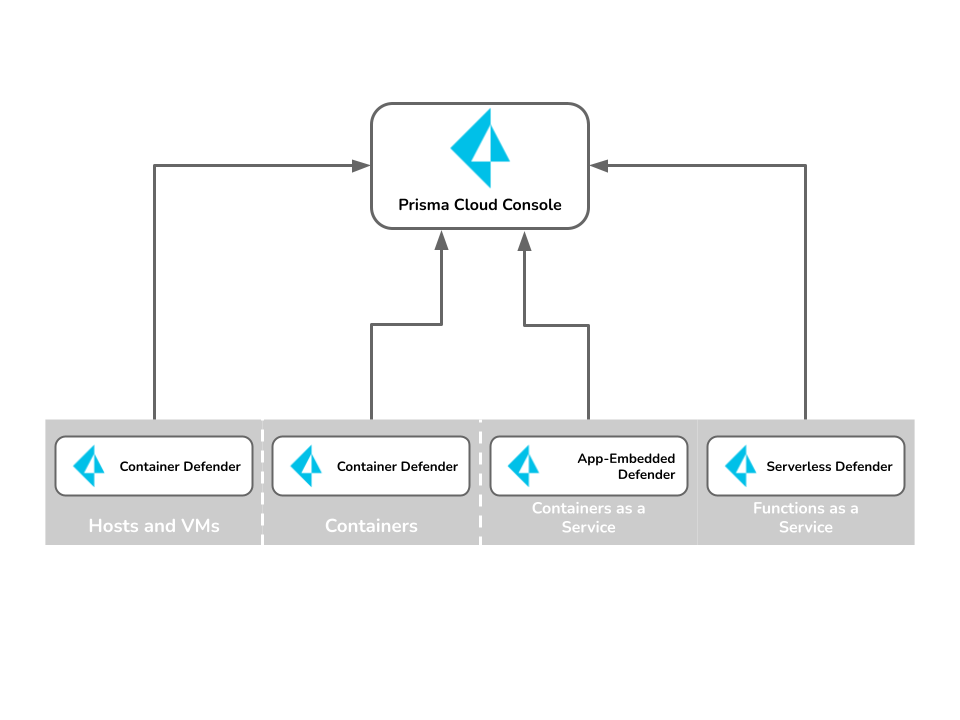
As you adopt other cloud-native technologies, Prisma Cloud can be extended to protect those environments too. Deploy the Defender type best suited for the job. For example, today you might use Amazon EKS (Kubernetes) clusters to run your apps. This part of your environment would be protected by Container Defender. Later you might adopt AWS Lambda functions. This part of your environment would be secured by Serverless Defender. Extending Prisma Cloud to protect other types of cloud-native technologies calls for deploying the right Defender type.
All Defenders, regardless of their type, report back to Console, letting you secure hybrid environments with a single tool. The main criteria for installing Defender is that it can connect to Console. Defender connects to Console via websocket to retrieve policies and send data.
## Install guides
Start your install with one of our dedicated guides.
| Install procedure | Description |
| ---------------------------------------------------------------------------------------------------------------------------------------------------------- | -------------------------------------------------------------------------------------------------------------------------------------------------------------------------------------------------------------------------------------------------------------------------------------------------------------------------------------------------------------------------------------------------------------------------------------------------------------------------------------------------------------------------------------------------------------------------------------------------------------------------------------------------------------------------------------------------------------------------------------------------------------------------------------------------------------------------------------------------------------------------------------------------------------------------------------------------------------------------------------------------------------------------- |
| [Kubernetes](https://github.com/PaloAltoNetworks/pc-docs-md/tree/main/compute-edition/34/admin-guide/install/deploy-defender/orchestrator/orchestrator.md) |
Prisma Cloud runs on any implementation of Kubernetes, whether you build the cluster from scratch or use a managed solution (also known as Kubernetes as a service). We’ve tested and validated the install on:
In some cases, there is a dedicated section for installing on a specific cloud provider’s managed solution. When there is no dedicated section, use the generic install method.
|
| [OpenShift 4](/admin-guide/install/deploy-defender/orchestrator/openshift.md) | Prisma Cloud offers native support for OpenShift. |
| [Amazon ECS](/admin-guide/install/deploy-defender/orchestrator/install-amazon-ecs.md) | |
| [Windows](/admin-guide/install/deploy-defender/host/windows-host.md) | Install Defender on Windows hosts running containers. Defender is installed using a PowerShell script. |
## Encryption
All network traffic is encrypted with TLS (https) for user to Console communication. Likewise, all Defender to Console communication is encrypted with TLS (WSS).
---
# Agent Instructions
This documentation is published with GitBook. GitBook is the documentation platform designed so that both humans and AI agents can read, navigate, and reason over technical content effectively. Learn more at gitbook.com.
## Querying This Documentation
If you need additional information that is not directly available in this page, you can query the documentation by asking a question.
Perform an HTTP GET request on the following URL with the `ask` and `goal` query parameters:
```
GET https://docs.prismacloud.io/admin-guide/install/getting-started.md?ask=&goal=
```
`ask` is the immediate question: it should be specific, self-contained, and written in natural language.
`goal` is what the user is ultimately trying to achieve, the reason they need the answer. Sharing it helps GitBook give you a better, more relevant answer. A goal is most helpful when it describes the outcome the user wants rather than restating the question. For example, with `ask=how do I create an API token`, a goal like `automate deployments from our CI pipeline` lets GitBook tailor the answer to that use case.
The response will contain a direct answer to the question and relevant excerpts and sources from the documentation.
Use this mechanism when the answer is not explicitly present in the current page, you need clarification or additional context, or you want to retrieve related documentation sections.