> For the complete documentation index, see [llms.txt](https://docs.prismacloud.io/llms.txt). Markdown versions of documentation pages are available by appending `.md` to page URLs; this page is available as [Markdown](https://docs.prismacloud.io/admin-guide/welcome/releases.md).
# Releases
In general, you should stay on the latest major release unless you require a feature or fix from a subsequent maintenance release. We recommend that you upgrade to new major releases as they become available. For more information, see the [Prisma Cloud support lifecycle](/admin-guide/welcome/support-lifecycle.md).
The bell icon in the Console shows a notification when a new release is available.
## Downloading the software
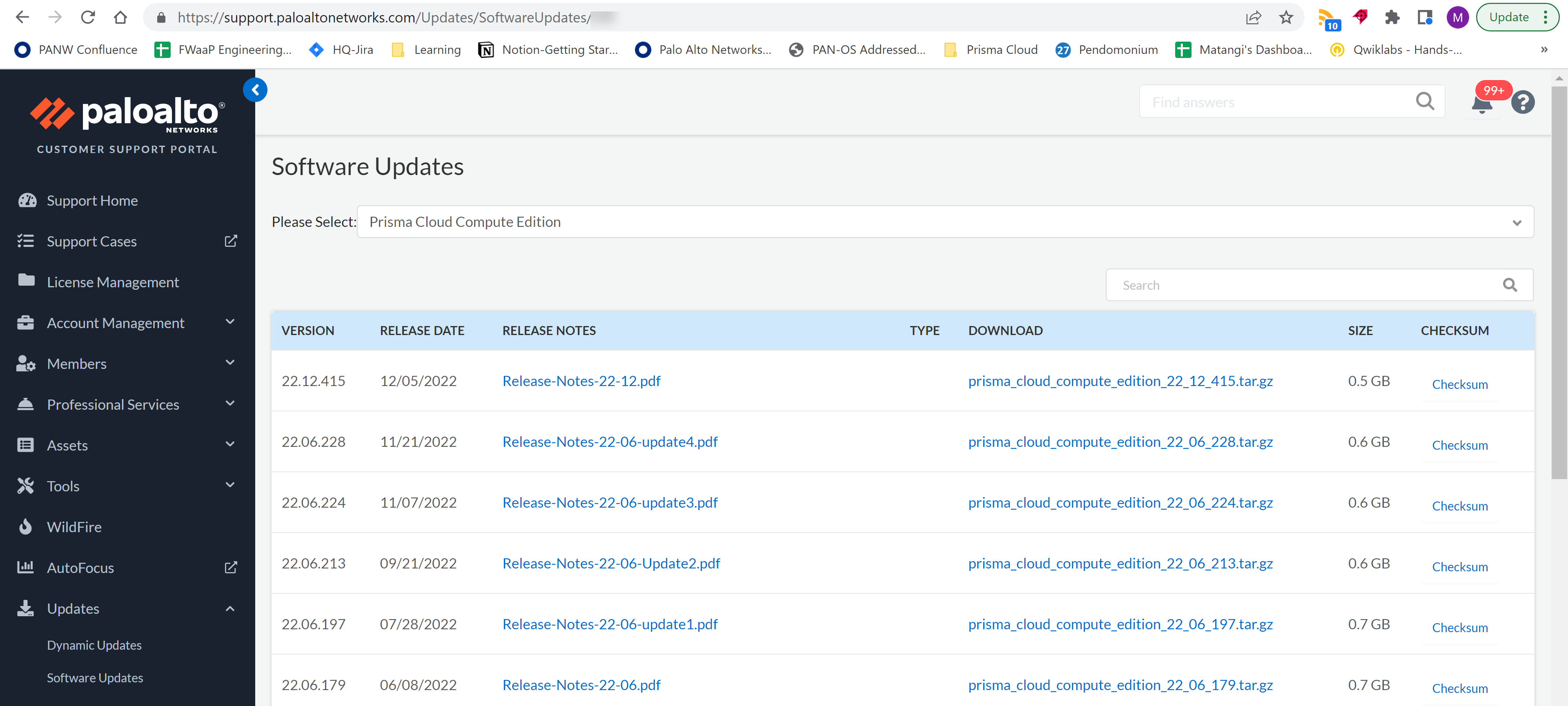
Download the software from the Palo Alto Networks [Customer Support portal](https://support.paloaltonetworks.com/).
If you don’t see **Prisma Cloud Compute Edition** in the drop-down list, contact customer support. They’ll send you a direct link to the download. We are currently working on fixing all accounts that have this issue.
1. Log into the [Customer Support portal](https://support.paloaltonetworks.com/).
2. Go to **Updates > Software Updates**.
3. From the drop-down list, select **Prisma Cloud Compute Edition**. All releases available for download are displayed.
## Downloading the software programmatically
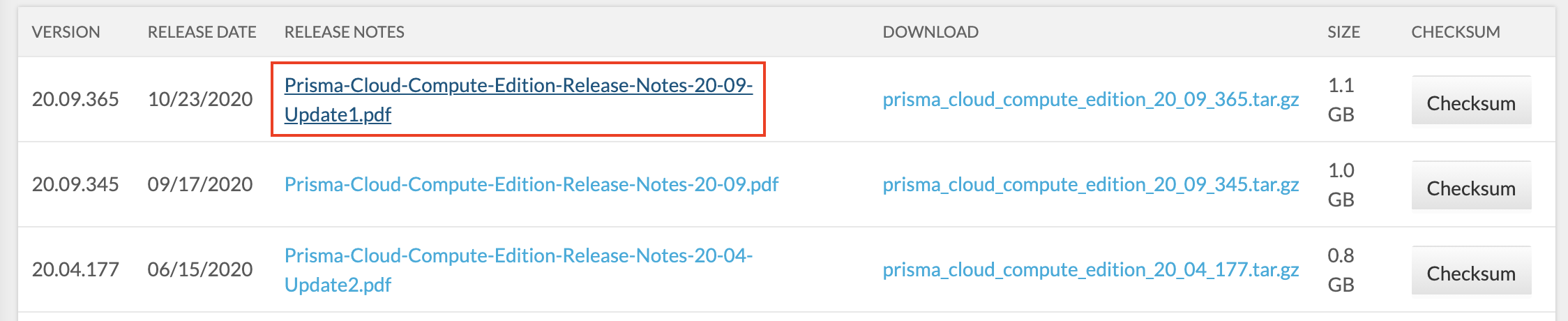
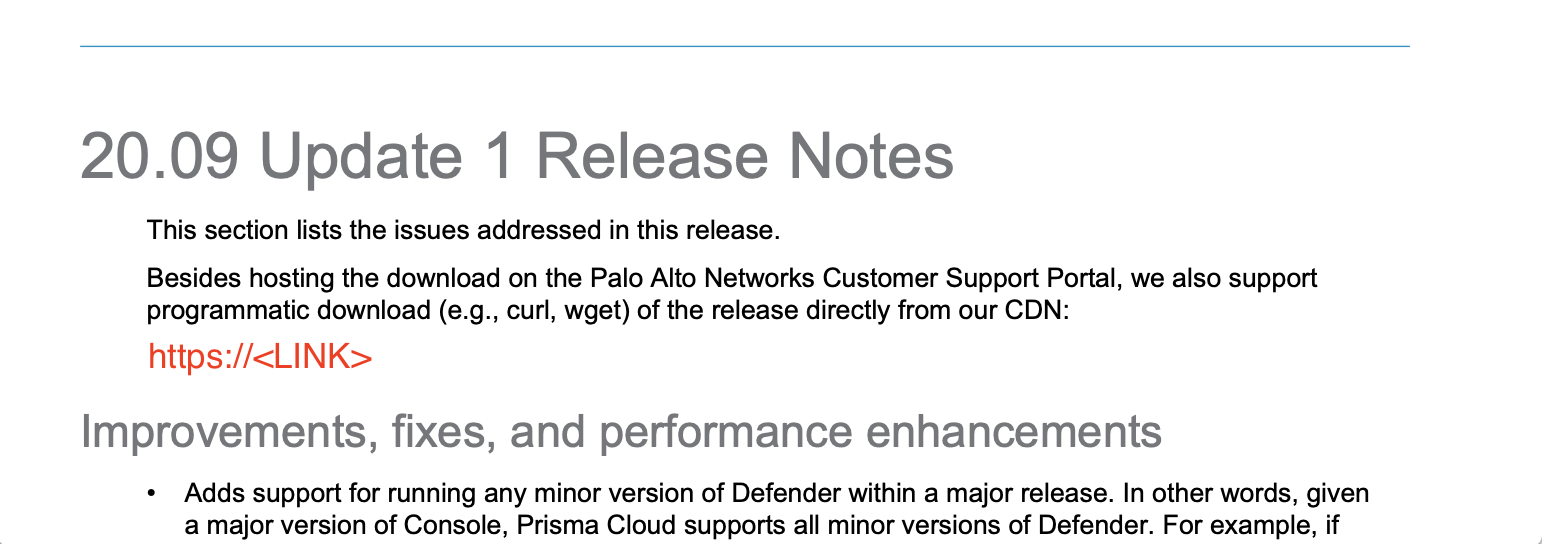
Besides hosting the download on the Customer Support Portal, we also support programmatic download (e.g., curl, wget) of the release directly from our CDN. The link to the tarball is published in the release notes.
If you don’t see **Prisma Cloud Compute Edition** in the drop-down list, contact customer support. They’ll send you a direct link to the download. We are currently working on fixing all accounts that have this issue.
1. Log into the [Customer Support portal](https://support.paloaltonetworks.com/).
2. Go to **Updates > Software Updates**.
3. From the drop-down list, select **Prisma Cloud Compute Edition**. All releases available for download are displayed.
4. Open the releases notes PDF.
5. Scroll down to the release information to get the link.
## Open-source components
Prisma Cloud includes various open-source components, which may change between releases. Before installing Prisma Cloud, review the components and licenses listed in *prisma-oss-licenses.pdf*. This document is included with every release tarball. Changes to components or licenses between releases are highlighted.
A full listing of the open-source software and their licenses is also embedded in the Defender image. For example, to extract the listing from Defender running in a Kubernetes cluster, use the following command:
```
kubectl exec -ti -n twistlock -- cat /usr/local/bin/prisma-oss-licenses.txt
```
## Code names
We often use code names when referring to upcoming releases. They’re convenient to use in roadmap presentations and other forward-looking communications. Code names tend to persist even after the release ships.
### Version to code name mapping
Version numbers indicate the date a release first shipped, along with the build number, as follows:
\.\.\
For example, 22.01.840 is the Joule release, which first shipped in January 2022.
The following table maps versions to code names. The table is sorted from the newest (top) to the oldest release.
| Version | Code name |
| ------------------ | --------- |
| Next Major release | O’Neal |
| 31.xx.xxx | Newton |
| 30.xx.xxx | Maxwell |
| `22.12.xxx` | Lagrange |
| `22.06.XXX` | Kepler |
| `22.01.XXX` | Joule |
| `21.08.XXX` | Iverson |
---
# Agent Instructions
This documentation is published with GitBook. GitBook is the documentation platform designed so that both humans and AI agents can read, navigate, and reason over technical content effectively. Learn more at gitbook.com.
## Querying This Documentation
If you need additional information that is not directly available in this page, you can query the documentation by asking a question.
Perform an HTTP GET request on the following URL with the `ask` and `goal` query parameters:
```
GET https://docs.prismacloud.io/admin-guide/welcome/releases.md?ask=&goal=
```
`ask` is the immediate question: it should be specific, self-contained, and written in natural language.
`goal` is what the user is ultimately trying to achieve, the reason they need the answer. Sharing it helps GitBook give you a better, more relevant answer. A goal is most helpful when it describes the outcome the user wants rather than restating the question. For example, with `ask=how do I create an API token`, a goal like `automate deployments from our CI pipeline` lets GitBook tailor the answer to that use case.
The response will contain a direct answer to the question and relevant excerpts and sources from the documentation.
Use this mechanism when the answer is not explicitly present in the current page, you need clarification or additional context, or you want to retrieve related documentation sections.