> For the complete documentation index, see [llms.txt](https://docs.prismacloud.io/llms.txt). Markdown versions of documentation pages are available by appending `.md` to page URLs; this page is available as [Markdown](https://docs.prismacloud.io/content-collections/administration/alarm-center/review-alarms.md).
# Review Alarms
You can review the alarm notifications and take the necessary action to rectify the issue or error. You can filter the alarms and also set up email notifications.
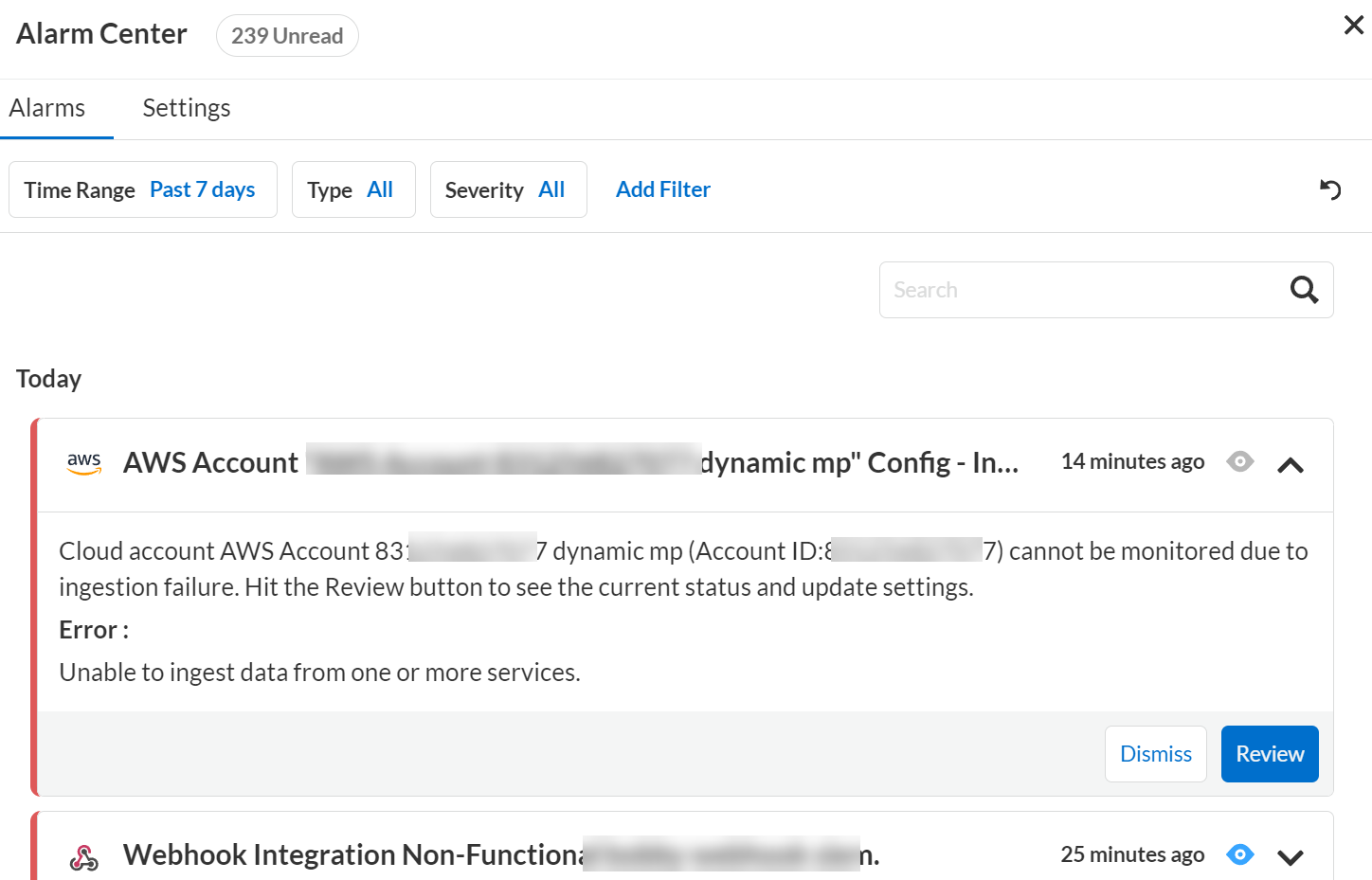
1. Select **Alarms** to view the Alarm Center that lists all the alarm notifications.
Alarms are sorted based on the time of occurrence. The latest alarms are displayed at the top. The alarm notifications are retained for 30 days from the time they are generated.
2. Filter alarms based on:
* **Time Range**—Past 24 hours, past 7 days, or past month
* **Alarm Type**—Integrations, Cloud Accounts, License, Access Key, or All
* **Severity**—High (red, indicates complete failure), medium (orange, indicates partial failure), low (yellow), or all. The colored strip on the left of each alarm signifies its severity.
In case of Cloud Accounts, high severity alarm indicates an authentication issue and medium severity indicates a missing permissions issue.
Currently, Prisma Cloud only generates high severity alarms for Integration based issues, which indicates that the Integration has failed.
3. The Alarms tab ticker highlights the number of unread notifications. Once you click on a notification, it changes from unread to read.
* Information such as error code and relevant messages are displayed.
* Use the filters to get a specific list of alarms.
* Click **Delete** if you want to remove the notification from the alarm center. Once deleted, a similar alarm will not appear for the next 24 hours, if the same error occurs in that time period. After 24 hours, a similar error will generate a new alarm notification.
4. Click **Review**.
* Depending on the alarm type, the License, Integrations, or Cloud Accounts page is displayed, which shows the details of the License, Integration, or Cloud Account that has failed or caused this alarm.
* Review the Integration parameters or Cloud Account details and take further action to rectify the failure.
* **License Usage** — An alarm is generated on the last day of the month if your monthly usage is >80% (configurable limit) of the credits purchased
* **Credit Allocation Rule Usage** — An alarm is generated when the credit allocation threshold you [defined](/content-collections/administration/prisma-cloud-licenses.md) is exceeded.
* **License Expiry** -— An alarm is generated 1 month before your license expires (for non-POC tenants).
* **Module Activation Failure** -— An alarm is generated for any module provisioning failures.
---
# Agent Instructions
This documentation is published with GitBook. GitBook is the documentation platform designed so that both humans and AI agents can read, navigate, and reason over technical content effectively. Learn more at gitbook.com.
## Querying This Documentation
If you need additional information that is not directly available in this page, you can query the documentation dynamically by asking a question.
Perform an HTTP GET request on the current page URL with the `ask` query parameter, and the optional `goal` query parameter:
```
GET https://docs.prismacloud.io/content-collections/administration/alarm-center/review-alarms.md?ask=&goal=
```
`ask` is the immediate question: it should be specific, self-contained, and written in natural language.
`goal` is optional and describes the broader end goal you are ultimately trying to accomplish on behalf of the user. GitBook uses it to tailor the answer towards what is most useful for that goal.
The response will contain a direct answer to the question and relevant excerpts and sources from the documentation.
Use this mechanism when the answer is not explicitly present in the current page, you need clarification or additional context, or you want to retrieve related documentation sections.