> For the complete documentation index, see [llms.txt](https://docs.prismacloud.io/llms.txt). Markdown versions of documentation pages are available by appending `.md` to page URLs; this page is available as [Markdown](https://docs.prismacloud.io/content-collections/administration/network-security.md).
# Network Security
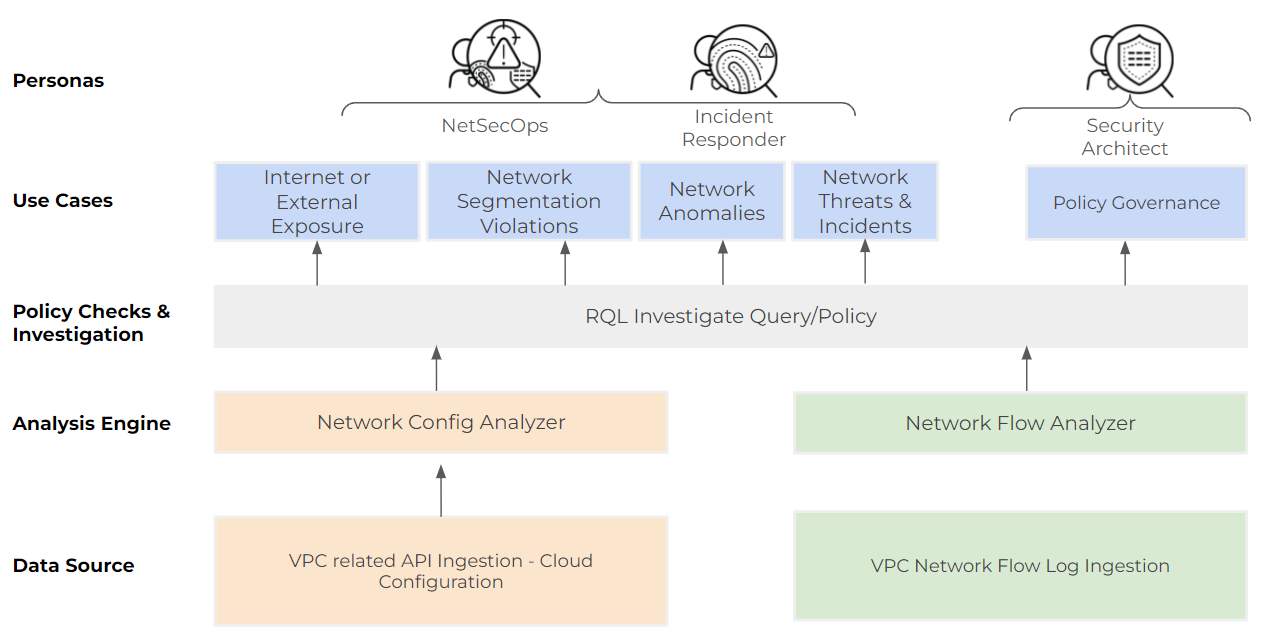
Prisma Cloud enhances your network security posture within public cloud environments. It helps you to find incidents and threats that are based on VPC flow logs and also the network exposure of your cloud assets based on configuration.
Prisma Cloud ingests and monitors network traffic from cloud services and allows you to [query network](https://github.com/PaloAltoNetworks/pc-docs-md/tree/main/enterprise-edition/content-collections/search-and-investigate/network-queries/network-queries.md) events in your cloud environments. You can detect when services, applications, or databases are exposed to the Internet and if there are potential data exfiltration attempts. It also monitors network configuration and traffic logs to and from your assets deployed on the cloud environment after you have onboarded your cloud accounts.
Network exposure queries are currently supported only on AWS, Azure, and GCP cloud environments and are currently not available in the Government and China regions.
Prisma Cloud’s inbuilt Cloud Network Analyzer (CNA) engine automatically calculates net effective reachability of cloud assets through entities such as virtual machines, databases, and network interfaces and helps detect unrestricted network access from the Internet or external network domain using two main vectors:
* Routing path exists from source to destination, and
* Net effectiveness of all cloud-native network security policies in the path.
Prisma Cloud network security capabilities include high fidelity alerts that provide rich context, so you know exactly how a particular cloud asset is exposed and can prioritize the risk and take meaningful action. It includes out-of-the-box policies that help you identify risky network exposure.
---
# Agent Instructions
This documentation is published with GitBook. GitBook is the documentation platform designed so that both humans and AI agents can read, navigate, and reason over technical content effectively. Learn more at gitbook.com.
## Querying This Documentation
If you need additional information that is not directly available in this page, you can query the documentation by asking a question.
Perform an HTTP GET request on the following URL with the `ask` and `goal` query parameters:
```
GET https://docs.prismacloud.io/content-collections/administration/network-security.md?ask=&goal=
```
`ask` is the immediate question: it should be specific, self-contained, and written in natural language.
`goal` is what the user is ultimately trying to achieve, the reason they need the answer. Sharing it helps GitBook give you a better, more relevant answer. A goal is most helpful when it describes the outcome the user wants rather than restating the question. For example, with `ask=how do I create an API token`, a goal like `automate deployments from our CI pipeline` lets GitBook tailor the answer to that use case.
The response will contain a direct answer to the question and relevant excerpts and sources from the documentation.
Use this mechanism when the answer is not explicitly present in the current page, you need clarification or additional context, or you want to retrieve related documentation sections.