> For the complete documentation index, see [llms.txt](https://docs.prismacloud.io/llms.txt). Markdown versions of documentation pages are available by appending `.md` to page URLs; this page is available as [Markdown](https://docs.prismacloud.io/content-collections/administration/prisma-cloud-licenses.md).
# License Types
Prisma Cloud is available as a one-, two-, or three-year subscription in the following offerings:
* **Prisma Cloud Compute Edition**—Subscription includes workload protection for hosts, containers, and serverless deployments. This offers both an agentless and an agent-based approach to protect assets across the application lifecycle. Prisma Cloud Compute edition is a self-operated software solution that you deploy, manage, and update in your own environments—whether public, private, or hybrid clouds—including entirely air-gapped environments.
* **Prisma Cloud Enterprise Edition**—Subscription is a SaaS offering that comprises product modules providing distinct security capabilities. These product modules offer you the flexibility in where and how you secure your code and cloud environments.The options are:
* **Standard**—An a la carte option where you can select any combination of Prisma Cloud capabilities with a standard success plan. The Enterprise edition—delivered as a SaaS model—combines agentless, API- and agent-based approaches to deliver comprehensive host, container, serverless, IaaS, PaaS, WAAS, IAM security, network security, application security, and data security for supported environments. It is an add-on approach where you can pick and choose the security capabilities that are most important to your organization. The capabilities protect you from the most sophisticated threats with advanced machine learning capabilities, network security monitoring, user entity behavior analysis (UEBA) for detecting location- and activity-based anomalies, and integration with host vulnerability management tools.
* **Cloud Security**—Plans for the runtime security offerings are available with a combination of VM-based and developer-based metering. You can choose from the bundles for Cloud Security Foundations and Cloud Security Advanced, and you can take advantage of additional capabilities as add-ons, which are not part of the above bundles. Features include, [Data Security](#../administration/configure-data-security/subscribe-to-data-security), [Software Composition Analysis (SCA), Secrets Security, CI/CD Security](/content-collections/application-security/get-started/application-security-license-types.md).
* Opt for **Cloud Security Foundations** for agentless access to all of the following:
* Real-time threat and misconfiguration detection for IaaS and PaaS (Infrastructure and Platform as a Service)
* Compliance management
* Workload vulnerability scanning
* Infrastructure as code (IaC) misconfiguration detection
* Least-privileged access enforcement
* Add on **Cloud Security Advanced** to ensure your application development in the cloud is secure by design. Features incude:
* Host, container, and serverless runtime security
* Web Application and API Security
With the Enterprise Edition, you can optionally upgrade to a premium success plan that includes 24x7 access to customer success experts, custom workshops, implementation assistance, configuration and planning, and best practices guides.
Each of these offerings has a different capacity unit and unit price in Prisma Cloud Credits. The number of credits required to secure your assets can vary based on the offering and the size of your deployment. Refer to the [Prisma Cloud Licensing and Editions Guide](https://www.paloaltonetworks.com/resources/guides/prisma-cloud-pricing-and-editions) for details. Licensing is sold in increments of 100 credits and you estimate the number of units you need to monitor and protect.
## License and Consumption Details
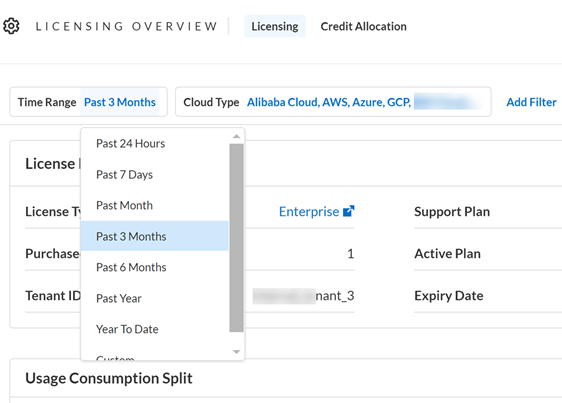
On the Prisma Cloud administrative console **Settings > Licensing**, you can easily view your active license plan, the average credit consumption trend, and details on how the average credits are being used by cloud type and each cloud account.
Only resources that are active (or running) count towards Prisma Cloud credit usage. Non-active (or dormant) resources do not count towards credit usage. Credits are not counted for resources that belong to disabled cloud accounts.
The page is grouped in five sections:
* License Information—Complete details on the license type, the currently active license, and support plan, as well as information about your Prisma Cloud tenant, such as the serial number and tenant ID. For additional licensing details, including your Prisma ID, select the **Show more information** button.
* Filters—The filters enable you to narrow the information in the consumption trend graph and the table. You can choose the time range, cloud type, cloud account and account group.
The zip file download is available for the standard plan only. It provides a granular breakdown of assets that are consuming credits within a module.
* Consumption Trend Graph— The graph provides the overall view of your license consumption trends for the selected time period. Credit consumption is measured hourly and the hourly samples are averaged to create daily samples. The credit usage for a specified time range uses the appropriate hourly, daily or monthly average. If there is less than 30 days of data available, the average is calculated using the days available.
You can review the average usage overlaid against the Prisma Cloud credits you have purchased and the actual credit usage trends. The usage trends can help you identify bursts in usage to meet short-term needs for your business and the steady usage as you accelerate or scale back in deploying assets in your cloud adoption journey.
The average usage graph presents a daily average for up to a 6-month period, and monthly averages for 6 months to last 3-year term.
* Consumption Details Table—The tabular format provides you with the average credit usage for run-time assets and build-time assets that you are monitoring with Prisma Cloud. The Build Time view displays usage information only if you have activated the Application Security subscription.
If you have environments where you have deployed Prisma Cloud Defenders either on-premises or on private or public cloud platforms that are not onboarded on Prisma Cloud, such as on OpenShift or on-prem Kubernetes clusters, these are grouped as **Other** cloud accounts. The row labeled Other displays the average credits used towards assets deployed on cloud environments that are not onboarded on Prisma Cloud.
You can also download the data that you are viewing in the table in a CSV file format. For a time period of 180 days, you can download daily usage information. To hide/show columns and reset the default view, use the column picker above the table.
## Behavior on License Expiry
Prisma Cloud licenses are valid for the period of time associated with the license purchase. After your Prisma Cloud license expires, your access to the Prisma Cloud administrative console is disabled until you renew the license.
If the license is not renewed within the first 90-days of your license expiration (“Grace Period”), your Prisma Cloud tenant is completely deleted. It may take up to 30 days after the Grace Period to permanently delete the data you provided and stored in the Prisma Cloud console and/or API, except in the case of the Cloud Application Security module, it will take up to 365 days from the last date of scan to permanently delete your data.
## Credit Allocation
Prisma Cloud credits are used towards the features that you have subscribed and are using to monitor your cloud assets and environments. On the Credit Allocation page you can distribute credits to specific account groups and receive notifications when the credit usage exceeds a specific threshold, you can . After your set up these allocation rules, the page displays the list of rules and the current status of the purchased versus used credits.
1. Select **Settings > Licensing > Credit Allocation**.
2. **Add Credit Allocation Rule**.
Enter the details for the rule.
1. **Name** to identify the rule.
2. Select the **Account Groups** for which you want to monitor credit usage.
3. Enter the **Total Credit Balance**. This is the number of credits you want to allocate for the selected account groups.
4. Enter a percentage value for the **Average Usage Threshold**.
When this threshold is met, say 75% of 1000 allocated credits, an alarm is generated. You can view this alarm in the Alarm Center, and also configure [alarm notifications](https://github.com/PaloAltoNetworks/pc-docs-md/tree/main/enterprise-edition/content-collections/alarm-center/set-up-email-notifications-for-alarms.md).
5. **Submit** your changes.
3. View the rules and credit usage violations
For each rule, Rule Name, Allocated Credits, Total Credit Usage, Average Credit Usage (%), and Account Groups information is available for your review. You can select each rule to edit or delete it.
Serverless Radar consumes credits even if your deployment does not actively use it. This is because Serverless Radar is part of cloud discovery and security posture management which is always on and cannot be disabled.
## Credit Usage Measurement
Prisma Cloud measures credit consumption hourly. The hourly samples are averaged to create daily samples. The averaging measurement methodology is designed to prevent reporting overages based on short-term bursts. On the Prisma Cloud **Licensing Overview** page, the credit usage for a specified time range uses the appropriate hourly, daily, or monthly average.
If there is less than 30 days of data available, the average is calculated using the days that were available.
### Caveats
Prisma Cloud maintains historical credit consumption data so that you have a record for accounting and planning purposes. If you unsubscribe from a module and stop using it, the credit consumption for that module is still reflected in historical data and also when viewing credit consumption over a time period when the module was used.
* **Unsubscribing from CDEM**: If you decide to unsubscribe from the paid version of Cloud Discovery and Exposure Management (CDEM), a flat 100 credits will be charged for the period of 12 months from the date you subscribe.
* **Unsubscribing from Data Security**: If you decide to unsubscribe from data security, your credits will be charged for the period of 12 months from the date you subscribe.
---
# Agent Instructions
This documentation is published with GitBook. GitBook is the documentation platform designed so that both humans and AI agents can read, navigate, and reason over technical content effectively. Learn more at gitbook.com.
## Querying This Documentation
If you need additional information that is not directly available in this page, you can query the documentation by asking a question.
Perform an HTTP GET request on the following URL with the `ask` and `goal` query parameters:
```
GET https://docs.prismacloud.io/content-collections/administration/prisma-cloud-licenses.md?ask=&goal=
```
`ask` is the immediate question: it should be specific, self-contained, and written in natural language.
`goal` is what the user is ultimately trying to achieve, the reason they need the answer. Sharing it helps GitBook give you a better, more relevant answer. A goal is most helpful when it describes the outcome the user wants rather than restating the question. For example, with `ask=how do I create an API token`, a goal like `automate deployments from our CI pipeline` lets GitBook tailor the answer to that use case.
The response will contain a direct answer to the question and relevant excerpts and sources from the documentation.
Use this mechanism when the answer is not explicitly present in the current page, you need clarification or additional context, or you want to retrieve related documentation sections.