> For the complete documentation index, see [llms.txt](https://docs.prismacloud.io/llms.txt). Markdown versions of documentation pages are available by appending `.md` to page URLs; this page is available as [Markdown](https://docs.prismacloud.io/content-collections/administration/view-audit-logs.md).
# View Audit Logs
As part of compliance requirement for organizations, companies need to demonstrate they are proactively tracking security issues and taking steps to remediate issues as they occur. The Prisma Cloud Audit Logs section enables companies to prepare for such audits so that they can demonstrate compliance. The Audit logs list all actions initiated by Prisma Cloud administrators. It lists who did what and when, to help you identify any configuration changes and activity initiated on a cloud account of behalf of the administrator who initiated the action.
Audit logs older than 120 days are deleted.
1. Select **Settings > Audit Logs**.
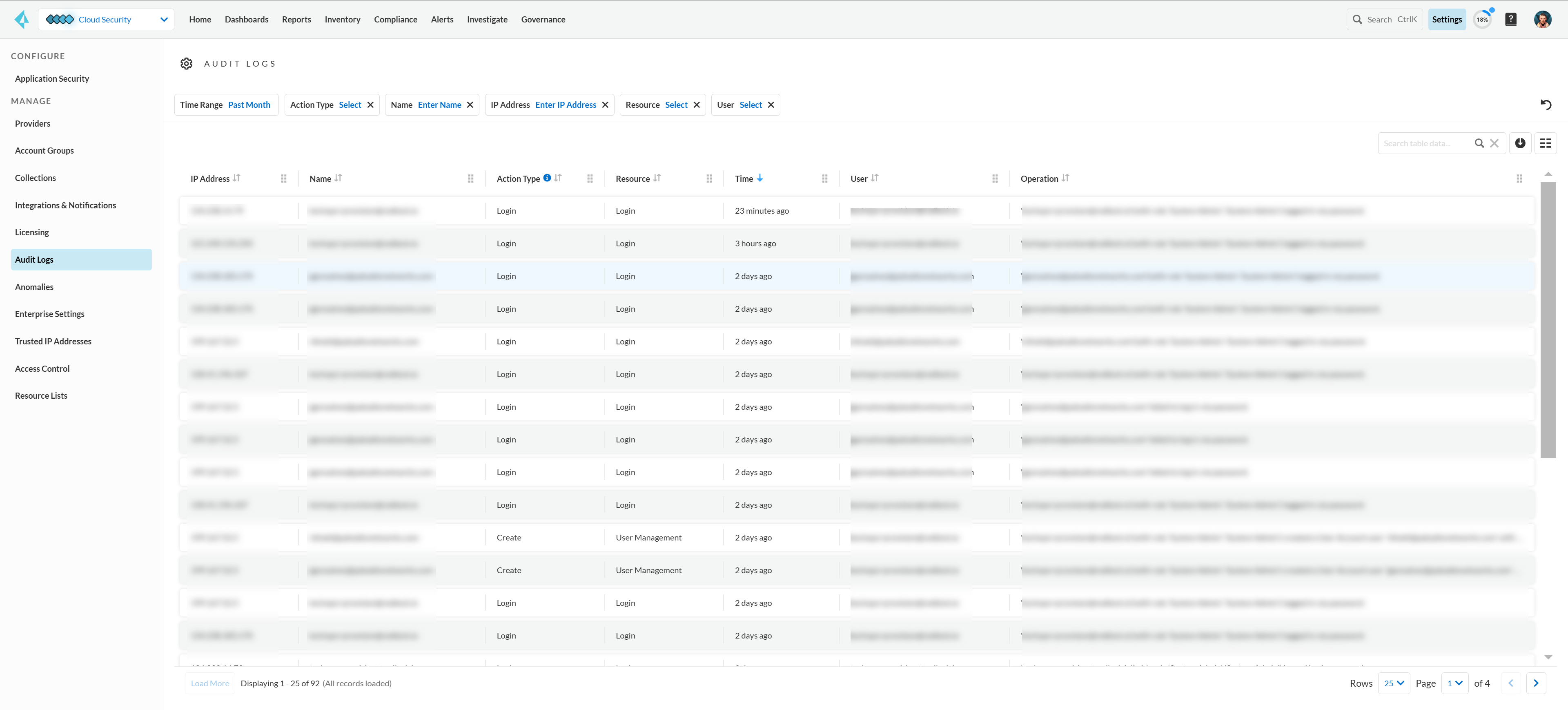
2. Select a **Time Range** to view the activity details by users in the system.
3. Select **Add Filter** to make your search more efficient.
* **Action Type**— Filter audit logs by the type of activity performed on a resource by a user or system, such as **Create**, **Read**, **Update**, **Delete**, **Login**, and **Test**.
* **Name**— Enter the name of the resource that you want to find. You can enter up to 10 resource names.
* **IP Address**— Enter the IP addresses that you want to find. You can enter up to 10 IP addresses.
* **Resource**— Filter audit logs based on the resource categories. You can select up to 10 resource categories.
* **User**— Search for the name of the user who performed an activity. You can select up to 10 users.
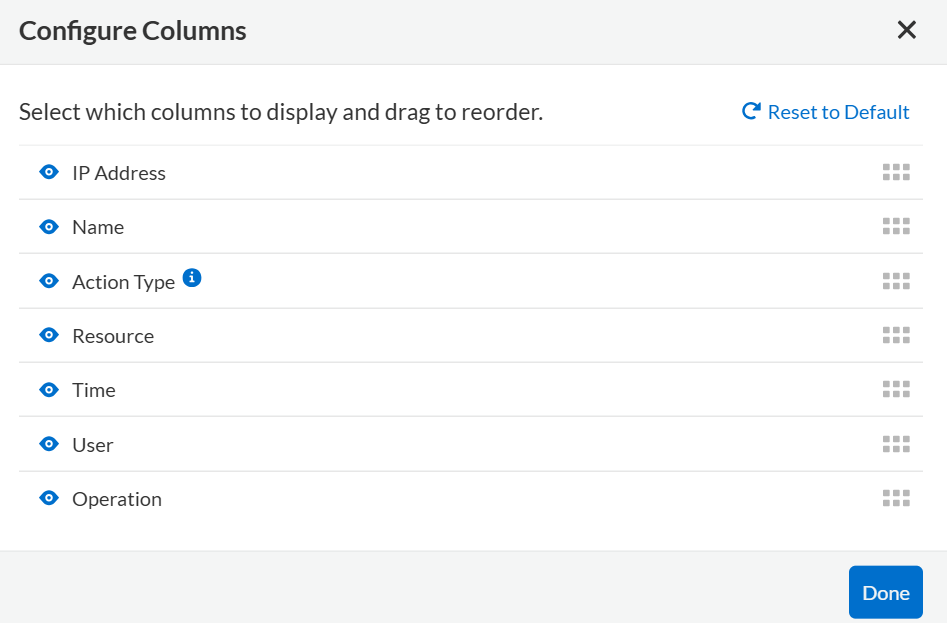
4. Select the columns you want to display and their order.
5. After selecting the columns, you can **Download** all administrator activity.
The details are in a CSV format.
6. View the data in the CSV file.
The **Load More** button retrieves additional audit log records, enhancing user experience. The maximum limit is 500 records per request. When the number of audit log records is below 500 for a request, the **Load More** button will be disabled.
## Audit Log Details
The Prisma Cloud audit log includes the following fields, which are available for ingestion in to your security and event management systems:
| **Field Name** | **Description** |
| ---------------- | ------------------------------------------------------------------------------------------------------------------------------------------------------------------------------------------------------------------------------------------------------------------------------------------------------------------------------------------------------------------------------------------------------------------------------------------------------------------------------------------------------------------------------------------------------------------------------------------------------------------------------------------------------------------------------------------------------------------------------------------------------------------------------------------------------------------------------------------------------------------------------------------------------------------------------------------------------------------------------------- |
| **action** | Contains the entire content of the audit log, which describes the actions performed by the Prisma Cloud user and details of the resource changed by the action. |
| **user** | Name of the Prisma Cloud user that performed the action. |
| **ipAddress** |
IP address that the user logged-in with.
If the action is a background process, which is not triggered by a user with an IP address, the placeholder Prisma Public Cloud Internal IP value is displayed.
|
| **actionType** | Type of action performed on a resource by a user or system, such as **Create**, **Read**, **Update**, **Delete**, **Login**, and **Test**. |
| **resourceName** | Prisma Cloud resource object that the activity was performed on. |
| **resourceType** |
Category of the activity performed by the Prisma Cloud user.
The values for this field are:
Account Group
Alert Config
Alert Rule
Alerts
Anomaly Settings
bridgecrew provision
CidrBlock
Cloud Account
Cloud Accounts
Data Pattern
Data Profile
Download Job
IaC Scan
iam provision
Integration
Investigate - Search
Login
Login Ip Whitelist Check
Notification Template
pcn provision
PublicNetwork
Saved Filter
Secure - Policy
Secure - Report
Security - SAML
Session Timeout
SSO Bypass Management
TenantConfig
twistlock provision
User Management
User Profile
User Role
Suppression
Enforcement exception rule
Enforcement default settings
Repository
|
| **result** |
Result of the action performed.
The values for this field are:
Success
Successful
True
Failed
Failure
False
|
| **timestamp** | Time that the Prisma Cloud audit event occurred, in epoch format and UTC timezone. |
## Forward Audit Logs
Get ready for security audits by streamlining your workflow and integrating Prisma Cloud audit logs with your existing reporting infrastructure. With Prisma Cloud you can forward audit logs to AWS SQS or Webhooks.
Follow the steps below to enable audit log forwarding:
1. Select **Settings > Enterprise Settings**.
2. Enable **Send Audit Logs to integration**.
3. Select the AWS SQS or Webhooks notification channel from the **Select Integration** drop-down.
4. Choose the [Add Integration](https://docs.paloaltonetworks.com/prisma/prisma-cloud/prisma-cloud-admin/configure-external-integrations-on-prisma-cloud) option if you need to configure a new integration.
All new audit logs that are generated after you enable the integration will be sent to this channel. You can view the audit logs on **Settings > Audit Logs** on Prisma Cloud.
---
# Agent Instructions
This documentation is published with GitBook. GitBook is the documentation platform designed so that both humans and AI agents can read, navigate, and reason over technical content effectively. Learn more at gitbook.com.
## Querying This Documentation
If you need additional information that is not directly available in this page, you can query the documentation by asking a question.
Perform an HTTP GET request on the following URL with the `ask` and `goal` query parameters:
```
GET https://docs.prismacloud.io/content-collections/administration/view-audit-logs.md?ask=&goal=
```
`ask` is the immediate question: it should be specific, self-contained, and written in natural language.
`goal` is what the user is ultimately trying to achieve, the reason they need the answer. Sharing it helps GitBook give you a better, more relevant answer. A goal is most helpful when it describes the outcome the user wants rather than restating the question. For example, with `ask=how do I create an API token`, a goal like `automate deployments from our CI pipeline` lets GitBook tailor the answer to that use case.
The response will contain a direct answer to the question and relevant excerpts and sources from the documentation.
Use this mechanism when the answer is not explicitly present in the current page, you need clarification or additional context, or you want to retrieve related documentation sections.