> For the complete documentation index, see [llms.txt](https://docs.prismacloud.io/llms.txt). Markdown versions of documentation pages are available by appending `.md` to page URLs; this page is available as [Markdown](https://docs.prismacloud.io/content-collections/alerts/suppress-alerts-for-prisma-cloud-anomaly-policies.md).

# Suppress Alerts for Prisma Cloud Anomaly Policies

Exclude resources from generating anomaly alerts on Prisma Cloud.

Use the **Anomaly Trusted List** to include the list of resources for which you do not want Prisma Cloud to generate [Anomaly Policies](/content-collections/governance/anomaly-policies.md#id31e46cf0-ad50-471b-b517-6a545b57521e) alerts.

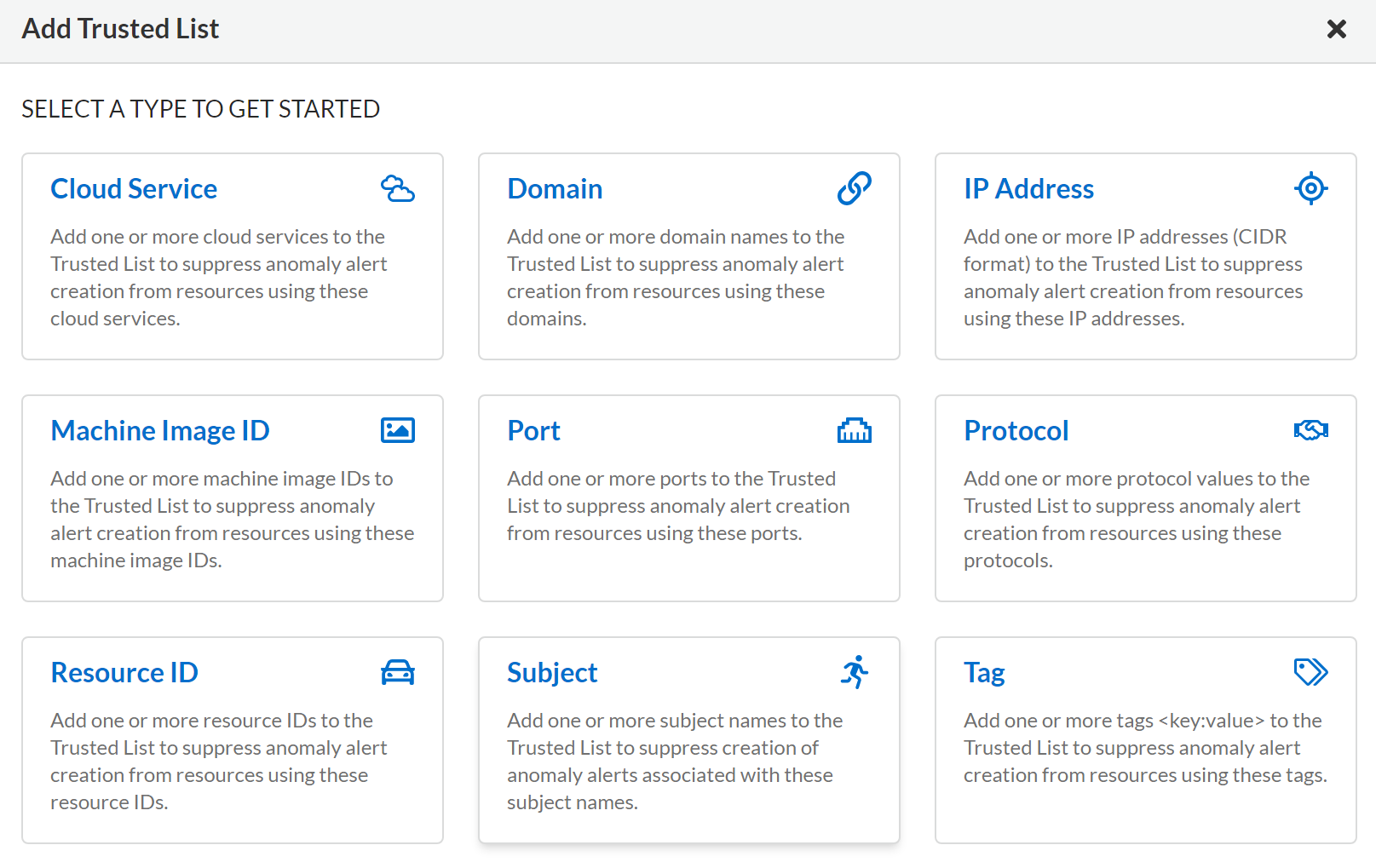
Within a list, you can choose the resource type or identifier such as cloud service name, domain, IP address, machine image ID, port, protocol, resource ID, subject name, or tag for which you want to suppress alerts and apply the list to a set of anomaly policies.

Only users granted Policies Read permissions are able to view the Anomaly Trusted List on the Prisma Cloud administrative console. Navigate to **Settings > Access Control** to add the required permissions to view the Anomaly Trusted List.

1. Select **Settings > Anomalies > Anomaly Trusted List**.

   You must have the correct role, such as the System Administrator role, on Prisma Cloud to view or edit the Anomaly Settings page. See [Prisma Cloud Administrator Permissions](/content-collections/administration/prisma-cloud-admin-permissions.md) for the roles that have access.
2. Click **Add Trusted List**.
3. Select the resource type and click **Next**.

   Choose the resource type or identifier such as cloud service name, domain, IP address, machine image ID, port, protocol, resource ID, subject name, or tag. For adding an IP address to the list, see [Trusted IP Addresses on Prisma Cloud](https://github.com/PaloAltoNetworks/pc-docs-md/tree/main/enterprise-edition/content-collections/administration/trusted-ip-addresses-on-prisma-cloud.md#ide7e2d4b6-c677-4466-a0b0-befc62fb0531).

   <figure><img src="/files/EFLWulU56jHip46k3OCL" alt="add anomaly trusted list 1"><figcaption></figcaption></figure>
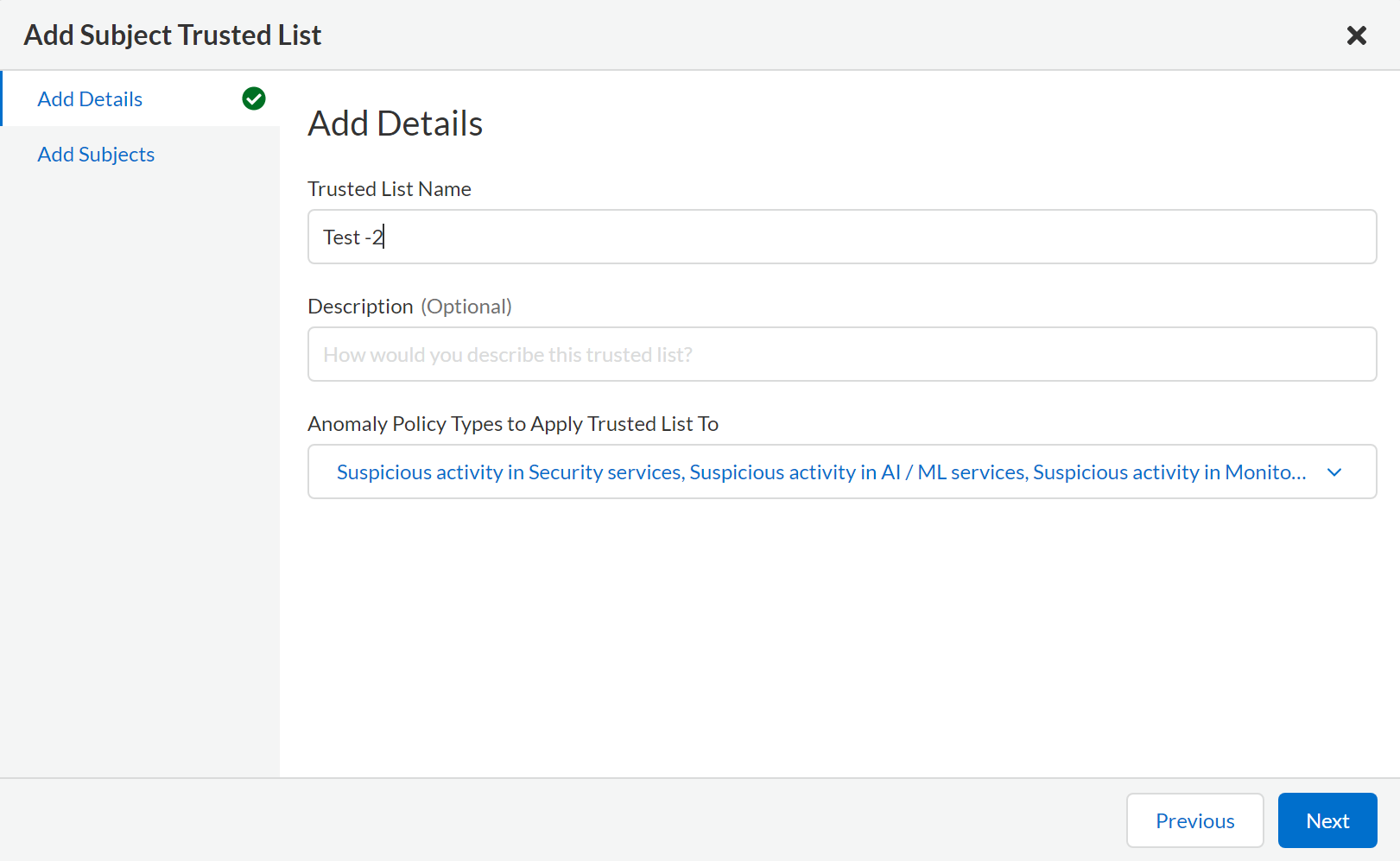
4. Enter a **Trusted List Name** and, optionally a **Description**.
5. Select the Anomaly Policies for which you do not want to generate alerts.

   <figure><img src="/files/YbsjVY5zTYnk5DlUB44j" alt="anomaly trusted subject 1"><figcaption></figcaption></figure>
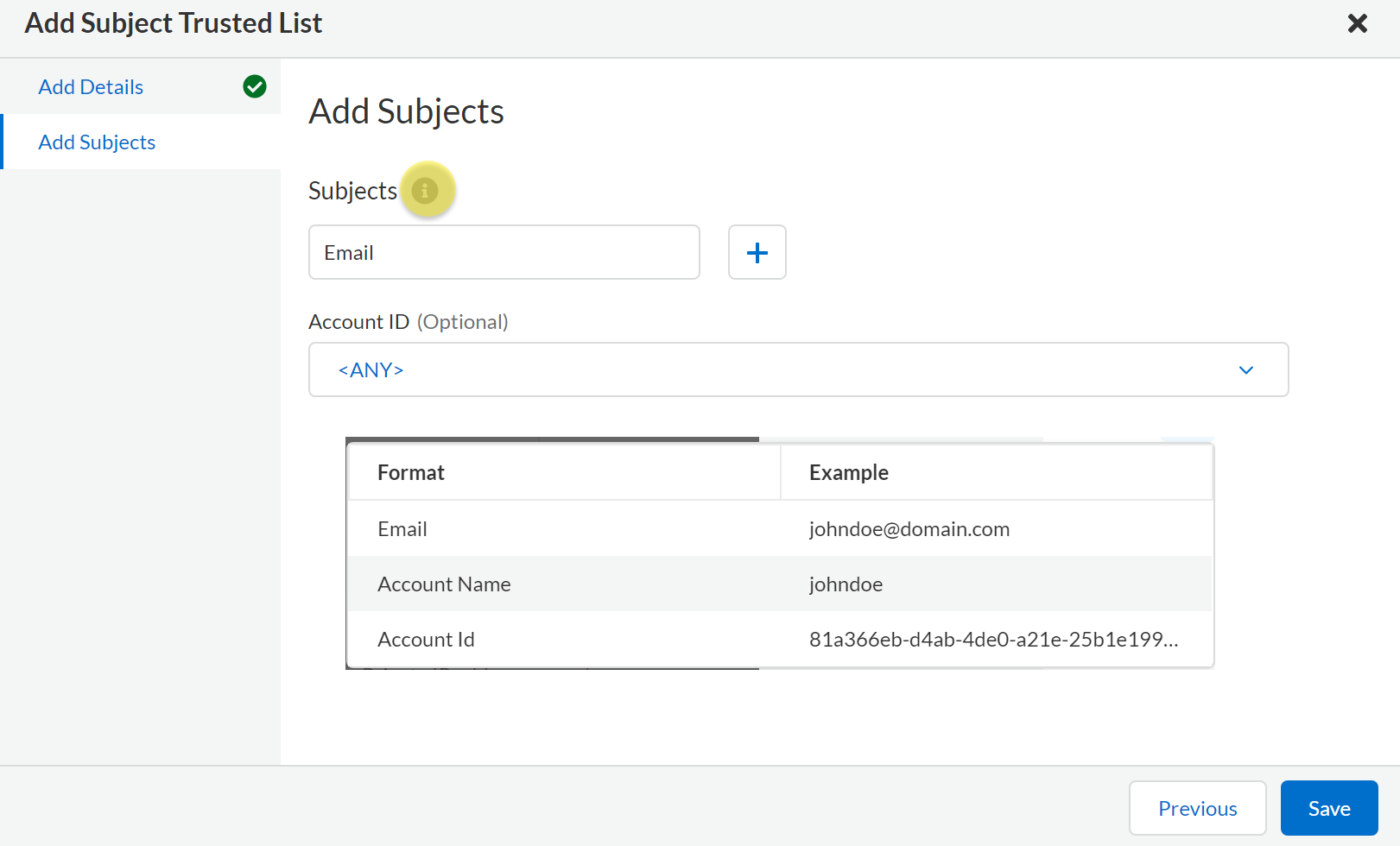
6. Enter the value for the resource type you selected.

   For each resource type, refer to the [Resource Syntax for Trusted List](#id47fecd66-ebcf-4d0b-9c05-a4948ef28a0e) for details on the supported values. By default, the entries you add to the trusted list are excluded from generating alerts against any (all) cloud accounts that are onboarded to Prisma Cloud. If you want to select a specific cloud account, select an **Account ID** and \*VPC ID\*or set it to Any to exclude any account that is added to Prisma Cloud.

   <figure><img src="/files/gnZz25RXu4J26NexLqXD" alt="anomaly trusted subject 2"><figcaption></figcaption></figure>
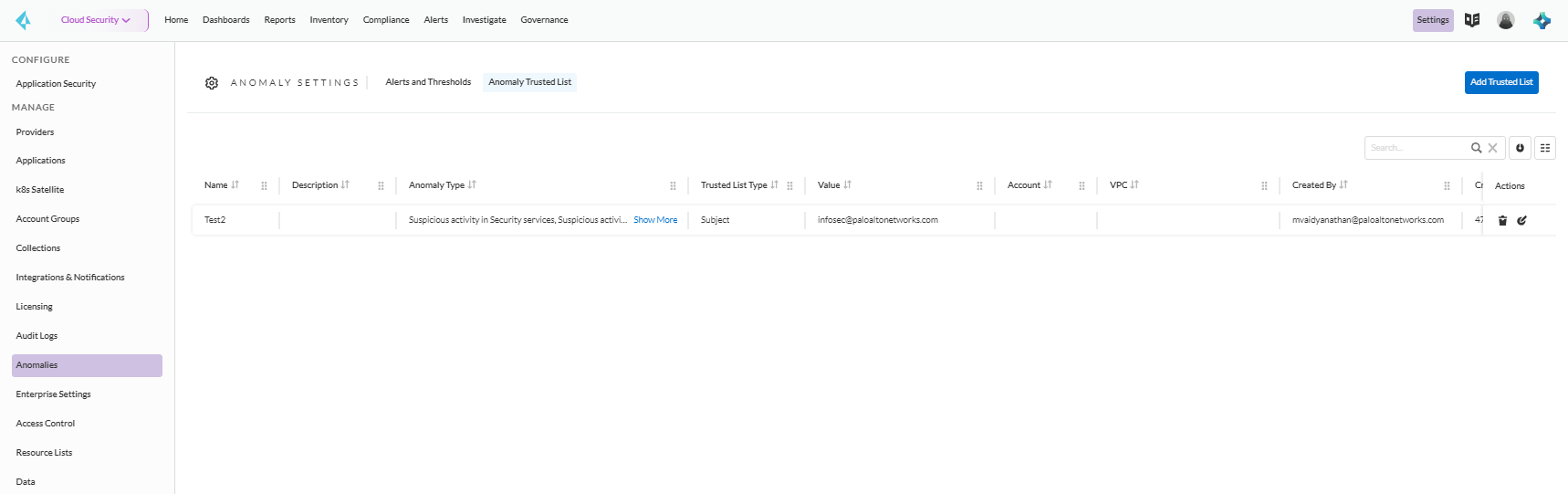
7. **Save** the list.

   <figure><img src="/files/qIhfFvog0Ab36Be7Sxdd" alt="anomaly trusted subject 3"><figcaption></figcaption></figure>

   When you save the list, for the selected anomaly policies Prisma Cloud will not generate alerts for the resources included in this list.

   Only the administrator who created the list can modify the name, description, Account ID and VPC ID; other administrators with the correct role can add or delete entries on the trusted list.

## Resource Syntax for Trusted List

Use RQL to view the resource configuration meta data on the **Investigate** page. The following table provides a few examples.

| **Resource Type**      | **Resource URL**                                                                                                                                                                                                                                                                                   | **Value in the Trusted List**                                                                                                                                                           | **Description**                                                                                                                                                                                                            |
| ---------------------- | -------------------------------------------------------------------------------------------------------------------------------------------------------------------------------------------------------------------------------------------------------------------------------------------------- | --------------------------------------------------------------------------------------------------------------------------------------------------------------------------------------- | -------------------------------------------------------------------------------------------------------------------------------------------------------------------------------------------------------------------------- |
| **Resource ID**        |                                                                                                                                                                                                                                                                                                    |                                                                                                                                                                                         |                                                                                                                                                                                                                            |
| AWS Resource ID        | /investigate/details?resourceId=rrn::instance:us-east-1:349006084872::i-05c2e0a4cbc970575                                                                                                                                                                                                          | i-05c2e0a4cbc970575                                                                                                                                                                     | Last value in resource URL                                                                                                                                                                                                 |
| GCP Resource ID        | /investigate/details?resourceId=rrn::instance:us-central1:lilit-3:ee45f1eebc4f436939f89374e8d9c33fe4485718:7923637926488106011                                                                                                                                                                     | 7923637926488106011                                                                                                                                                                     | Last value in resource URL                                                                                                                                                                                                 |
| Azure Resource ID      | /investigate/details?resourceId=rrn::instance:eastus:06f9b271-fa8f-44c3-b597-f3af54ca770d::282b247f-9a03-412a-91e2-afc0c4bbadfb-%2Fsubscriptions%2F06f9b271-fa8f-44c3-b597-f3af54ca770d%2FresourceGroups%2Flilit-ds-resources%2Fproviders%2FMicrosoft.Compute%2FvirtualMachines%2Fds-dnd-lilit-NSG | 282b247f-9a03-412a-91e2-afc0c4bbadfb-/subscriptions/06f9b271-fa8f-44c3-b597-f3af54ca770d/resourceGroups/lilit-ds-resources/providers/Microsoft.Compute/virtualMachines/ds-dnd-lilit-NSG | URL Decoded version of last value in resource URL                                                                                                                                                                          |
| **Machine Image ID**   |                                                                                                                                                                                                                                                                                                    |                                                                                                                                                                                         |                                                                                                                                                                                                                            |
| AWS Machine Image ID   | "imageId": "ami-0a0ddd875a1ea2c7f"                                                                                                                                                                                                                                                                 | "ami-0a0ddd875a1ea2c7f"                                                                                                                                                                 | value for the key imageId in resource json                                                                                                                                                                                 |
| GCP Machine Image ID   | NOT SUPPORTED                                                                                                                                                                                                                                                                                      | NOT SUPPORTED                                                                                                                                                                           | NOT SUPPORTED                                                                                                                                                                                                              |
| Azure Machine Image ID | "properties.storageProfile": { "imageReference": { ""sku"": "2019-Datacenter", "offer": "WindowsServer", "version": "latest", "publisher": "MicrosoftWindowsServer" } }"                                                                                                                           | MicrosoftWindowsServer-WindowsServer-2019-Datacenter-latest                                                                                                                             | Join the following using a ""-""vm.storageProfile().imageReference().publisher(),vm.storageProfile().imageReference().offer(),vm.storageProfile().imageReference().sku(),vm.storageProfile().imageReference().version());" |
| **Tags**               |                                                                                                                                                                                                                                                                                                    |                                                                                                                                                                                         |                                                                                                                                                                                                                            |
| AWS                    | """tags"": \[ { ""key"": ""Name"", ""value"": ""Flowlogs-Automation-2"" }]"                                                                                                                                                                                                                        | <p>Key = Name</p><p>Value = Flowlogs-Automation-2</p>                                                                                                                                   | Provide the key and value as-is                                                                                                                                                                                            |
| Azure                  | """tags"": { ""items"": \[ ""http-server"" ]}"                                                                                                                                                                                                                                                     | Key = http-server                                                                                                                                                                       | Provide the value from items list as the key. Value is not needed                                                                                                                                                          |
| GCP                    | """tags"": { ""purpose"": ""ds-flowlogs-bucket"" }"                                                                                                                                                                                                                                                | <p>Key = purpose</p><p>Value = ds-flowlogs-bucket</p>                                                                                                                                   | Provide the key from the json element as key and the value from json element as the value                                                                                                                                  |
| **Cloud Service**      |                                                                                                                                                                                                                                                                                                    |                                                                                                                                                                                         |                                                                                                                                                                                                                            |
| AWS Service            | s3.amazonaws.com                                                                                                                                                                                                                                                                                   | s3.amazonaws.com                                                                                                                                                                        | as is                                                                                                                                                                                                                      |
| GCP Service            | compute.googleapis.com                                                                                                                                                                                                                                                                             | compute.googleapis.com                                                                                                                                                                  | as is                                                                                                                                                                                                                      |
| Azure Service          | microsoft.compute                                                                                                                                                                                                                                                                                  | microsoft.compute                                                                                                                                                                       | as is                                                                                                                                                                                                                      |


---

# Agent Instructions
This documentation is published with GitBook. GitBook is the documentation platform designed so that both humans and AI agents can read, navigate, and reason over technical content effectively. Learn more at gitbook.com.

## Querying This Documentation
If you need additional information that is not directly available in this page, you can query the documentation dynamically by asking a question.

Perform an HTTP GET request on the current page URL with the `ask` query parameter, and the optional `goal` query parameter:

```
GET https://docs.prismacloud.io/content-collections/alerts/suppress-alerts-for-prisma-cloud-anomaly-policies.md?ask=<question>&goal=<endgoal>
```

`ask` is the immediate question: it should be specific, self-contained, and written in natural language.
`goal` is optional and describes the broader end goal you are ultimately trying to accomplish on behalf of the user. GitBook uses it to tailor the answer towards what is most useful for that goal.

The response will contain a direct answer to the question and relevant excerpts and sources from the documentation.

Use this mechanism when the answer is not explicitly present in the current page, you need clarification or additional context, or you want to retrieve related documentation sections.