> For the complete documentation index, see [llms.txt](https://docs.prismacloud.io/llms.txt). Markdown versions of documentation pages are available by appending `.md` to page URLs; this page is available as [Markdown](https://docs.prismacloud.io/content-collections/application-security/get-started/application-security-license-types.md).
# Application Security License Types
The Prisma Cloud Application Security license offering is an a la carte model that includes three modules using credits per developer. A developer as per the licensing configuration is a user who actively commits on Git, who is identified through a unique Git email address with a contribution history to any Git repositories in the last 90 days. At every stage of the Prisma Cloud licensing subscription you can choose to enable one or more modules for an enhanced Shift-left experience.
The Prisma Cloud Application Security licenses are available as a part of the [Prisma Cloud License Types](/content-collections/administration/prisma-cloud-licenses.md).
* **Infrastructure as Code (IaC) Security**
The module offers security throughout the infrastructure lifecycle while proactively reducing the runtime risk by remediating security and compliance issues in development workflows.
* **Software Composition Analysis (SCA)**
This module enables developers to find, prioritize, and fix security vulnerabilities and license compliance issues in open source dependencies.
* **Secrets Security**
This module scans all files to prevent exposing API keys, passwords, certificates, tokens, and other sensitive secrets with high fidelity. To analyze your code for secrets, Prisma Cloud performs a full clone of onboarded repositories for VCS integrations and retains the data for one year.
* **CI/CD Security**
This module provides continuous coverage and visibility of your engineering environment from source to deployment, allowing security teams to monitor security across the organization without interfering with development processes, to secure your CI/CD pipelines by analyzing your attack surface, and to prioritize and offer remediation for CI/CD security risks detected in your system in order to optimize your CI/CD posture across your entire software delivery chain.
For every new and existing subscription of Application Security on Prisma Cloud, IaC Security and SCA are enabled by default.
## Configure License Offerings
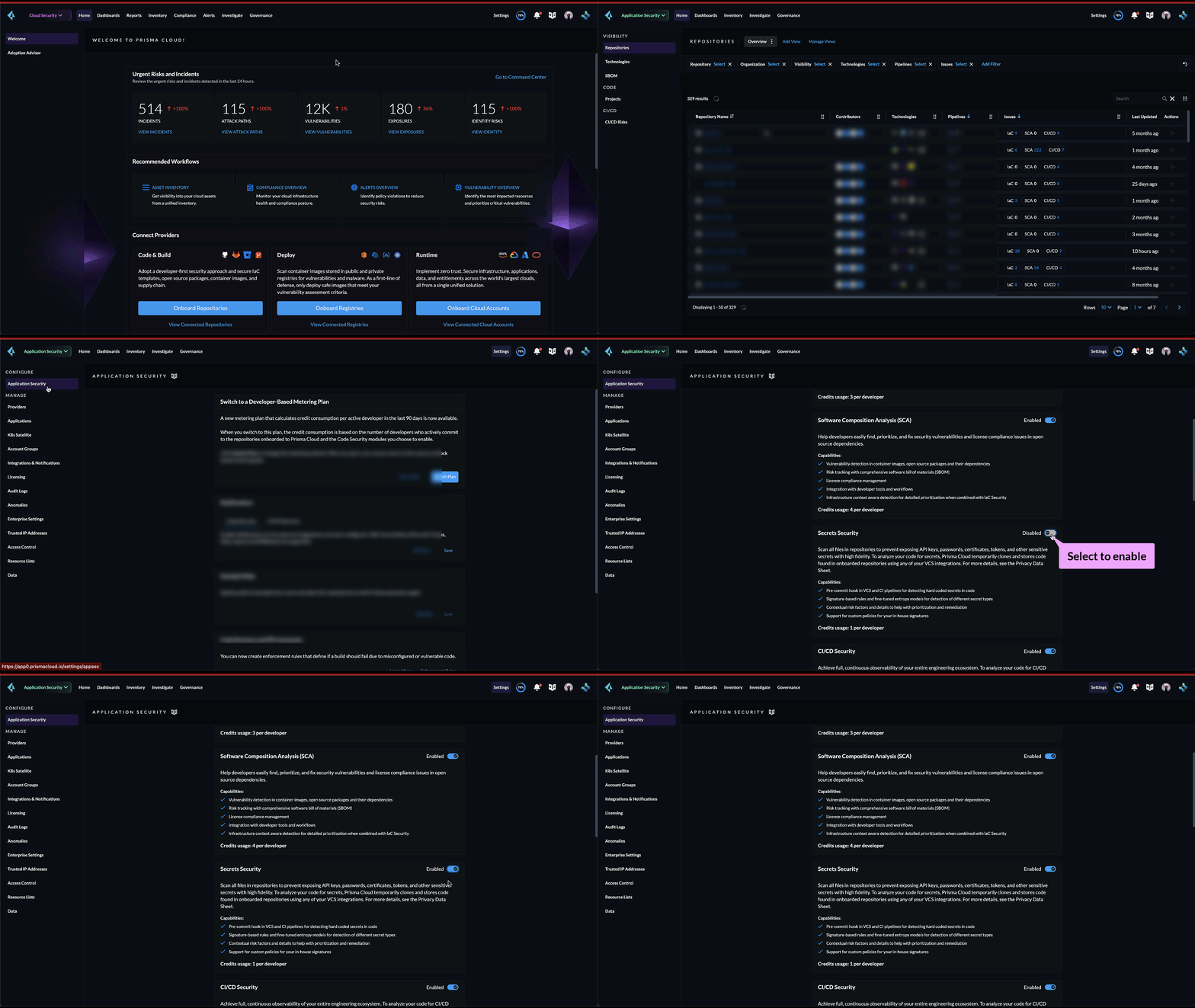
Ensure you are on Application Security on the **Prisma Cloud switcher**. From **Settings > Application Security** configure a la carte of Application Security licenses to meet your security requirements. In this example, see how Secrets Security is enabled as a part of licensing offerings.
You are required to switch your existing subscription a credit metering licensing configuration.
Once the Application Security licensing configuration is complete you can view the license credit consumption on **Settings > Licensing > Build Time**.
For each enabled subscription you can view the associated credit consumption.
In this example, the Application Security subscriptions are not yet enabled.
If you are on a Prisma Cloud Application Security trial, you will not see credit consumption listed until your trial ends. Please work with your account team to view your current credit consumption.
---
# Agent Instructions
This documentation is published with GitBook. GitBook is the documentation platform designed so that both humans and AI agents can read, navigate, and reason over technical content effectively. Learn more at gitbook.com.
## Querying This Documentation
If you need additional information that is not directly available in this page, you can query the documentation by asking a question.
Perform an HTTP GET request on the following URL with the `ask` and `goal` query parameters:
```
GET https://docs.prismacloud.io/content-collections/application-security/get-started/application-security-license-types.md?ask=&goal=
```
`ask` is the immediate question: it should be specific, self-contained, and written in natural language.
`goal` is what the user is ultimately trying to achieve, the reason they need the answer. Sharing it helps GitBook give you a better, more relevant answer. A goal is most helpful when it describes the outcome the user wants rather than restating the question. For example, with `ask=how do I create an API token`, a goal like `automate deployments from our CI pipeline` lets GitBook tailor the answer to that use case.
The response will contain a direct answer to the question and relevant excerpts and sources from the documentation.
Use this mechanism when the answer is not explicitly present in the current page, you need clarification or additional context, or you want to retrieve related documentation sections.