> For the complete documentation index, see [llms.txt](https://docs.prismacloud.io/llms.txt). Markdown versions of documentation pages are available by appending `.md` to page URLs; this page is available as [Markdown](https://docs.prismacloud.io/content-collections/application-security/risk-management/monitor-and-manage-code-build/drift-detection.md).
# Drift Detection
Drifts are inconsistencies in code configuration that occur when a resource is modified locally or manually using CLI or console. These inconsistencies are seen as divergences in code and are most often not tracked or recorded until an error is identified during the build and deploy phase. Prisma Cloud Application Security supports Drift Detection for your integrated repositories and periodically scans them to identify drifts that may occur between the build and deploy phase. On **Projects**, in **IaC Misconfiguration** view, you can view contextual information for drifts while executing corrective solutions to handle traceable configuration changes. To know more see [Fix Code Security Issues](/content-collections/application-security/risk-management/monitor-and-manage-code-build/fix-code-issues.md).
Drift detection is currently available only for resources that are deployed using Terraform and CloudFormation on AWS, GCP and Azure.
## Set up Drift Detection
For a drift detection scan to run on your repository you need to connect your AWS, GCP and Azure cloud account and code repositories to Prisma Cloud.
After the repository integration, set up [Yor](https://yor.io/) and [Traceability and Tagging](/content-collections/application-security/risk-management/monitor-and-manage-code-build/traceability-and-tagging.md). The `yor_trace tag` must be unique for the resource. The tag must not be in use on another Prisma Cloud tenant or a copy of a public demo repository.
Yor tags are not required for CloudFormation templates connected to an AWS account. You will automatically see drifts violations on the **Projects** once Prisma Cloud detects a gap between the the runtime and build time resources.
* Onboard your AWS and Azure cloud account and code repositories to Prisma Cloud.
The AWS, GCP and Azure cloud account and code repositories must be connected to Prisma Cloud. For more details to onboard your cloud accounts see, [AWS](https://docs.paloaltonetworks.com/prisma/prisma-cloud/prisma-cloud-admin/connect-your-cloud-platform-to-prisma-cloud/onboard-your-aws-account), [GCP](https://docs.paloaltonetworks.com/prisma/prisma-cloud/prisma-cloud-admin/connect-your-cloud-platform-to-prisma-cloud/onboard-gcp) and [Azure](https://docs.paloaltonetworks.com/prisma/prisma-cloud/prisma-cloud-admin/connect-your-cloud-platform-to-prisma-cloud/onboard-your-azure-account) and then [Connect Your Repositories to Application Security](https://github.com/PaloAltoNetworks/pc-docs-md/tree/main/enterprise-edition/content-collections/application-security/risk-management/get-started/connect-code-and-build-providers/code-repositories/code-repositories.md) that hosts the Terraform and CloudFormation templates used to deploy resources on the AWS and Azure cloud account.
For AWS: If you have previously onboarded your AWS cloud account on Prisma Cloud, you must enable the additional permissions required for a drift detection scan. See [update an onboarded AWS account](https://docs.paloaltonetworks.com/prisma/prisma-cloud/prisma-cloud-admin/connect-your-cloud-platform-to-prisma-cloud/onboard-your-aws-account/update-an-onboarded-aws-account) for redeploying the stack with the required permissions that are included in the `AWSCloudFormationReadOnlyAccess` policy.
```
lambda:GetLayerVersion
lambda:GetEventSourceMapping
lambda:GetFunction
s3:ListBucket
sns:GetSubscriptionAttributes
```
For GCP Accounts: Ensure the custom role associated with the service account includes the following permission required for drift detection: `compute.disks.createSnapshot`.
Add the Prisma Cloud IP addresses and hostname for Application Security to an allow list, to [enable access to the Prisma Cloud Console](https://docs.paloaltonetworks.com/prisma/prisma-cloud/prisma-cloud-admin/get-started-with-prisma-cloud/enable-access-prisma-cloud-console.html).
* Set up Yor
Yor is an open-source tool that helps you manage tags consistently across infrastructure as code frameworks on your CI/CD. To set up Yor for your repository you need to install and run Yor and then enable Yor to scan your repository for a drift detection scan.
* Install and Run Yor.
You can choose to install Yor either through a [GitHub Actions or GitLab CI](https://yor.io/2.Using%20Yor/installation.html).
* Enable Yor on the Prisma Cloud console.
Enable automated resource trace tags to a new or modified IaC resource blocks using **Projects > More Actions** and then select **Manage tags** to enable the `yor_trace` tag. For further details on how to manage tags see [Traceability and Tagging](/content-collections/application-security/risk-management/monitor-and-manage-code-build/traceability-and-tagging.md).
## Manage Drift
You can manage drift scan results for your repositories by either fixing the issue or suppressing it.
1. Review drifts identified in your scanned repository.
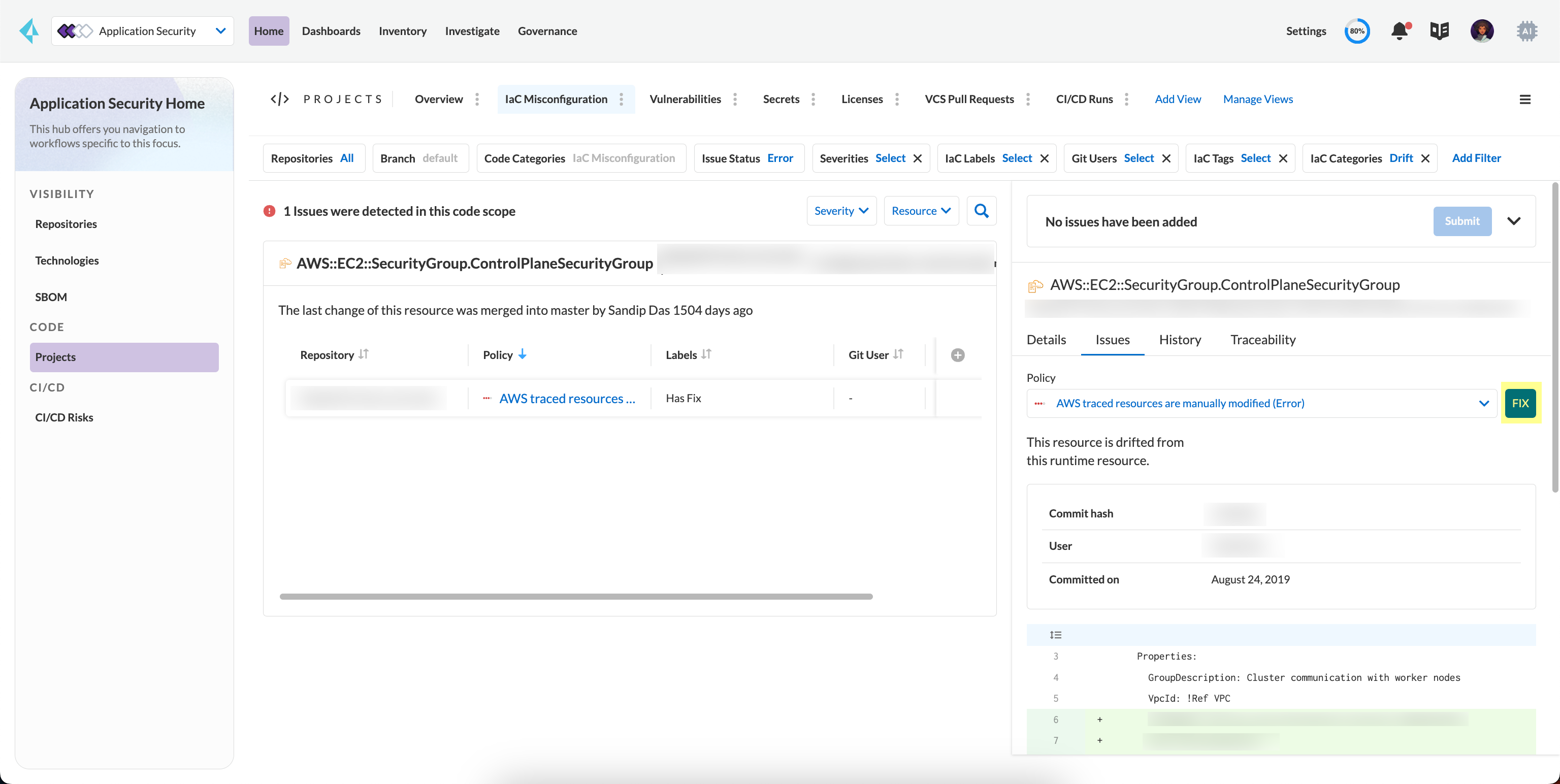
1. Select **Projects** and then select **IaC Misconfiguration**.
2. Select **Add Filter > IaC Categories** and then select **Drift**.
2. Take action and manage drifts.
1. Select a **Resource Block** and then access **Resource Explorer** on the side panel.
2. Select **Issues** to take an action and manage drift.
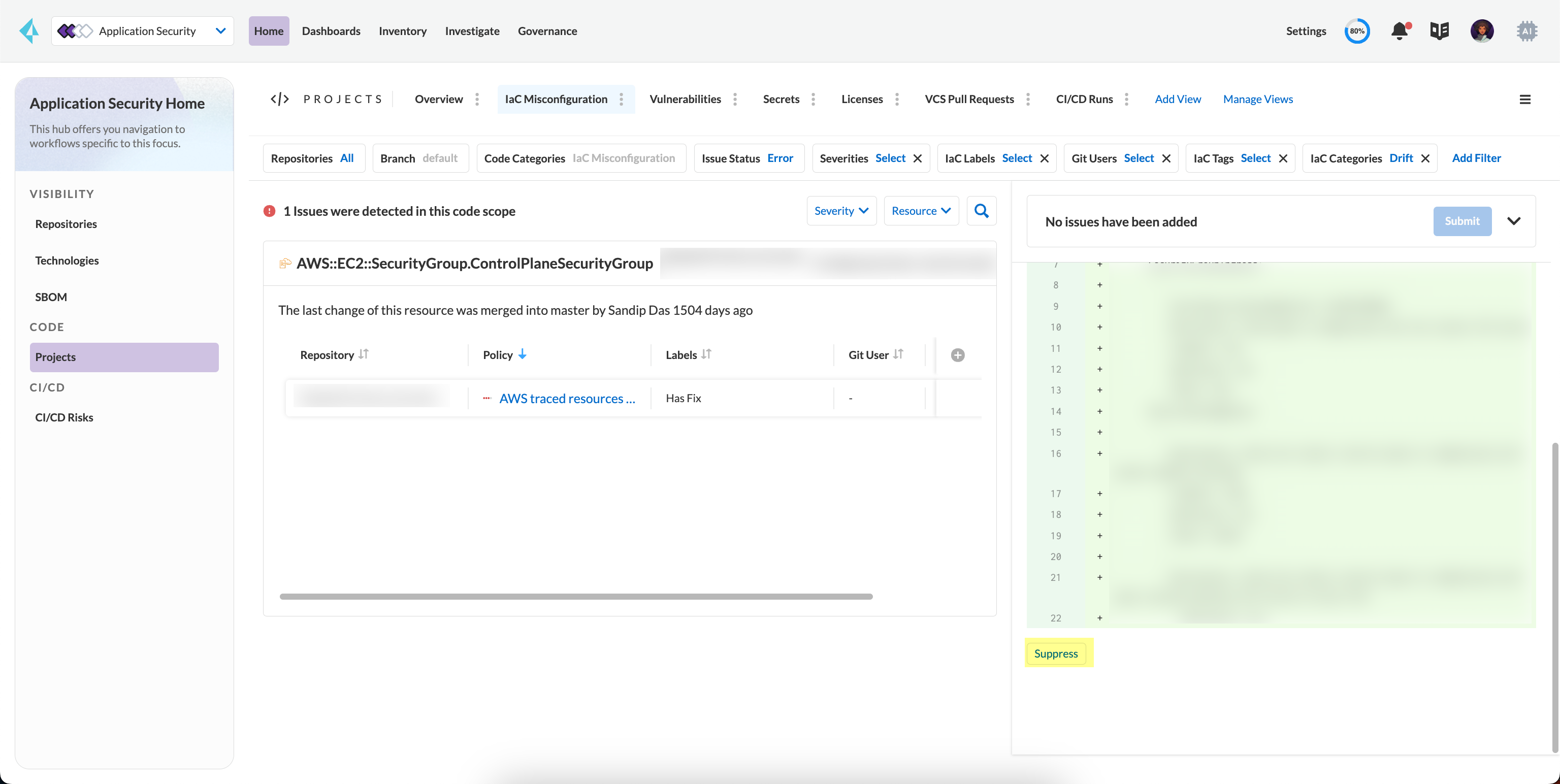
To manage a drift you can either **FIX** a drift or choose to **Suppress** it.
* **Fix**
Enables you to apply the manual changes made locally or in a CLI to the code configuration. When you fix drift, you correct the template configuration to match the running configuration of the resource. Fixing a drift creates a PR (Pull Request) after you Submit with the changes implemented within the template.
* **Suppress**
Enables you to revert the manual changes made locally or in a CLI to the code configuration. When you [Suppress code issues](/content-collections/application-security/risk-management/monitor-and-manage-code-build/suppress-code-issues.md), you can enforce the configuration as defined in the IaC template and revert any changes to the running resource.
Suppressing a drift will continue to display the drift detection result until the next scan where the running resource is compliant and the drift is fixed.
## Create Alert Rules for Detecting Drift
An alert rule for Drift Detection generates alerts when a drift occurs for resources deployed on AWS (Amazon Web Services), Google Cloud Platform (GCP) and Azure. When creating a drift alert rule, you must specify the account groups for which you would like to receive alerts and include the policies for which you want to generate alerts. See [create an alert rule](/content-collections/alerts/create-an-alert-rule-cloud-infrastructure.md) to know more on creating an alert rule.
## View Drift Alerts
Prisma Cloud operates a comprehensive alerting system designed to identify and report on configuration drifts. These alerts are triggered when deviations from the originally defined Infrastructure as Code (IaC) templates are detected within the runtime configuration of AWS, GCP, and Azure cloud resources.
Prisma Cloud closely monitors your cloud resources and actively compares the live configurations against the specifications laid out in your IaC templates. Whenever a discrepancy is detected, an alert is generated to promptly notify you of the inconsistency. This ensures that any runtime deviations from your intended configurations are promptly identified and brought to your attention, enabling you to take timely corrective actions.
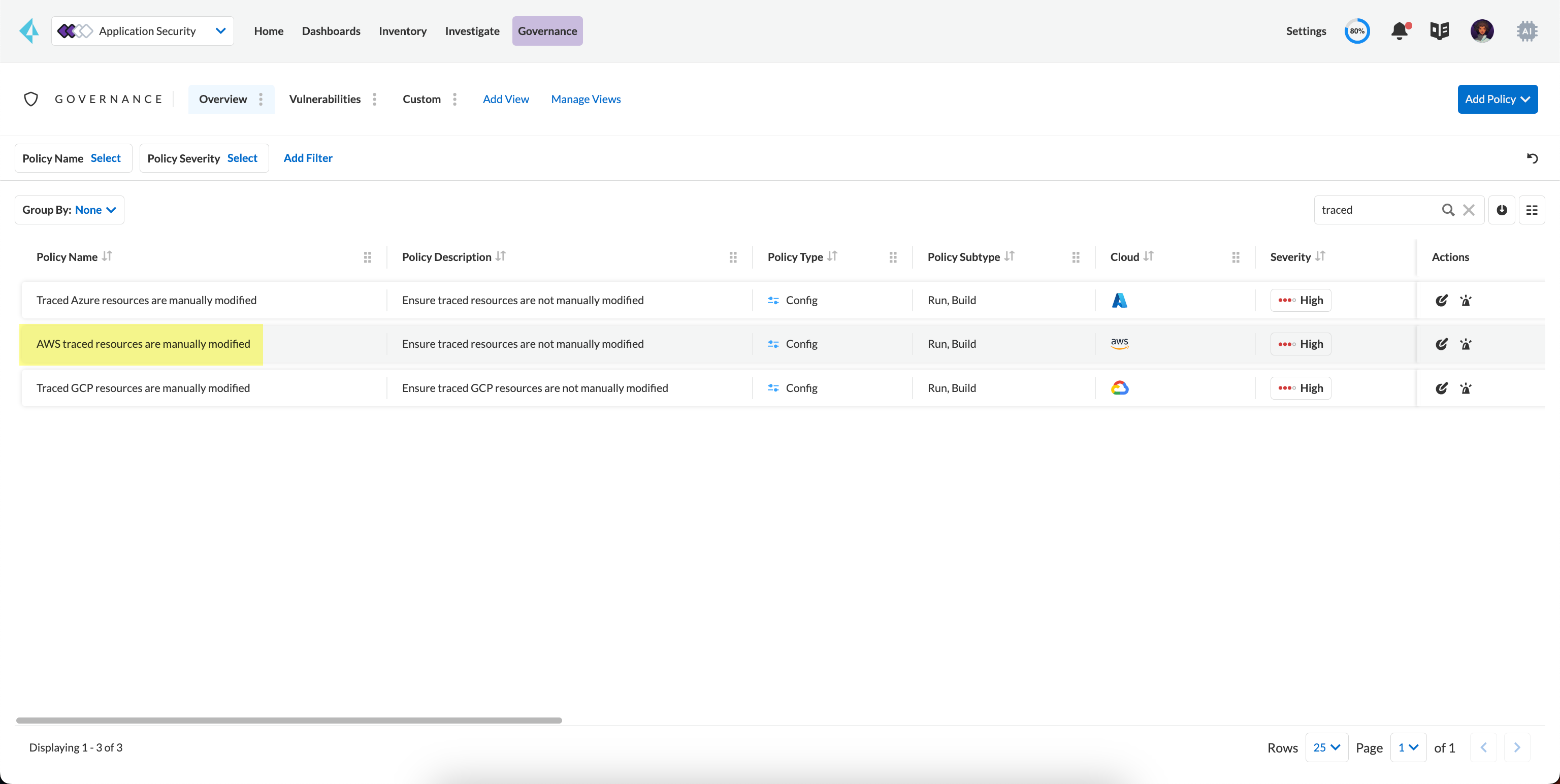
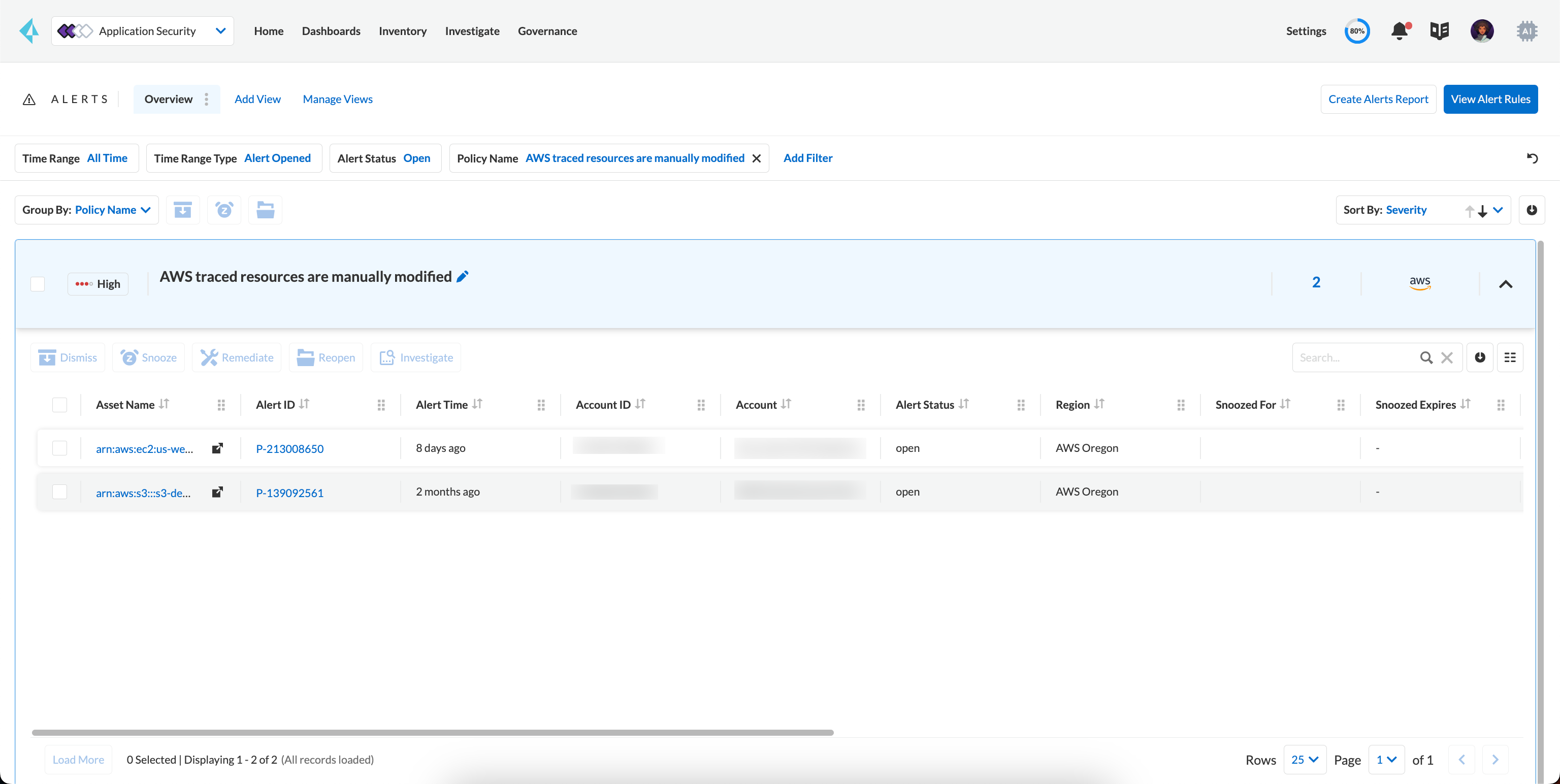
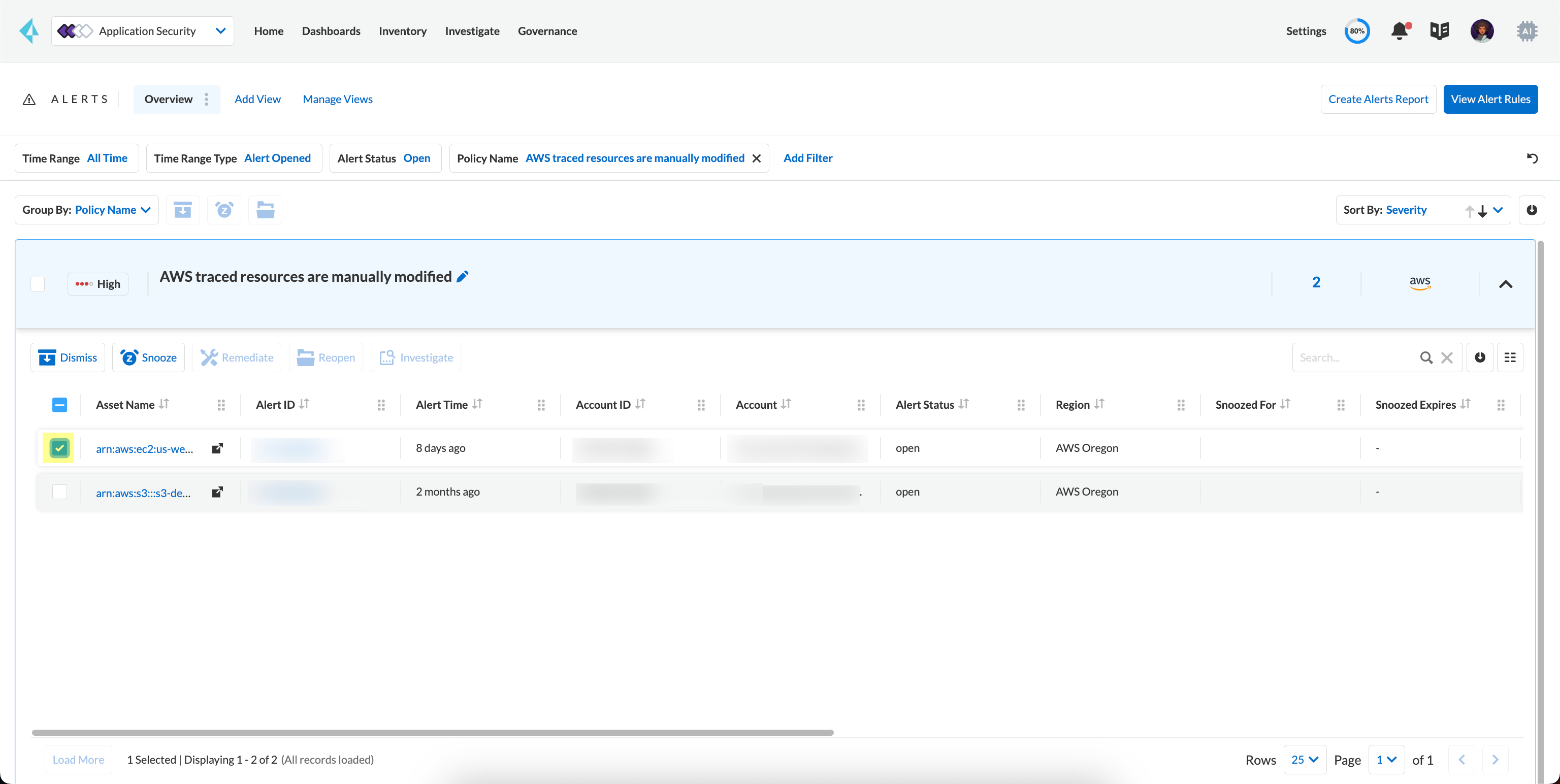
1. Search or filter the policy.
In this example, using the word 'traced' to search for `AWS traced resources are manually modified.`
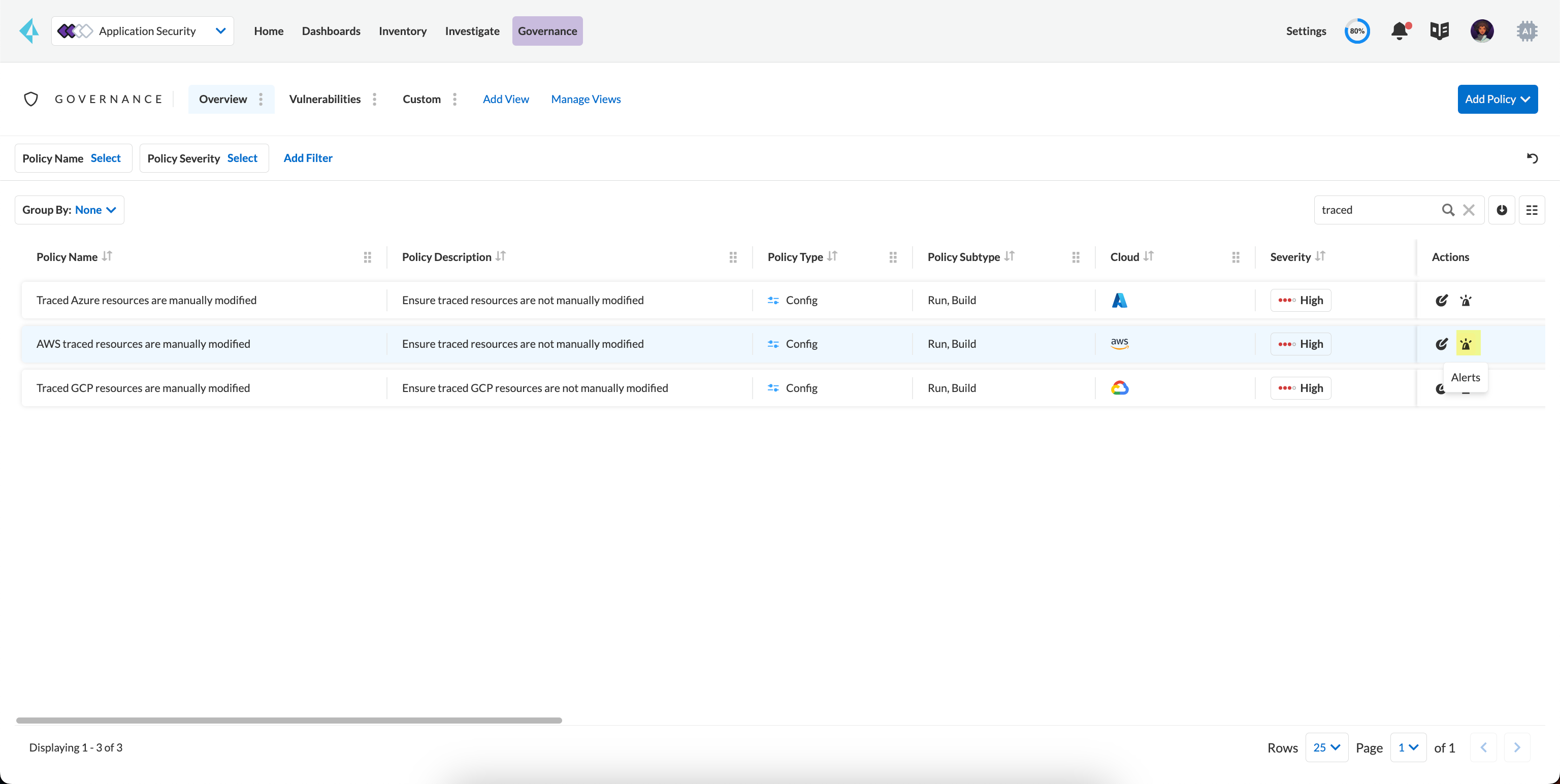
2. Select **Alerts**.
In this example, for the `AWS traced resources are manually modified` policy, there are 2 alert counts. Accessing each alert gives you granular information for each drift alert with IaC Resource Details.
3. View Contextual Information on Drift.
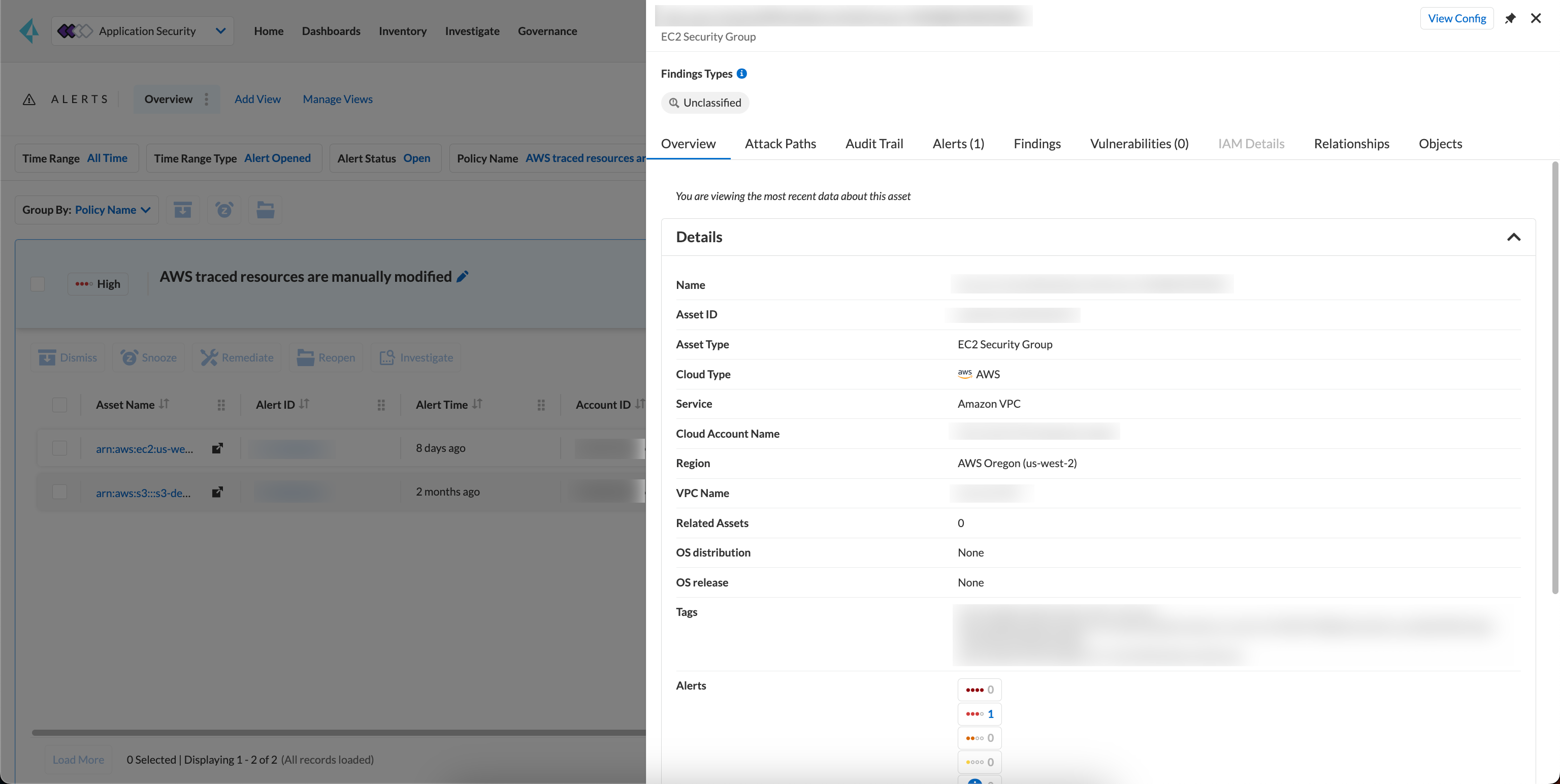
1. Select **Asset Name** or **Alert ID** to gain insight into drifts identified within a specific asset.
For each drift alert, you can see the following details.
* **Asset Name**
Selecting the asset name within the drift policy violation allows you to view detailed information about the resource. This includes when and where the resource is likely to be modified.
Use the information in **Details, Attack Paths, Audit Trail, Alerts, Findings, Vulnerabilities, Relationships and Objects** you can understand understand the origin of the drift.
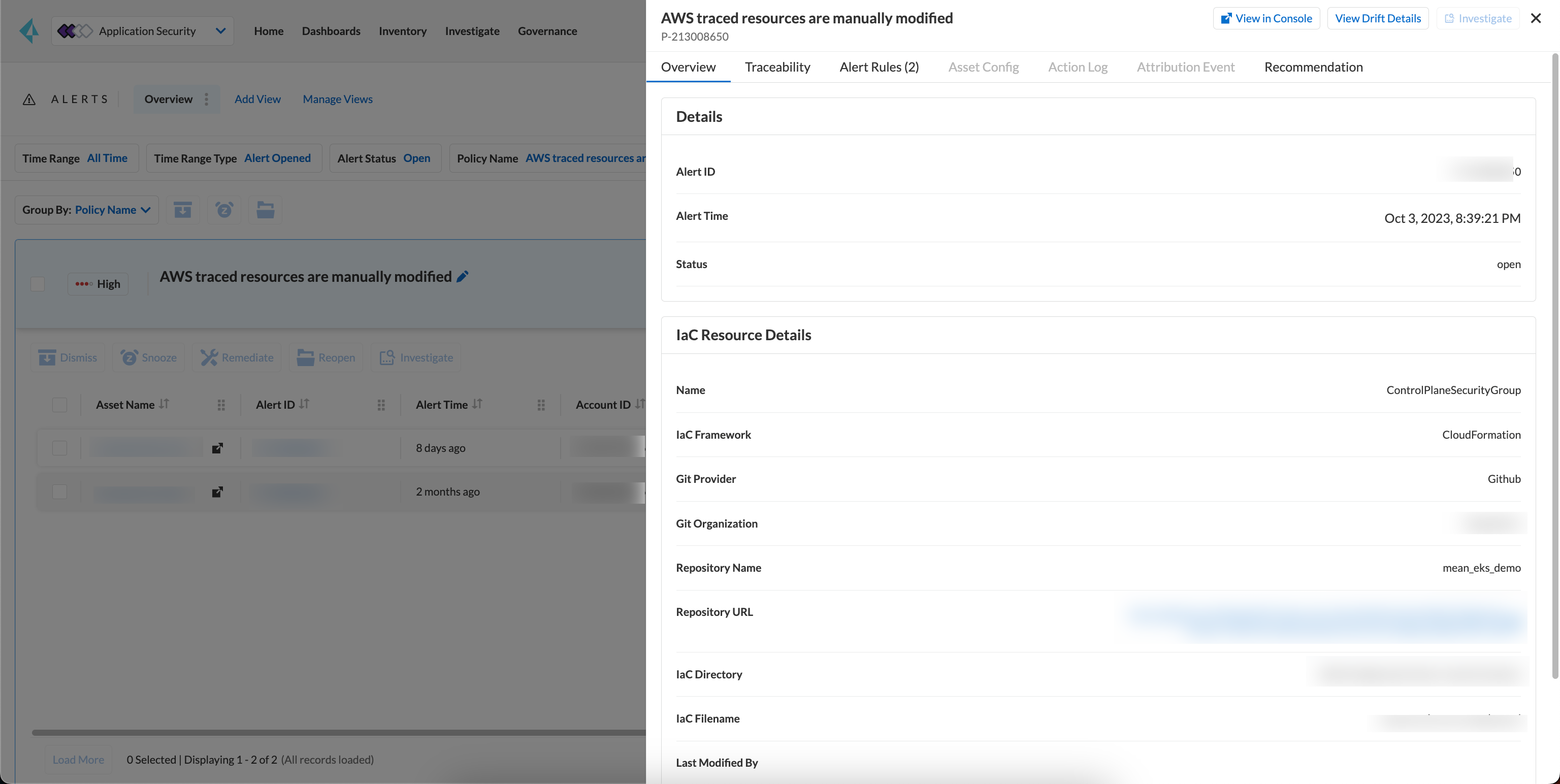
* **Alert ID**
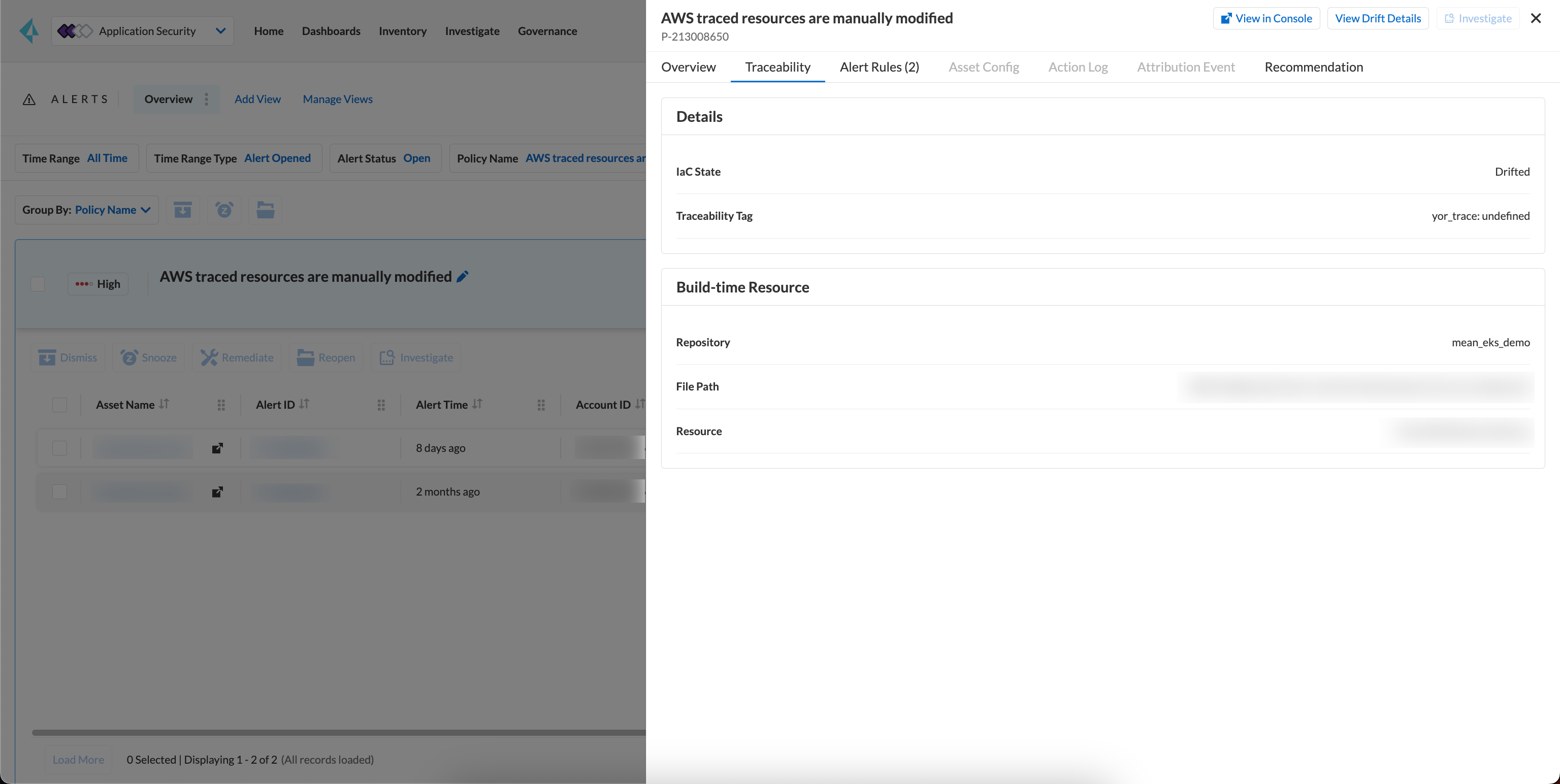
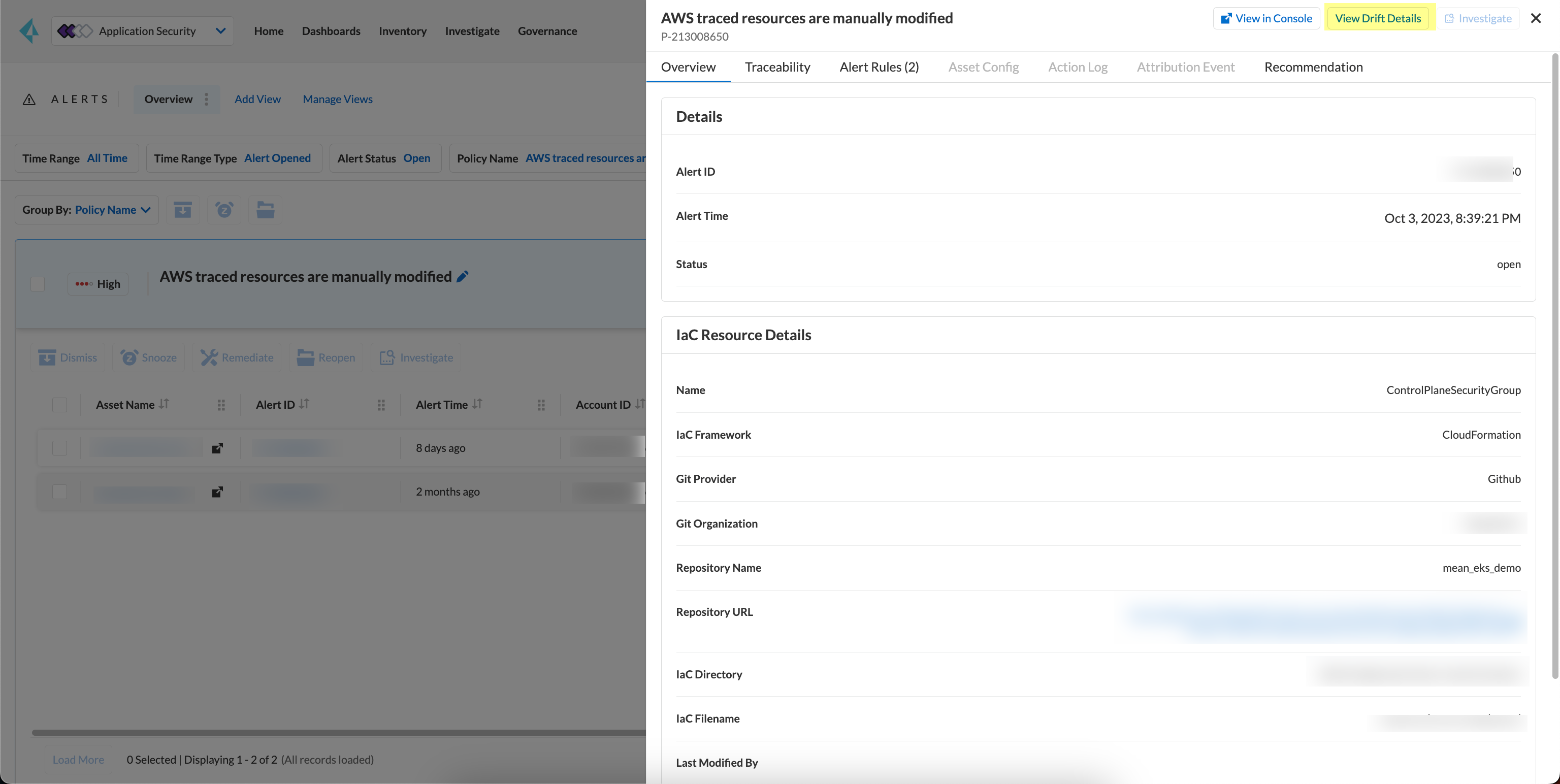
By selecting an alert ID within a resource where the drift policy violation occurs, you can view detailed information about the time and status of the alert. This includes **Overview, Traceability, Alert Rules, Resource Config, Action Log, and Attribution Event**.
In **Overview**, find **Details** and **IaC Resource Details**, containing information about the IaC Framework, Git Provider, Git Organization, IaC filename, last modification details, and updates.
In **Traceability**, find information about the resource’s IaC State and whether it has drifted or not. The traceability tag includes the yor\_trace tag used by Prisma Cloud to trace drifts with Checkov. On the build-time resource, you’ll see Repository, File Path, and Resource information related to the alert’s origin.
Using **View Drift Details**, you can access the drift on **Projects** and choose to **Fix** or **Suppress** the drift (if the status is open). You can also choose to view the alert origin on the AWS, Azure or GCP cloud platform by selecting **View in Console**.
## Dismiss and Snooze Drifts
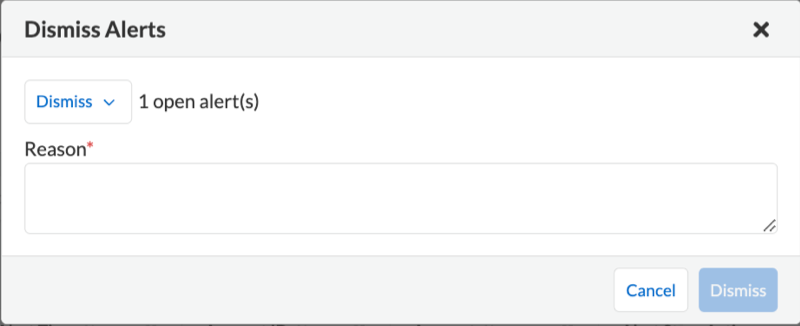
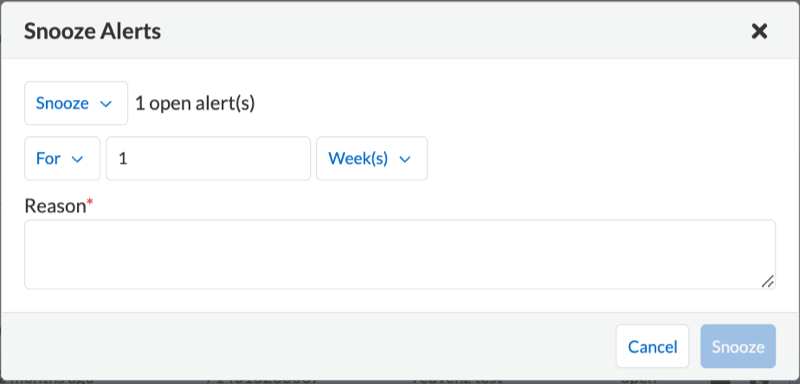
In addition to monitoring which resource you choose to receive an alert, you choose to Dismiss or Snooze an alert within a policy violation. In this example, you see the Dismiss and Snooze actions after selecting a specific policy violation.
* **Dismiss**: You can manually dismiss an alert even when the issue is not resolved with a mandatory reason for dismissing the alert. You can choose to reopen a dismissed alert if needed manually. Alerts that are manually dismissed remain **Dismissed** even when the same policy violation reoccurs.
* **Snooze**: You can temporarily snooze an active alert for a specific period with a mandatory reason for snoozing the alert. At the expiration of the specific timer, the alert automatically changes to an **Open** or **Resolved** status depending on if the drift was fixed.
Suppressing a drift on **Projects** parallelly suppresses a drift alert rule configured.
## Ignore Keys for Drift Detection
If you would like to skip specific keys in drift detection, you can leverage the native Terraform lifecycle.ignore\_changes block. Differences for the listed key:values will not be marked as drift on the platform.
For example, to ignore differences in the value of tag "foo":
```go
lifecycle {
ignore_changes = [
tags["foo"]
]
}
```
## Troubleshoot Drift Detection
Listed here are causes that may prevent drift detection.
* Your Prisma Cloud user role in your cloud account does not have the proper permissions. Ensure you have the right permissions when onboarding AWS, GCP and Azure accounts.
* The repository or cloud account with the resource is not onboarded in Prisma Cloud.
* Ensure your repository is private.
* For Terraform, the `yor_trace` ID is not unique to the Prisma Cloud tenant. In other words, the `yor_trace` is duplicated in another onboarded repository in any Prisma Cloud tenant.
* The changes in CloudFormation in the repository are not deployed in the cloud.
* Ensure three policies are enabled on Policies for drift detection.
* `AWS traced resources are manually modified`
* `AWS provisioned resources are manually modified`
* `Traced Azure resources are manually modified`
* `Traced GCP resources are manually modified`
Tracing and drift detection functionalities are not presently supported for AWS Route53 resources.
---
# Agent Instructions
This documentation is published with GitBook. GitBook is the documentation platform designed so that both humans and AI agents can read, navigate, and reason over technical content effectively. Learn more at gitbook.com.
## Querying This Documentation
If you need additional information that is not directly available in this page, you can query the documentation dynamically by asking a question.
Perform an HTTP GET request on the current page URL with the `ask` query parameter, and the optional `goal` query parameter:
```
GET https://docs.prismacloud.io/content-collections/application-security/risk-management/monitor-and-manage-code-build/drift-detection.md?ask=&goal=
```
`ask` is the immediate question: it should be specific, self-contained, and written in natural language.
`goal` is optional and describes the broader end goal you are ultimately trying to accomplish on behalf of the user. GitBook uses it to tailor the answer towards what is most useful for that goal.
The response will contain a direct answer to the question and relevant excerpts and sources from the documentation.
Use this mechanism when the answer is not explicitly present in the current page, you need clarification or additional context, or you want to retrieve related documentation sections.