> For the complete documentation index, see [llms.txt](https://docs.prismacloud.io/llms.txt). Markdown versions of documentation pages are available by appending `.md` to page URLs; this page is available as [Markdown](https://docs.prismacloud.io/content-collections/application-security/risk-management/monitor-and-manage-code-build/software-composition-analysis.md).
# Software Composition Analysis (SCA)
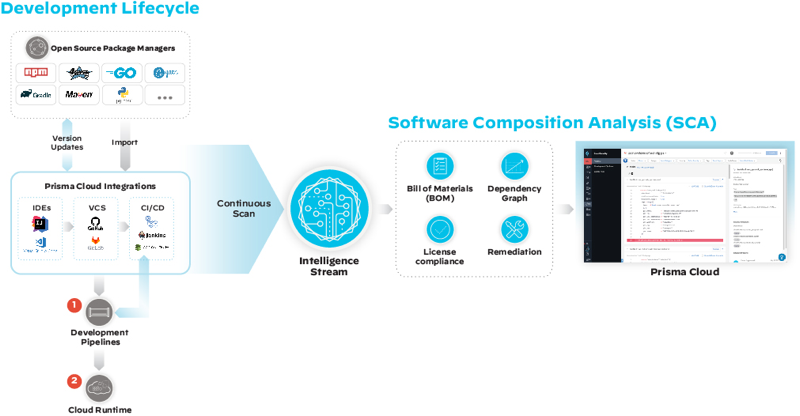
Software Composition Analysis (SCA) empowers you with information on open source software used in source code that has the potential to expose your organization to critical vulnerabilities, license compliance or legal and compliance issues. On Prisma Cloud, you can view the latest contextualized SCA information from continuous scans across all your integration [integrations of IDE, VCS repositories and CI/CD pipelines.](https://github.com/PaloAltoNetworks/pc-docs-md/tree/main/enterprise-edition/content-collections/application-security/risk-management/monitor-and-manage-code-build/connect-your-repositories/connect-your-repositories.md)
Open source software is a prebuilt code available publicly for direct use, modification or enhancement into any code. To use an open source software in your environment often requires you to use an open source package manager, which is a combination of files and metadata that help you describe how the code should be used. Parallelly, to ensure better performance, stability and security,open source package managers are continuously updated to the latest version. Once the open source code definition is set in your code, the scans begin at the Development lifecycle, where every package manager file in your integration is scanned automatically for any security violation or vulnerabilities before deploying it to development pipelines. All scan results are then analyzed using Intelligence Stream, an in house package vulnerability database to give you information on security vulnerabilities found in the open source package manager that are viewable on the Prisma console.
The SCA vulnerabilities scan results include:
* **Bill of Materials (BOM)**
Bill of materials (BOM) or [software bill of materials (SBOM)](https://github.com/PaloAltoNetworks/pc-docs-md/tree/main/enterprise-edition/content-collections/application-security/risk-management/visibility/sbom.md) is a contextualized inventory of open source packages and third-party components your source code utilizes. SBOM includes information on versions, licenses and vulnerabilities of the components that comprise your application’s source code, helping you make legal and risk assessments of your application. On the Prisma Cloud console you can view the SBOM reports on **Application Security > SBOM** where the reports are specific to runtime resources.
* **License compliance**
For every available open source software, there are licenses that define how to use, modify and enhance the open source code. The license grants user permissions and rights to repurpose the code into another code. Prisma Cloud scans for compliant licenses using industry standards to identify any restrictive licenses as violations. There are two ways you can identify license vulnerabilities on Prisma Cloud.
Firstly, during code development you can run a Checkov scan and secondly, on the Prisma Cloud console from **Application Security > Projects**. On the console using the contextualized information for license issues on [Resource Explorer](https://github.com/PaloAltoNetworks/pc-docs-md/tree/main/enterprise-edition/content-collections/application-security/risk-management/risk-management/monitor-and-manage-code-build/monitor-code-build-issues.md#additional-info-side-panel) you can make an informed decision to suppress the violation. For more information see [Licensing in Software Composition Analysis (SCA)](/content-collections/application-security/risk-management/monitor-and-manage-code-build/software-composition-analysis/license-compliance-in-sca.md).
* **Remediation**
You can automatically remediate SCA open source package vulnerabilities on the Prisma Cloud console by bumping a package version of direct and sub-dependent packages by creating a pull request to your VCS. A package bump suggestion includes the minimum version of the root package that remediates both direct dependency and sub-dependency vulnerabilities.
The vulnerabilities identified across the scan results are seen across multiple sections of the Prisma Cloud console and are contextualized to help you with vulnerability management. See [Monitor and Manage Code Build](https://github.com/PaloAltoNetworks/pc-docs-md/tree/main/enterprise-edition/content-collections/application-security/risk-management/risk-management/monitor-and-manage-code-build/monitor-and-manage-code-build.md) for more information.
## Software Composition Analysis
For each vulnerability identified in an SCA scan, Prisma Cloud contextualizes it as a Common Vulnerabilities and Exposures (CVE) for open source package managers. CVE is publicly available information on cybersecurity vulnerabilities and exposures often listed by [Mitre corporation](https://cve.mitre.org/index.html). Each CVE has an ID that uniquely identifies one vulnerability from the list. In addition to the CVE ID, on Prisma Cloud you can view CVSS (Common Vulnerability Scoring System), an open framework for calculating the severity of software vulnerabilities defined by [NIST](https://nvd.nist.gov/vuln-metrics/cvss#:~:text=The%20Common%20Vulnerability%20Scoring%20System,Base%2C%20Temporal%2C%20and%20Environmental). With CVE ID, CVSS, package name and version, Prisma Cloud also gives you Risk Factors to help you with your vulnerability management that is associated with each scanned package and have seven defined categories.
## Mitigate Runtime Vulnerabilities at Source
Prisma Cloud’s image-to-repository tracing capabilities allow you to contextualize CVE vulnerabilities detected in your runtime environment within Cloud Application Security (CAS), as well as to identify their source in the codebase. This enables you to mitigate these vulnerabilities at source, preventing them from impacting your runtime environment.
On the **Application Security** > **Projects** page, you can leverage the **Vulnerability Risk Factors** filter to trace CVEs detected in runtime back to your codebase. This allows you to focus and mitigate vulnerabilities at their source, preventing them from reaching runtime environments. The following runtime risk factors are available to filter vulnerabilities in CAS.
| Vulnerability Risk Factor | Description |
| ------------------------- | ------------------------------------------------------------------------------------------------------------------------------------------------------------------------------------------ |
| Attack complexity | This helps you understand if the vulnerability is easily exploitable |
| DoS | Component is vulnerable to denial of service attacks, such as buffer overflow attacks, and ICMP floods. The risk is categorized as high or low based on impact |
| Attack vector | Vulnerability is remotely exploitable. The vulnerable component is bound to the network, and the attacker’s path is through the network |
| Remote execution | Vulnerability can be exploited to run arbitrary code |
| Exploit POC | Code and procedures to exploit the vulnerability are publicly available |
| Exploit in the Wild | Exploit attempts of this vulnerability that have been seen in the wild. All vulnerabilities are from the [CISA KEV Catalog](https://www.cisa.gov/known-exploited-vulnerabilities-catalog). |
| Package in Runtime | The traced container image and the vulnerable package share a "package in use" risk factor (loaded to memory) identified by CWP |
| Repository in Runtime | The traced container image used to build the application is accessible within the runtime environment |
| Manifest in Runtime | The presence of a package manager file (such as `package.json`) is detected within the runtime environment |
For more information on runtime risk factors, refer to [Vulnerabiity Explorer](/content-collections/runtime-security/vulnerability-management/vulnerability-explorer.md).
You can view the SCA scan results on:
* **Integrations**
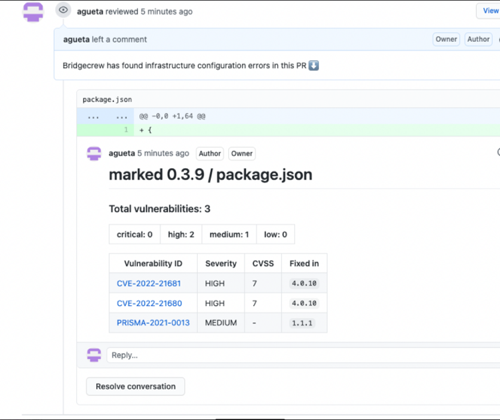
You can monitor SCA scan results in your development lifecycle through integrations of development environments (IDEs) where scan results are in line with package manager files as you code, helping you commit secure code before deployment. In version control system (VCS) integrations with GitHub and GitLab, vulnerability findings are accessible in pull requests that include information on the CVE ID, severity, CVSS score and the minimum package version to remediate the vulnerability.
* **Checkov**
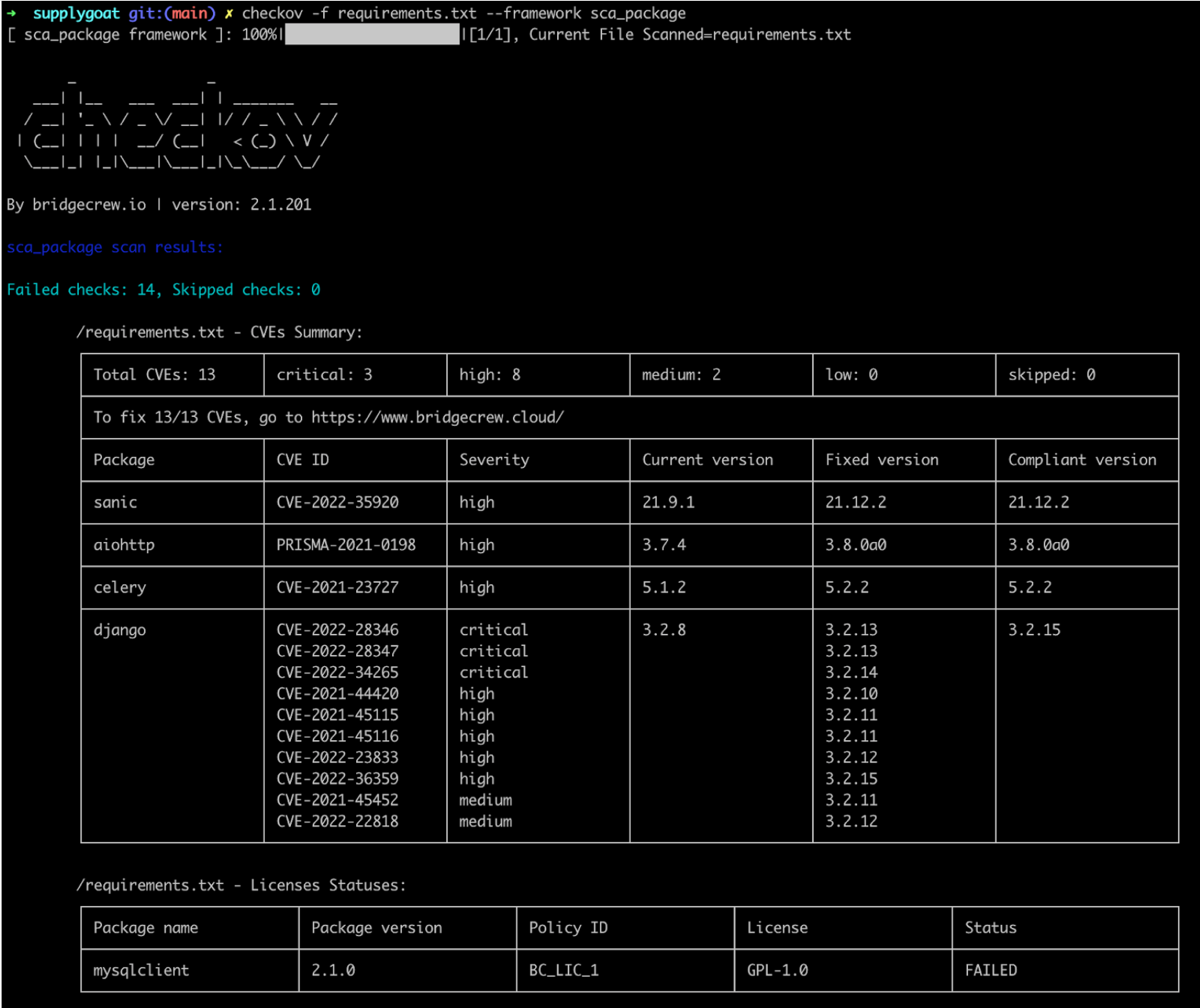
During your code development or through a CI/CD pipeline you can identify SCA violations in vulnerabilities and licenses by running Checkov. By running Checkov you can natively scan all your files or choose to specifically identify SCA violations by using `--framework sca_package`. In this example, you see the scan result of a Checkov run for an SCA scan.
* **Projects**
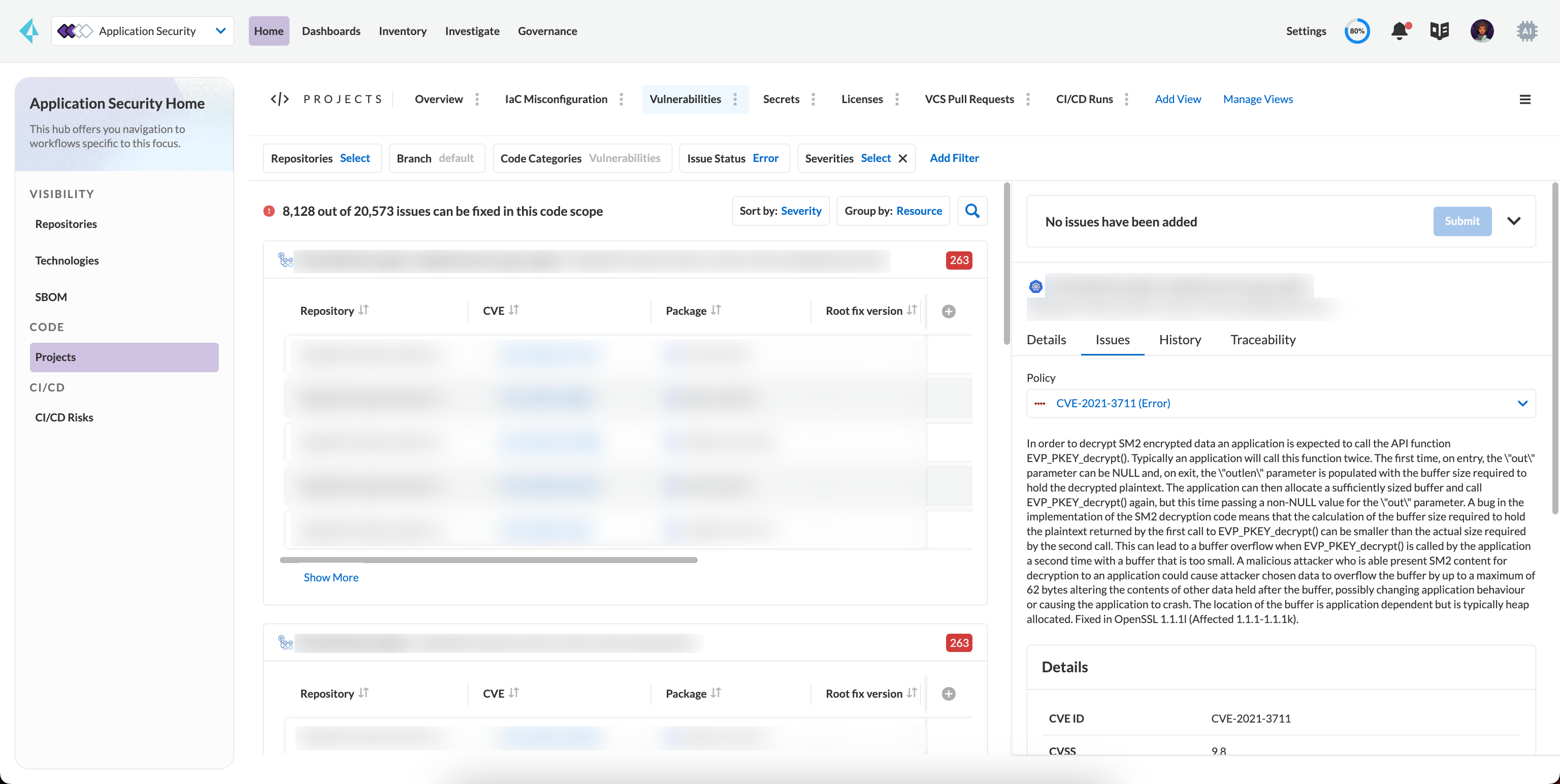
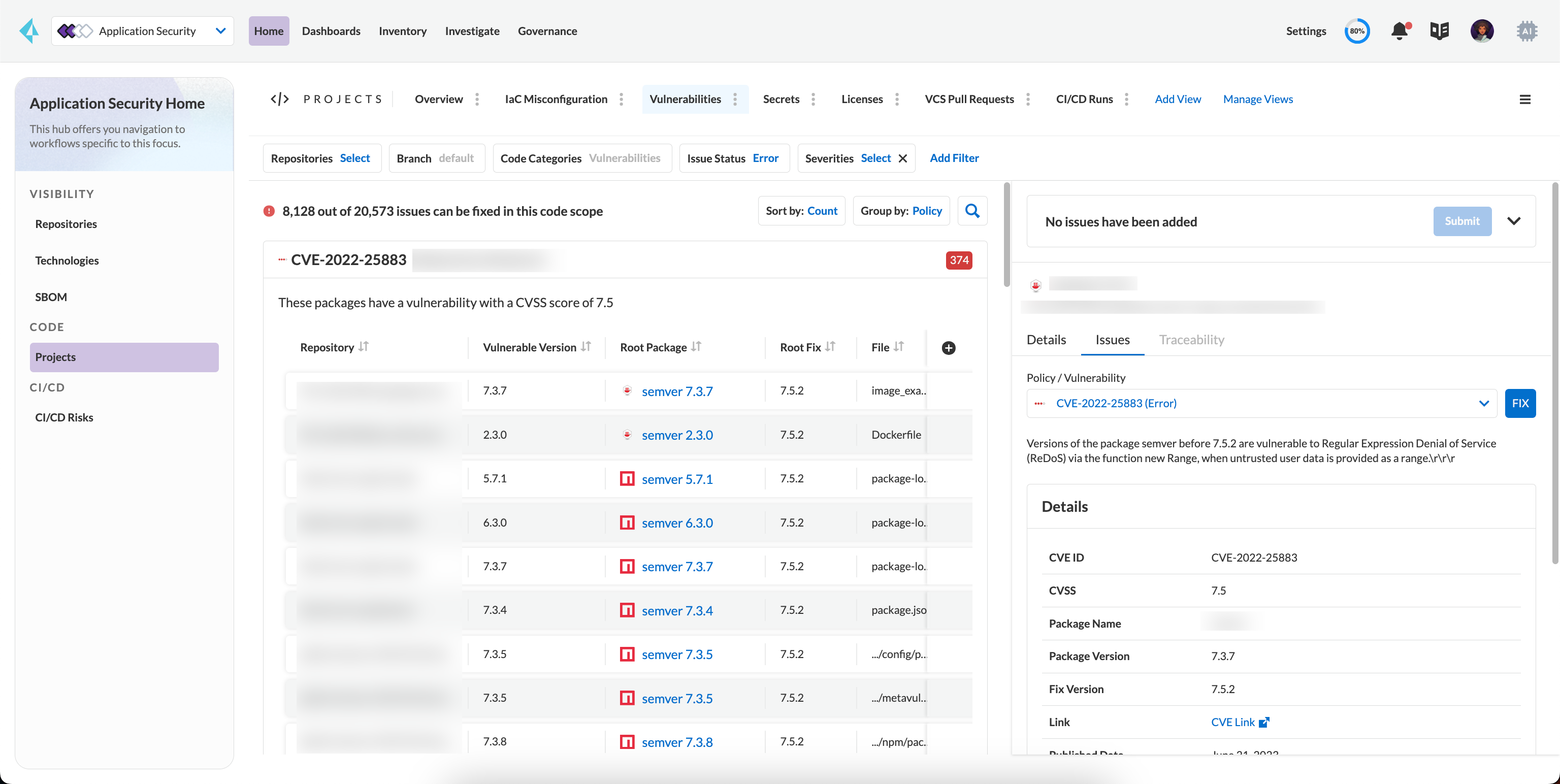
During periodic scans on Prisma Cloud the SCA scan results are updated and contextualized for monitoring and remediating package vulnerabilities identified in the source code on **Application Security > Projects** and then select **Vulnerabilities** view to see results exclusively for SCA scan results.
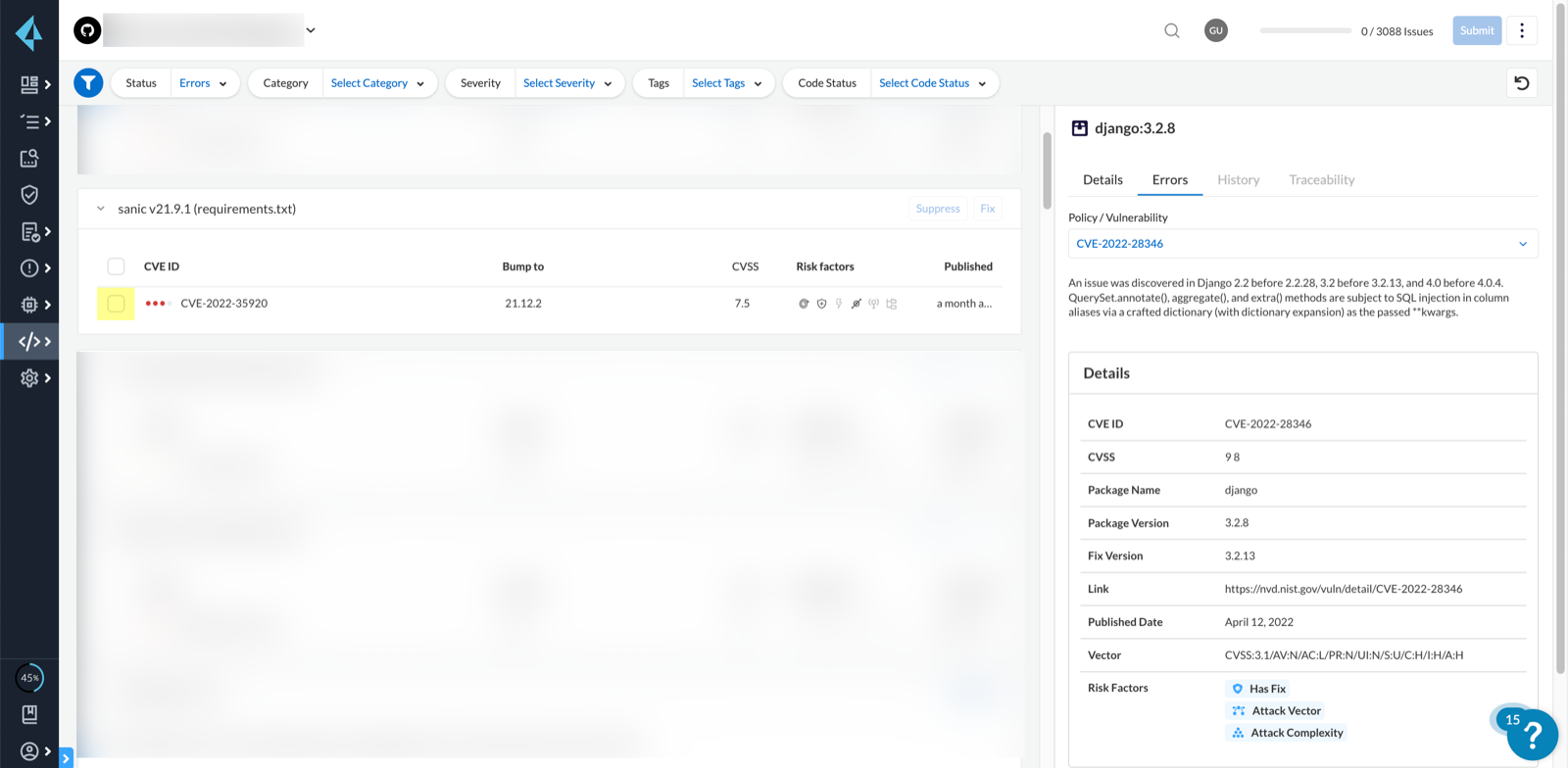
The contextualized information for each package is available on the [Resource Explorer](https://github.com/PaloAltoNetworks/pc-docs-md/tree/main/enterprise-edition/content-collections/application-security/risk-management/risk-management/monitor-and-manage-code-build/monitor-code-build-issues.md#additional-info-side-panel). The scan results outline direct and sub-dependency packages in the source code to help you make informed decisions for each type of package. In this example, you see the scan result of a direct dependency package with contextualized information of a package vulnerability in **Resource Explorer > Issues**.
In this example, you see the scan result of a sub-dependency package with contextualized information of a package vulnerability in **Resource Explorer > Issues**.
## Remediate vulnerabilities for SCA
Remediation for SCA scan results can be performed on the console from **Projects**.
For identified package vulnerabilities, especially packages with direct dependencies, Prisma Cloud provides an automated fix solution for bumping the package version. Additionally, if there are vulnerabilities found in sub-dependency packages, Prisma Cloud offers a solution to bump the root version of the package to the nearest secure version, irrespective of the source of vulnerability.
1. Access **Application Security > Projects** and then select **Vulnerabilities**.
2. Select a policy to remediate.
1. On the side panel select **Issues** and then **Fix** to remediate a policy violation.
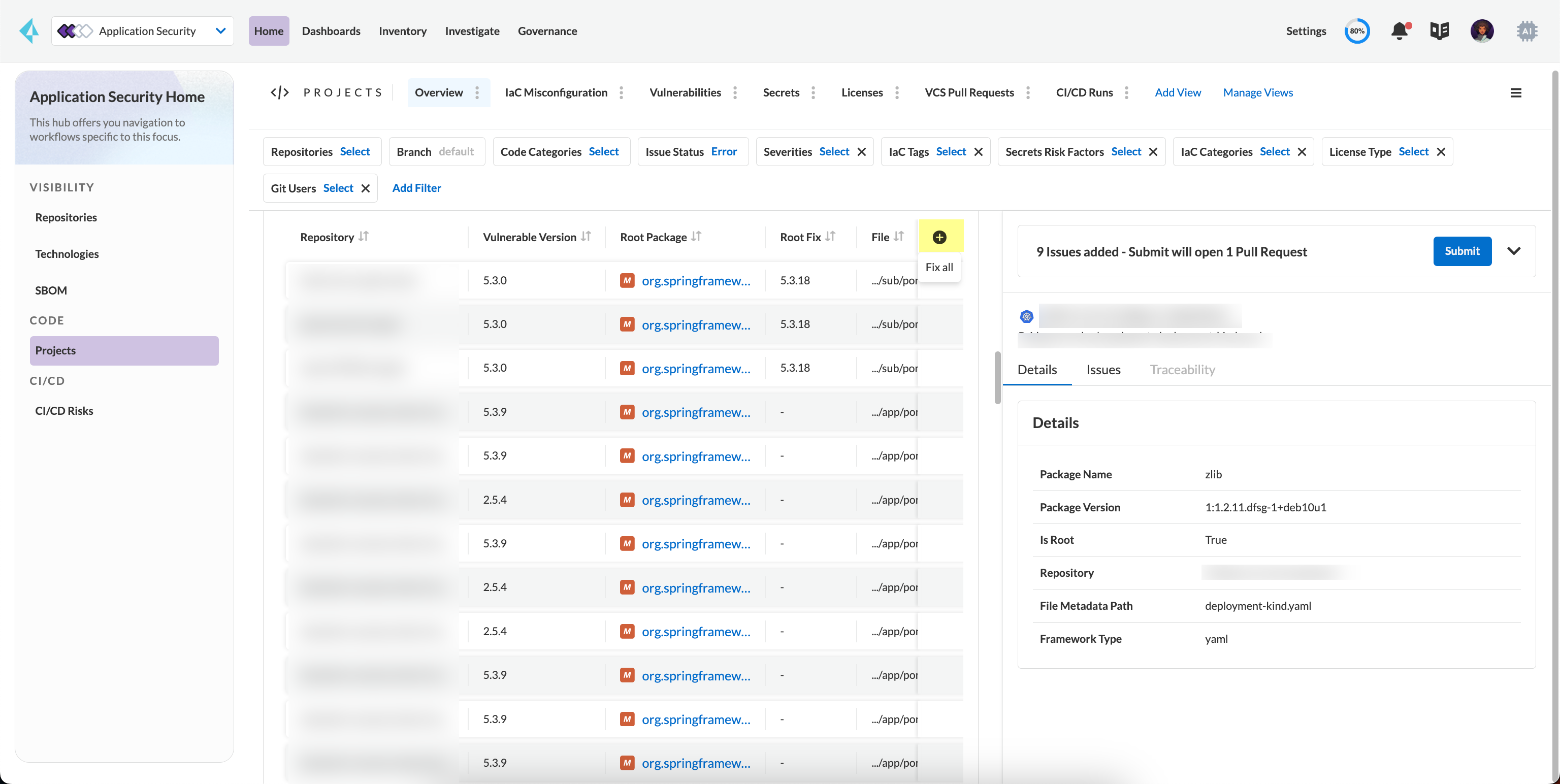
You can choose to remediate a single package or all dependent packages. To to fix individual packages, select fix in corresponding to the package.
Optionally select **Fix all** to remediate all packages where the policy violation exists.
2. Select **Submit** to implement the remediation fixes.
## Suppress vulnerabilities for SCA
Every identified vulnerability in an SCA scan can be suppressed on the console from Projects. Suppressing a vulnerability absolves the next scan from identifying it through a suppression rule. The suppression rule must have a definitive explanation indicating the non-conformance to be not problematic.
1. Access **Application Security > Projects** and then select **Vulnerabilities**.
2. Select a vulnerability to suppress.
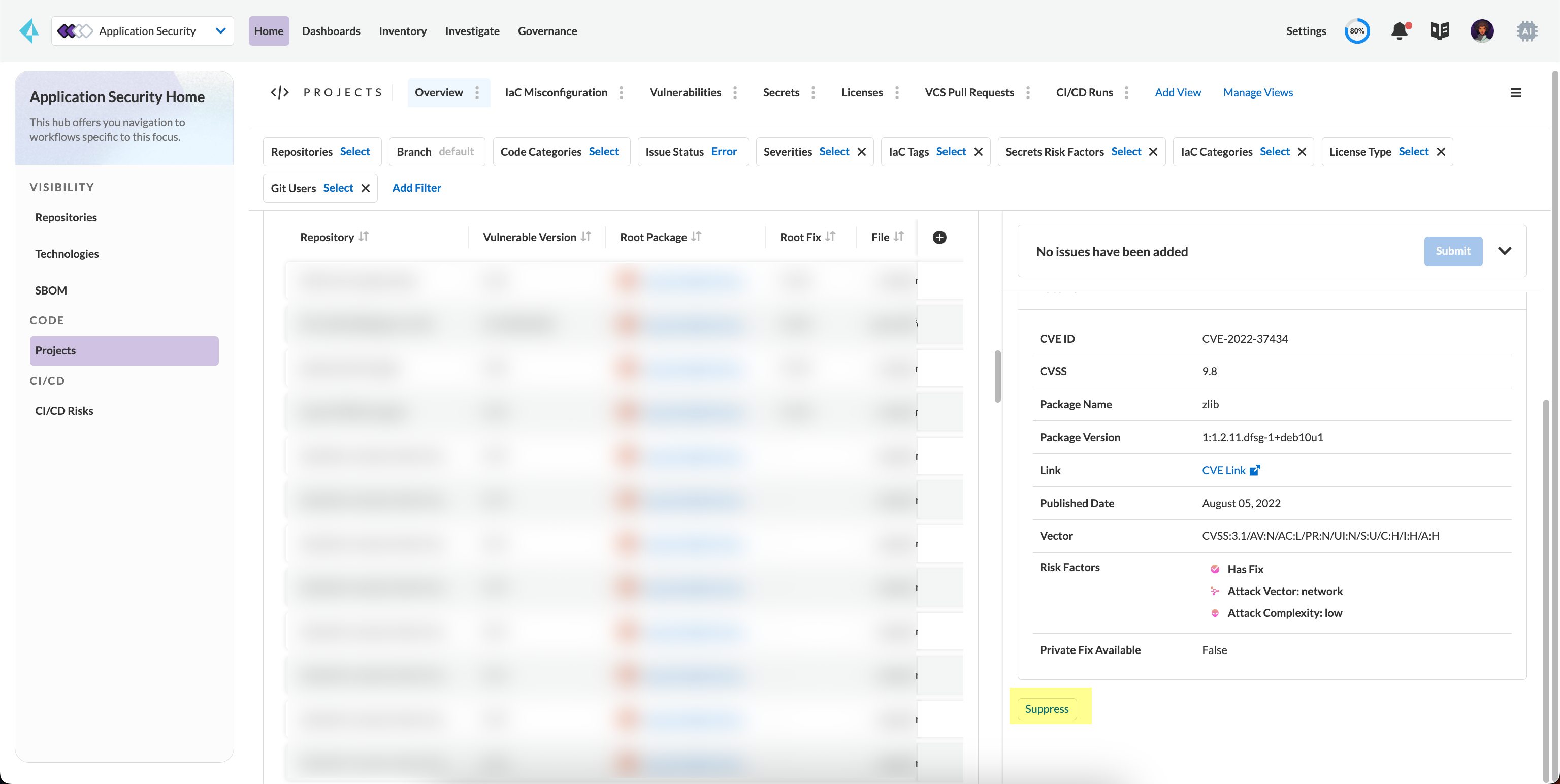
1. On the side panel select **Issues**.
2. Select **Suppress**.
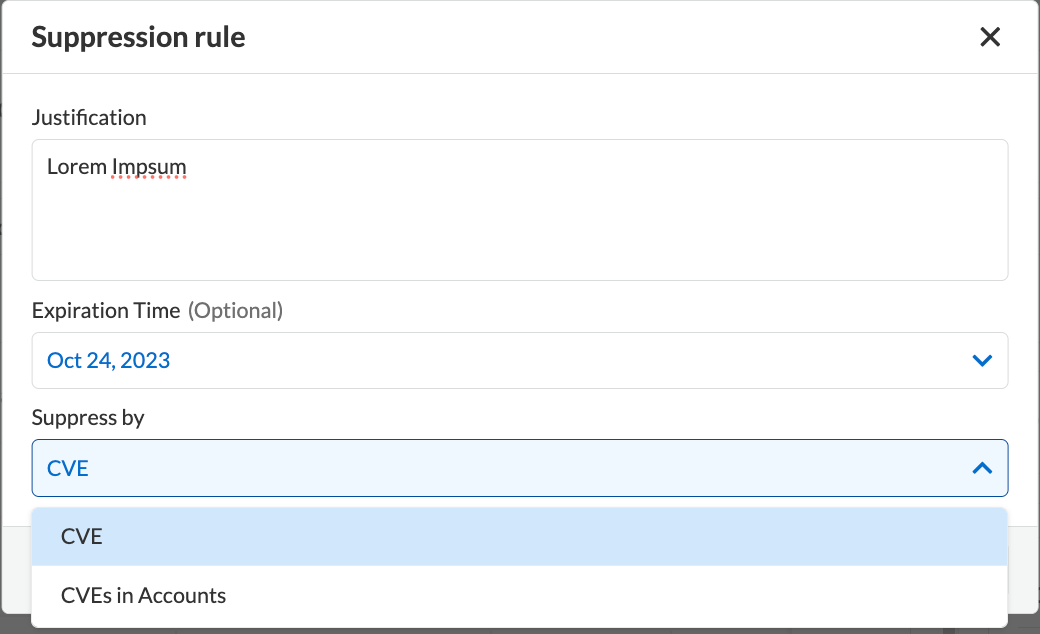
3. Add a justification as a definitive explanation for suppressing the specific vulnerability.
Optionally you can add an **Expiration Time**.
4. Select **Suppress by**. You can choose either **CVE** or **CVEs in Accounts**.
* **CVE**: You will be suppressing alerts related to specific known vulnerabilities. This approach allows you to address alerts associated with a particular vulnerability, providing a targeted response to potential security risks.
* **CVEs in Accounts**: You will be suppressing alerts across multiple accounts that share common vulnerabilities. By choosing this option, you will suppress alerts related to specific vulnerabilities that may be affecting multiple accounts within your system.
3. Select **Save** to enable suppression.
## Supported Package Managers for Software Composition Analysis (SCA)
For SCA scans, Prisma Cloud supports a list of Package Managers across multiple languages. Refer to [Supported Package Managers for Software Composition Analysis (SCA)](/content-collections/application-security/supported-technologies.md#sca-package-support) for more information.
## Troubleshooting
To troubleshoot SCA scan issues, refer to [Troubleshoot Software Composition Analysis (SCA) Issues](/content-collections/application-security/risk-management/monitor-and-manage-code-build/software-composition-analysis/sca-troubleshoot.md).
---
# Agent Instructions
This documentation is published with GitBook. GitBook is the documentation platform designed so that both humans and AI agents can read, navigate, and reason over technical content effectively. Learn more at gitbook.com.
## Querying This Documentation
If you need additional information that is not directly available in this page, you can query the documentation by asking a question.
Perform an HTTP GET request on the following URL with the `ask` and `goal` query parameters:
```
GET https://docs.prismacloud.io/content-collections/application-security/risk-management/monitor-and-manage-code-build/software-composition-analysis.md?ask=&goal=
```
`ask` is the immediate question: it should be specific, self-contained, and written in natural language.
`goal` is what the user is ultimately trying to achieve, the reason they need the answer. Sharing it helps GitBook give you a better, more relevant answer. A goal is most helpful when it describes the outcome the user wants rather than restating the question. For example, with `ask=how do I create an API token`, a goal like `automate deployments from our CI pipeline` lets GitBook tailor the answer to that use case.
The response will contain a direct answer to the question and relevant excerpts and sources from the documentation.
Use this mechanism when the answer is not explicitly present in the current page, you need clarification or additional context, or you want to retrieve related documentation sections.