> For the complete documentation index, see [llms.txt](https://docs.prismacloud.io/llms.txt). Markdown versions of documentation pages are available by appending `.md` to page URLs; this page is available as [Markdown](https://docs.prismacloud.io/content-collections/cloud-and-software-inventory/api-endpoints-inventory.md).
# API Endpoints Inventory
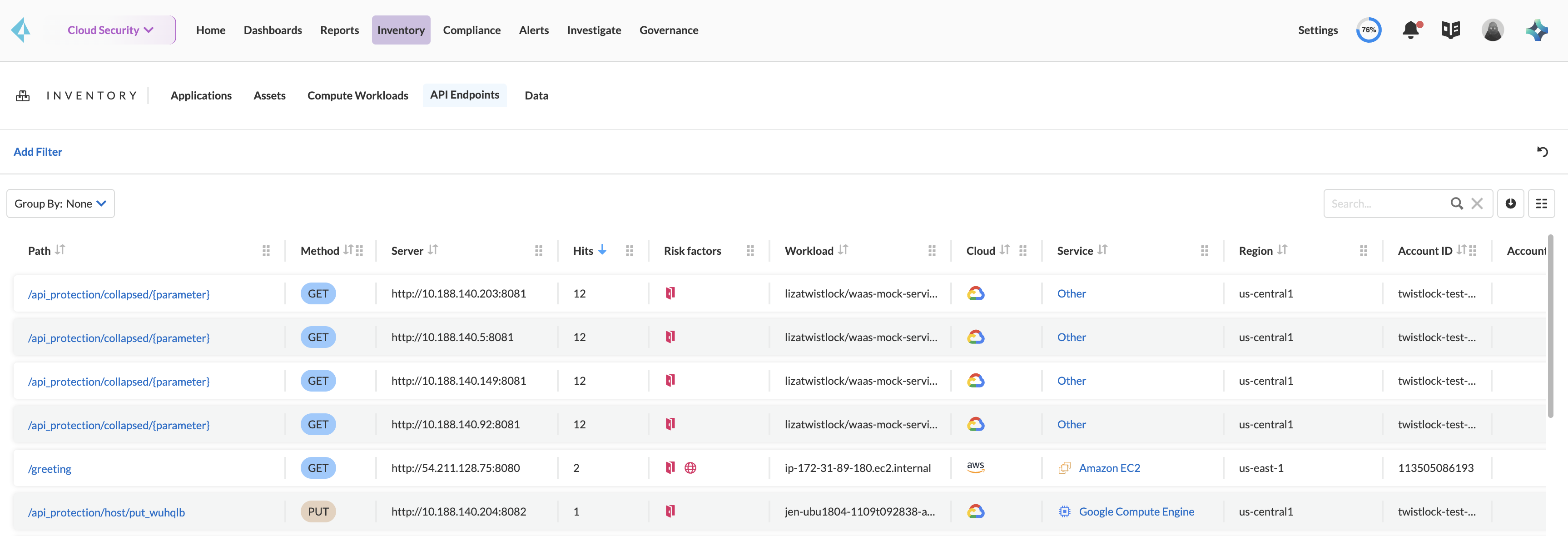
As you [Connect your Cloud Accounts](https://github.com/PaloAltoNetworks/pc-docs-md/tree/main/enterprise-edition/content-collections/connect/connect-cloud-accounts/connect-cloud-accounts.md), Prisma Cloud provides a continuous discovery of all the API endpoints in your deployment. This discovery helps you to prioritize the risks and understand your security posture as well as attack vectors.
**Sources of API Discovery**
Prisma Cloud uses existing WAAS runtime rules (agent-based and agentless) to scan traffic and AWS API Gateway configurations within your deployment to list the API Endpoints on **Inventory > API Endpoints**.
This section helps you to:
* Discover all the API endpoints in your workloads and conduct risk assessments.
* Locate the high-risk API endpoints within your deployment and determine their associated Cloud accounts, regions, and services.
* Assess the services in your Cloud account that have risky API endpoints.
* Detect shadow APIs that handle sensitive information and lack proper authentication measures.
## API Endpoints Discovery and Monitoring
**Inventory > API Endpoints** gives insights into the discovered endpoints with details on URL Path, the HTTP method, assets relationship, services, Cloud accounts, risk factors, the workload the API endpoints are associated with, and the discovery method. You can group the discovered endpoints by Cloud type, service name, region, workload, and server either in a Card view or a Table view. For each endpoint, Prisma Cloud provides a comprehensive overview on:
* Internet Exposure
* Sensitive Data Exposure
* Authentication
* Malicious Activity
* Usage statistics
* Message Structure
Out of all the discovered endpoints, you can search and filter on various parameters, say for example you can see all the internet-exposed endpoints, endpoints with sensitive data, the HTTP methods, and recently changed/observed API endpoints.
## API Risk Profiling and Findings
Select an API Endpoint on **Inventory > API Endpoints** to understand its findings for risk assessment.
The API risk profiling gives you insights on policies violated, findings, the risk factors indicators, and the associate workload on which the endpoint is hosted. The risk factors assist in discovering API endpoints exposed to the internet, endpoints flagged with observed malicious activity, and endpoints that can be accessed without authentication, as well as the endpoints in which sensitive data is exchanged.
Refer to [API Discovery - Path risks profiling](/content-collections/runtime-security/waas/waas-api-discovery.md) for more details.
## Investigate API Endpoints
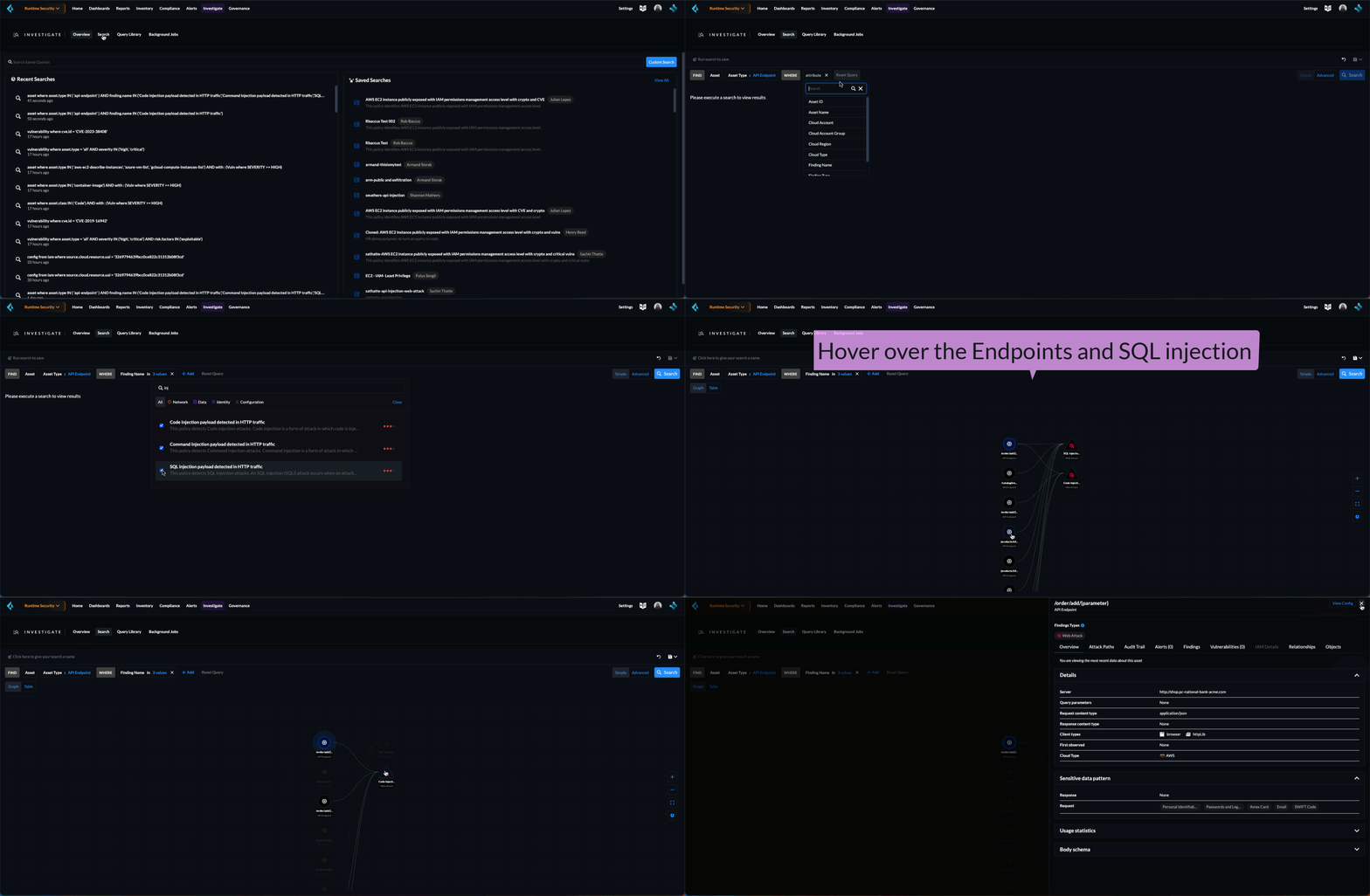
You can search and investigate WAAS assets on **Investigate**. Say, for example, to show all the asset types of API Endpoints, where the finding name has some injections.
1. Select **Investigate > Search**.
2. Run the query with the following query attributes and values:
FIND: Asset
Asset Type: API Endpoint
WHERE: Finding Name in "injection"
3. Select **Search**.
You can see the endpoints and the associated findings. For example, hover over a SQL injection Web attack and only see the endpoints affected by this attack.
Or, hover over an endpoint to view the SQL injection that affects this endpoint.
You can further click on an endpoint and **View Details** of the attack findings.
## What’s Next
Once you onboard your Cloud accounts and assess the attack vector, you can now set WAAS rules to enforce policies on these discovered endpoints, trigger WAAS events to generate alerts when the rules are violated, and make informed decisions to protect your applications. Refer to [Deploy WAAS](https://github.com/PaloAltoNetworks/pc-docs-md/tree/main/enterprise-edition/content-collections/runtime-security/waas/deploy-waas/deploy-waas.md).
---
# Agent Instructions
This documentation is published with GitBook. GitBook is the documentation platform designed so that both humans and AI agents can read, navigate, and reason over technical content effectively. Learn more at gitbook.com.
## Querying This Documentation
If you need additional information that is not directly available in this page, you can query the documentation by asking a question.
Perform an HTTP GET request on the following URL with the `ask` and `goal` query parameters:
```
GET https://docs.prismacloud.io/content-collections/cloud-and-software-inventory/api-endpoints-inventory.md?ask=&goal=
```
`ask` is the immediate question: it should be specific, self-contained, and written in natural language.
`goal` is what the user is ultimately trying to achieve, the reason they need the answer. Sharing it helps GitBook give you a better, more relevant answer. A goal is most helpful when it describes the outcome the user wants rather than restating the question. For example, with `ask=how do I create an API token`, a goal like `automate deployments from our CI pipeline` lets GitBook tailor the answer to that use case.
The response will contain a direct answer to the question and relevant excerpts and sources from the documentation.
Use this mechanism when the answer is not explicitly present in the current page, you need clarification or additional context, or you want to retrieve related documentation sections.