> For the complete documentation index, see [llms.txt](https://docs.prismacloud.io/llms.txt). Markdown versions of documentation pages are available by appending `.md` to page URLs; this page is available as [Markdown](https://docs.prismacloud.io/content-collections/cloud-and-software-inventory/iac-resources.md).
# IaC Resources
As a part of the asset inventory on Prisma Cloud, you can view a contextual inventory of all Infrastructure as Code (IaC) Resources across various cloud accounts and repositories. Resources come with detailed information about their misconfigurations, vulnerabilities in referenced images, connection to other resources via the graph on the backend, and Traceability. Using Traceability unique to Application Security, the inventory gives you an asset list of interconnected frameworks.
Every user on Prisma Cloud can use the information visible on the IaC Resource Inventory specific to their permissions and role.
## Code Inventory Exploration
As a Developer, you can use the comprehensive view of resources within code across diverse frameworks, enabling you to prioritize assets that require attention for posture enhancement. You can also identify the prevalence of specific resources and establish framework-specific goals for IaC resources.
## Traceability
For Developers, Security Engineers and DevOps personnel, you can identify code assets that have either drifted from the code or have never been deployed. Assets in a drift state signify cloud resources that diverge from the corresponding code and require changes in the codebase or within the cloud environment. The unused state of code assets pertains to undeployed code, potentially causing noise in code reviews or posing future risks in the cloud. These assets should either be removed or deployed promptly. You can also monitor resources associated with traced Cloud Security Posture Management alerts derived from the code assets.
**Additional Resources**
* For more information on traceability, refer to the [Trace and Traceability](/content-collections/application-security/risk-management/monitor-and-manage-code-build/traceability-and-tagging.md) documentation.
* For more information on drift detection, refer to the [Drift Detection](/content-collections/application-security/risk-management/monitor-and-manage-code-build/drift-detection.md) documentation.
## IaC Resource Inventory
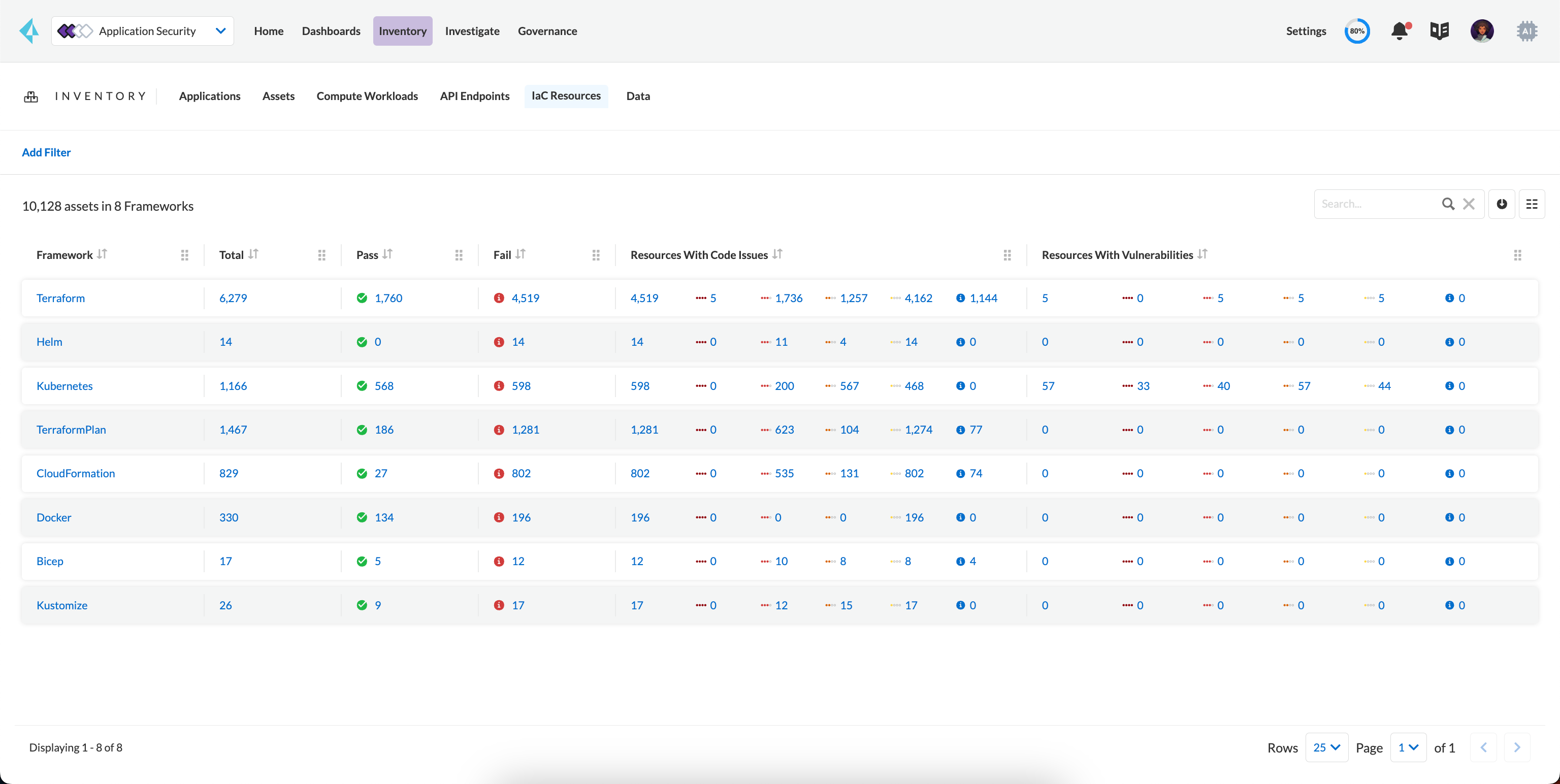
Familiarize yourself with the IaC Resource Inventory, a tabulated information listed by frameworks.
* **Framework**: The specific infrastructure-as-code (IaC) tool or service used to manage the asset, such as Terraform, CloudFormation, or Helm, determines the associated framework.
* **Total**: This represents the overall number of IaC assets.
* **Pass**: These resources have undergone the scan without issues.
* **Fail**: These refer to resources that have encountered a few alerts, indicating areas that may require attention.
* **Resources with Code Issues**: This metric reveals the total count of code-related issues within a framework across all levels of severity.
* **Resources with Vulnerabilities**: This metric provides insight into the total number of vulnerabilities identified within a framework, spanning across all levels of severity.
After you have completed the inventory monitoring, you can delve into individual issues for a more detailed assessment and implement necessary remediation measures if required.
### Add Filters
Select the **IaC Resources** tab > **Add Filter** to further refine the inventory metrics to focus exclusively on IaC assets, allowing you to see the most susceptible assets to misconfigurations and vulnerabilities. This feature provides a granular breakdown of alerts, providing valuable insights into their potential impact on the runtime posture.
For the IaC Resources Inventory, filters provide a granular way to customize your view of the inventory, allowing for more accurate analysis and management of the IaC assets with associated information.
* **Repository:** Narrow down the view to a specific repository where the Infrastructure as Code (IaC) asset is stored. It enables focused management and analysis of the codebase and its associated resources.
* **IaC Resource Type:** Specifies the category or classification of the IaC resource within the context of the build process. It provides a targeted view of the type of infrastructure component being defined or manipulated.
* **Code Issue Severity:** Categorizes detected misconfigurations or errors based on their severity levels. It assists in prioritizing and addressing issues, ensuring that the most critical ones are dealt with first.
* **Vulnerability Severity:** Use this filter to assess the level of risk associated with identified vulnerabilities in the IaC implementation. It aids in prioritizing security efforts, ensuring that the most severe vulnerabilities are addressed promptly.
* **Framework:** Allows you to focus on IaC assets based on the specific set of tools, libraries, and conventions used in their implementation. It provides insights into the underlying technology stack and methodology employed.
* **IaC Resource Tag:** Offers insights into the tags associated with the IaC resource.
* **Code Provider:** Indicates the cloud service provider associated with the asset.
* **Last Modified By:** Use this filter to track and view changes made to the IaC asset based on the user who most recently modified it. It provides transparency in the development and maintenance process.
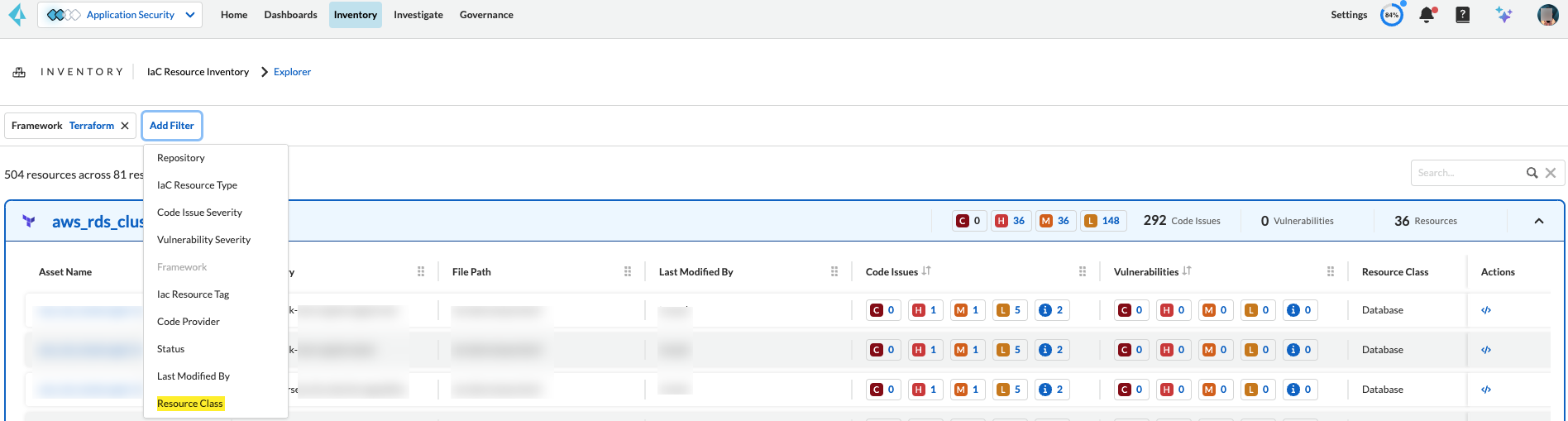
* **Resource Classes**: Filter IaC resources based on IaC resource classes. For more information, see [Resource Classes](#resource-class) below.
## Resource Classes
IaC resource classes provide a structured approach to categorizing infrastructure resources based on their type, function, or other relevant criteria. This categorization enables efficient filtering and management of assets within the IaC inventory.
Currently, Terraform, CloudFormation, ARM and Bicep frameworks support IaC resource classes.
To filter assets by IaC resource class:
1. Under **Inventory**, select select the **IaC Resources** tab.
2. Select a framework from the list in the inventory table.
3. Click **Add Filter** > **Resource Class**.
4. Select an option from the **Resource Class** filter dropdown as shown below.
* **Compute**: Represents resources related to processing power, including virtual machines, containers, serverless functions, and other compute instances.
* **Storage**: Includes resources for data storage and retrieval, such as databases, object storage, file shares, and block storage volumes.
* **Network**: Encompasses network-related resources, including virtual networks, subnets, load balancers, firewalls, and network security groups.
* **Identity & Security**: Covers resources responsible for identity management and security, such as users, groups, roles, security policies, and encryption configurations.
* **Database**: Represents database instances.
* **AI and Machine Learning**: Includes resources specifically designed for AI and ML workloads, such as machine learning models.
* **Analytics**: Encompasses resources used for data processing, analysis, and reporting.
* **Code**: Represents code repositories, build pipelines, and other software development resources.
* **Other**: A catch-all category for resources that don’t fit into the other categories.
---
# Agent Instructions
This documentation is published with GitBook. GitBook is the documentation platform designed so that both humans and AI agents can read, navigate, and reason over technical content effectively. Learn more at gitbook.com.
## Querying This Documentation
If you need additional information that is not directly available in this page, you can query the documentation by asking a question.
Perform an HTTP GET request on the following URL with the `ask` and `goal` query parameters:
```
GET https://docs.prismacloud.io/content-collections/cloud-and-software-inventory/iac-resources.md?ask=&goal=
```
`ask` is the immediate question: it should be specific, self-contained, and written in natural language.
`goal` is what the user is ultimately trying to achieve, the reason they need the answer. Sharing it helps GitBook give you a better, more relevant answer. A goal is most helpful when it describes the outcome the user wants rather than restating the question. For example, with `ask=how do I create an API token`, a goal like `automate deployments from our CI pipeline` lets GitBook tailor the answer to that use case.
The response will contain a direct answer to the question and relevant excerpts and sources from the documentation.
Use this mechanism when the answer is not explicitly present in the current page, you need clarification or additional context, or you want to retrieve related documentation sections.