> For the complete documentation index, see [llms.txt](https://docs.prismacloud.io/llms.txt). Markdown versions of documentation pages are available by appending `.md` to page URLs; this page is available as [Markdown](https://docs.prismacloud.io/content-collections/dashboards/dashboards-identity.md).
# Identity Dashboard
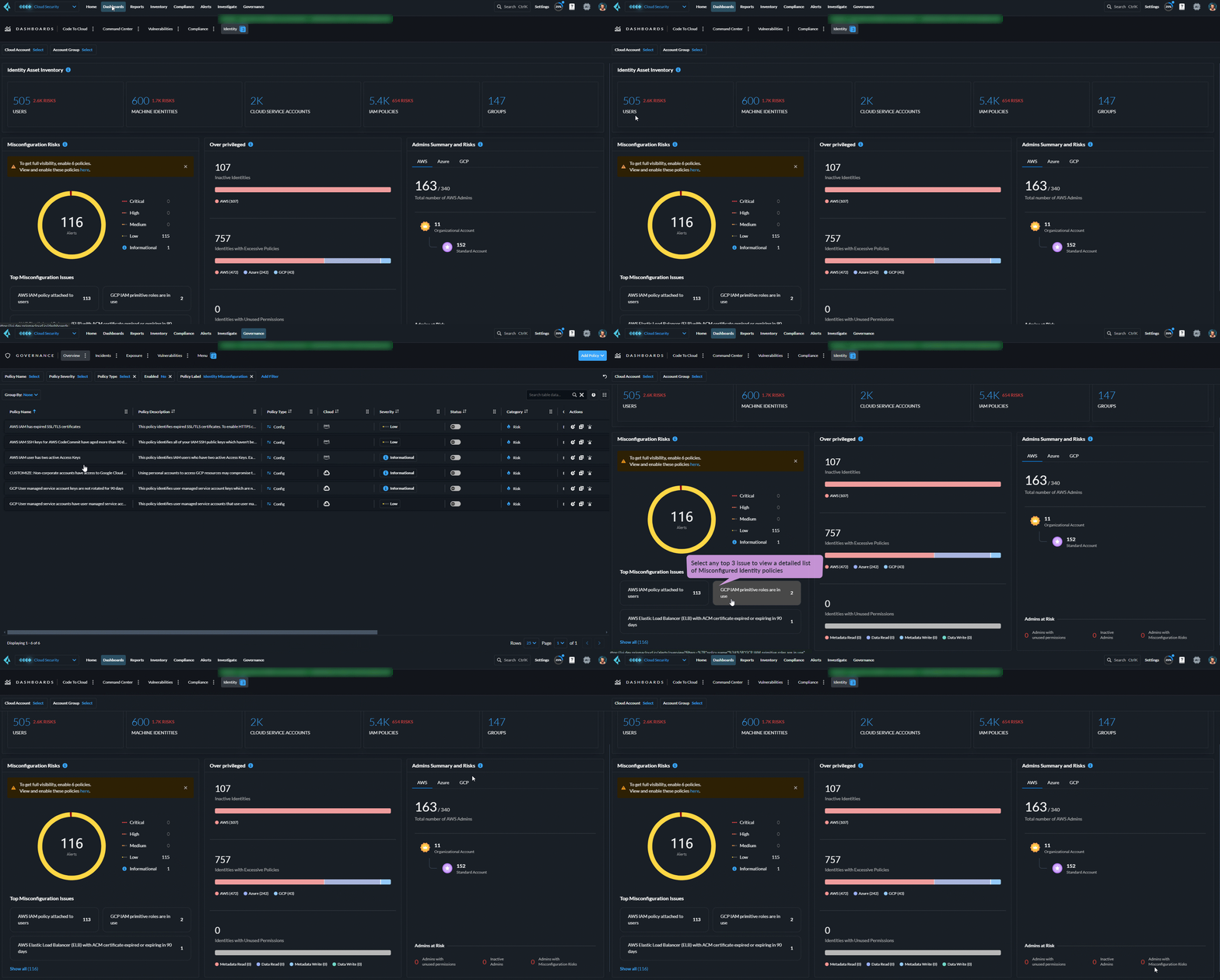
Prisma Cloud’s **Identity** dashboard provides a comprehensive view of security risk across the entire identity landscape including, users, permissions, access levels, and more. The dashboard provides critical insights into user activity, permissions, and potential risks, to help you proactively detect and mitigate identity-based threats like unauthorized access, misconfigurations, and privilege escalations.
Use the Identity dashboard as a risk oversight tool across all supported cloud platforms and quickly evaluate your identity posture using real-time data. Use the provided **Filters** to hone in on the cloud account, or account group you would like to focus on.
Asset totals reported on the Identity Dashboard and Asset Inventory are the sum of all assets with violations and not the total number of alerts generated by that asset. The Assets page therefore may have a different total than the tally found on the Identity dashboard and should not be compared.
The Identity Dashboard includes visualizations for the following widgets:
## Identity Asset Inventory
Provides visualizations depicting the security risks associated with each of the following identity types:
* Users
* Machine Identities (such as EC2 instance, Lambda, Azure and GCP Functions, VMs)
* Cloud Service Accounts (such as AWS Roles, Azure Service Principals and Managed Identities, and GCP Service Accounts)
* IAM Policies (such as AWS IAM Policy, Azure, and GCP Roles)
* IAM Groups
Click on any **Risk** on any identity type to see a list of prioritized [Alerts](/content-collections/alerts/risk-prioritization-remediation.md).
## Misconfigurations
Provides a pie chart visualization of identities with common misconfigurations that bad actors can potentially access for easy access to your cloud resources. Displays misconfigured identities with over-privileged or inactive credentials over a 30 day period.
Select any section to view the alerts and violating assets. Enable all suggested policies to get the most accurate view of identity misconfiguration risks.
## Over privileged
Provides a visualization of identities with overly permissive access, such as:
* **Inactive users** - Lists users that were inactive for 30 days or more per cloud provider.
* **Identities with Excessive Policies** Displays identities (users/machines/groups/cloud service accounts) with excessive policies attached. The IAM policy (AWS policy or Azure/GCP role) is considered excessive under the following conditions:
* AWS: When the action and/or scope of a policy includes “\*”
* Azure: Action includes “\*” and the level of role assignment is Subscription or higher
* GCP: Basic and Service Agent roles are granted at Folder or higher level
The permissions above are extremely dangerous and difficult to monitor.
* **Identities with Unused Permissions** - Displays identities (users/machines/groups/cloud service accounts) with unused permissions for more than 90 days.
Click on any bar chart to see a breakdown of identities triggering alerts.
## Admin Summary and Risks
Displays admin users, who are privileged identities and require close monitoring. The widget provides information about cloud resources with Admin Identities that meet the following criteria:
* Includes built-in Admin policies
* Includes custom policies with administrative permissions
The level at which access is granted for the identity is also taken into consideration.
---
# Agent Instructions
This documentation is published with GitBook. GitBook is the documentation platform designed so that both humans and AI agents can read, navigate, and reason over technical content effectively. Learn more at gitbook.com.
## Querying This Documentation
If you need additional information that is not directly available in this page, you can query the documentation by asking a question.
Perform an HTTP GET request on the following URL with the `ask` and `goal` query parameters:
```
GET https://docs.prismacloud.io/content-collections/dashboards/dashboards-identity.md?ask=&goal=
```
`ask` is the immediate question: it should be specific, self-contained, and written in natural language.
`goal` is what the user is ultimately trying to achieve, the reason they need the answer. Sharing it helps GitBook give you a better, more relevant answer. A goal is most helpful when it describes the outcome the user wants rather than restating the question. For example, with `ask=how do I create an API token`, a goal like `automate deployments from our CI pipeline` lets GitBook tailor the answer to that use case.
The response will contain a direct answer to the question and relevant excerpts and sources from the documentation.
Use this mechanism when the answer is not explicitly present in the current page, you need clarification or additional context, or you want to retrieve related documentation sections.