> For the complete documentation index, see [llms.txt](https://docs.prismacloud.io/llms.txt). Markdown versions of documentation pages are available by appending `.md` to page URLs; this page is available as [Markdown](https://docs.prismacloud.io/content-collections/dashboards/dashboards-vulnerabilities.md).
# Vulnerabilities Dashboard
Prisma Cloud **Vulnerabilities Dashboard** gives you a holistic graphical view of all the vulnerabilities across your Code to Cloud environment. An overview of the top impacting CVEs enables you to prioritize vulnerabilities based on existing risks and trace them from runtime back to the source. This risk assessment capability helps you to make informed decisions with findings and fix the vulnerable package or base image in code so that you remediate the root cause and resolve the issue when the build is next executed.
The dashboard helps you answer:
* What are all the vulnerable assets across my entire application lifecycle?
* Where should I focus to find and fix the vulnerabilities? What are the critical and urgent ones, and the ones that are patchable?
* What actions can I take to remediate or mitigate the vulnerabilities in Code or Cloud?
The dashboard is only available to users with the System Administrator role on all stacks, except for [app.gov](http://app.gov) and [app.cn](http://app.cn) stacks. Additionally, [app.gov](http://app.gov) stack users with a business license will not have access to the dashboard.
## Discover Vulnerabilities
On **Dashboard > Vulnerabilities** you can discover all the vulnerabilities across your environment. Let’s say, there are 25K vulnerabilities in your environment out of which only 20637 are critical and high, 7470 are exploitable, out of which 7400 are patchable meaning these vulnerabilities are actionable for you to fix them. The funnel in the Prioritized Vulnerabilities further narrows down to just 35 vulnerable packages that are in use in the runtime that you can focus on.
**Prerequisites**
* [Onboard Cloud accounts](https://github.com/PaloAltoNetworks/pc-docs-md/tree/main/enterprise-edition/content-collections/connect/connect-cloud-accounts/connect-cloud-accounts.md).
* [Onboard code repositories](https://github.com/PaloAltoNetworks/pc-docs-md/tree/main/enterprise-edition/content-collections/application-security/get-started/connect-code-and-build-providers/code-repositories/code-repositories.md).
* [Configure registry scans](/content-collections/runtime-security/vulnerability-management/registry-scanning/configure-registry-scanning.md).
* Enable [**Workload Incident** and **Workload Vulnerability** policies](/content-collections/governance/workload-protection-policies.md).
The following visualizations are available for you to help contextualize risks from vulnerabilities:
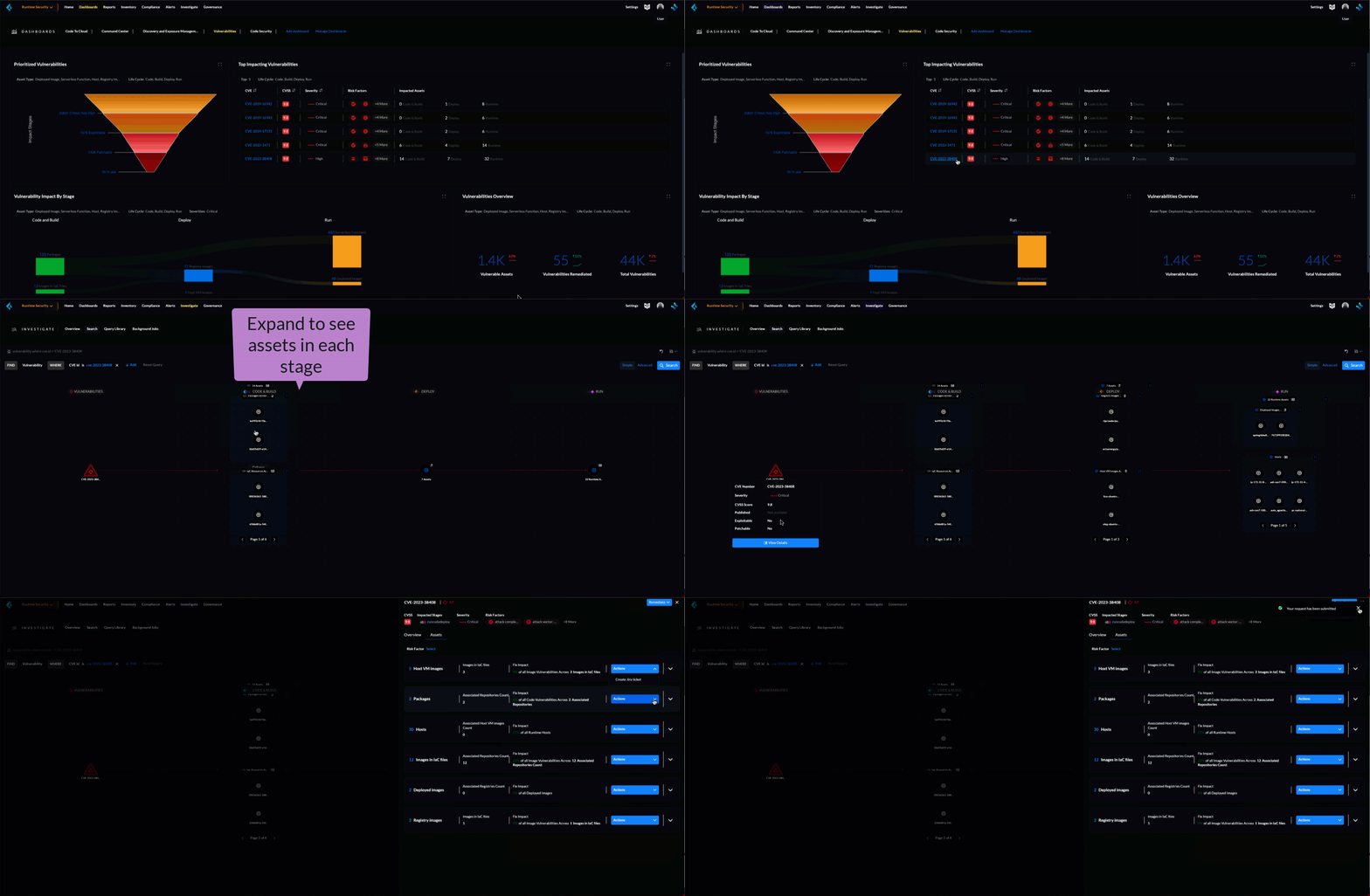
* **Vulnerabilities Overview** - Provides a summarized view of the total vulnerabilities in your environment further divided into Vulnerabilities by Asset and Vulnerabilities that have already been remediated, allowing you to track and share your progress in securing your environment. Visualize the trends with **Total Vulnerable Assets**, and their metadata, **Total Vulnerabilities Remediated**, and **Total Vulnerabilities** count in the current snapshot.
* **Prioritized Vulnerabilities** - Discover all the vulnerabilities across your workloads and identify the top-priority vulnerabilities (aggregated vulnerabilities that are urgent, exploitable, patchable, and vulnerable packages in use).
The vulnerabilities sourced from Compute and CAS (Cloud App Sec) are prioritized and aggregated based on the most urgent, exploitable, patchable, and vulnerable packages in use. This prioritization helps you to identify the top-priority vulnerabilities to focus on.
The aggregation is based on vulnerabilities that are:
* Urgent: Critical, High
* Exploitable: Exploit in the Wild and Exploit in POC
* Patchable: Vulnerabilities that are actionable and have a patch to fix or mitigate.
* Vulnerable packages in use
* **Top Impacting Vulnerabilities** - Provides a ranked list of the most critical vulnerabilities in your environment based on the risk score. The ranked list consists of CVEs affecting the environment. Each CVE includes data about its risk factors, severity, CVSS, risk factors, and assets impacted.
Review the top-impacting vulnerabilities based on the CVE severity, CVSS score, Risk Factors, and the assets impacted across your CI/CD pipeline.
* **Vulnerability Impact by Stage** - Visualize the sources of the vulnerabilities and the impact of the vulnerability across app stages of your application lifecycle. Trace vulnerabilities from runtime back to the repositories they originate from.
At each stage, you can select and investigate any of the impacted assets such as Packages, Images in IaC Files, Host VM Images, Registry Images, Deployed Images, Serverless Functions, and Hosts. This makes it easier for you to trace back the packages and images that were used to build a workload that is now vulnerable in the deploy stage, or runtime.
## Prioritize and Assess Risk
Once you get a summarized view of all the discovered vulnerabilities, the dashboard helps you to narrow down to the most important and critical vulnerabilities to focus on.
Following are the paths you take to investigate and assess risk across the CBDR graph:
| **What do you want to do** | **Where to go** | **Result** |
| --------------------------------------------------- | -------------------------------------------------------------------- | ----------------------------------------------------------------------------------------------------------------------------------------------------------------------------------------------------------------------------------------------------------------------------------------------------------------------------------------------------------------------------------------------------------------------------------------------------------------- |
| View the top critical and high vulnerabilities | In **Prioritized Vulnerabilities** select **Critical and High** | Vulnerabilities with **Critical** and **High** **Severity** are listed under **Investigate**. |
| View top exploitable vulnerabilities | In **Prioritized Vulnerabilities** select **Exploitable** | Vulnerabilities that are high and critical with **Risk factors** **Exploitable** are listed under **Investigate**. |
| View top patchable vulnerabilities | In **Prioritized Vulnerabilities** select **Patchable** | Vulnerabilities that are high and critical with **Risk factors** **Has fix** are listed under **Investigate**. |
| View vulnerabilities (packages) in use | In **Prioritized Vulnerabilities** select **In Use** |
Vulnerabilities that are high and critical with Risk factorsPackage in use are listed under Investigate.
You need to deploy Defenders to get real-time monitoring to detect the vulnerable packages in use in runtime.
|
| Identify the assets vulnerable to a CVE | In **Top Impacting Vulnerabilities** select a `CVE-XXXX-XXXXX` | Assets affected by the vulnerability with cve.id=`CVE-XXXX-XXXXX` are listed in a CBDR graph under **Investigate**. |
| View vulnerable serverless functions on Runtime | In **Vulnerability Impact By Stage** select **Serverless Functions** | Serverless functions with high vulnerability are listed under **Investigate** |
| See vulnerable deployed container images in Runtime | In **Vulnerability Impact By Stage** select **Deployed images** | Container images with high vulnerability are listed under **Investigate**. |
| Show vulnerable hosts in Runtime | In **Vulnerability Impact By Stage** select **Hosts** | Hosts with high vulnerability are listed under **Investigate**. |
| See vulnerable registry images in Deploy | In **Vulnerability Impact By Stage** select **Registry Images** | Container Registry images with high vulnerabilities are listed under **Investigate** |
| View host VM images with high vulnerability | In **Vulnerability Impact By Stage** select **Host VM Images** | Host VMs with high vulnerability are listed under **Investigate**. |
You can expand the assets in each CBDR stage and view details.
## Remediate or Mitigate Vulnerabilities
As you access the vulnerability Overview, Top Impacting Vulnerabilities, and Vulnerability Impact by Stage, you can now explore the remediation options.
1. Select **Dashboard > Vulnerabilities**.
1. Select a vulnerability from any of the entry paths on the dashboard. Refer to the possible entry paths in [prioritize and assess risks](#prioritize-assess-risk).
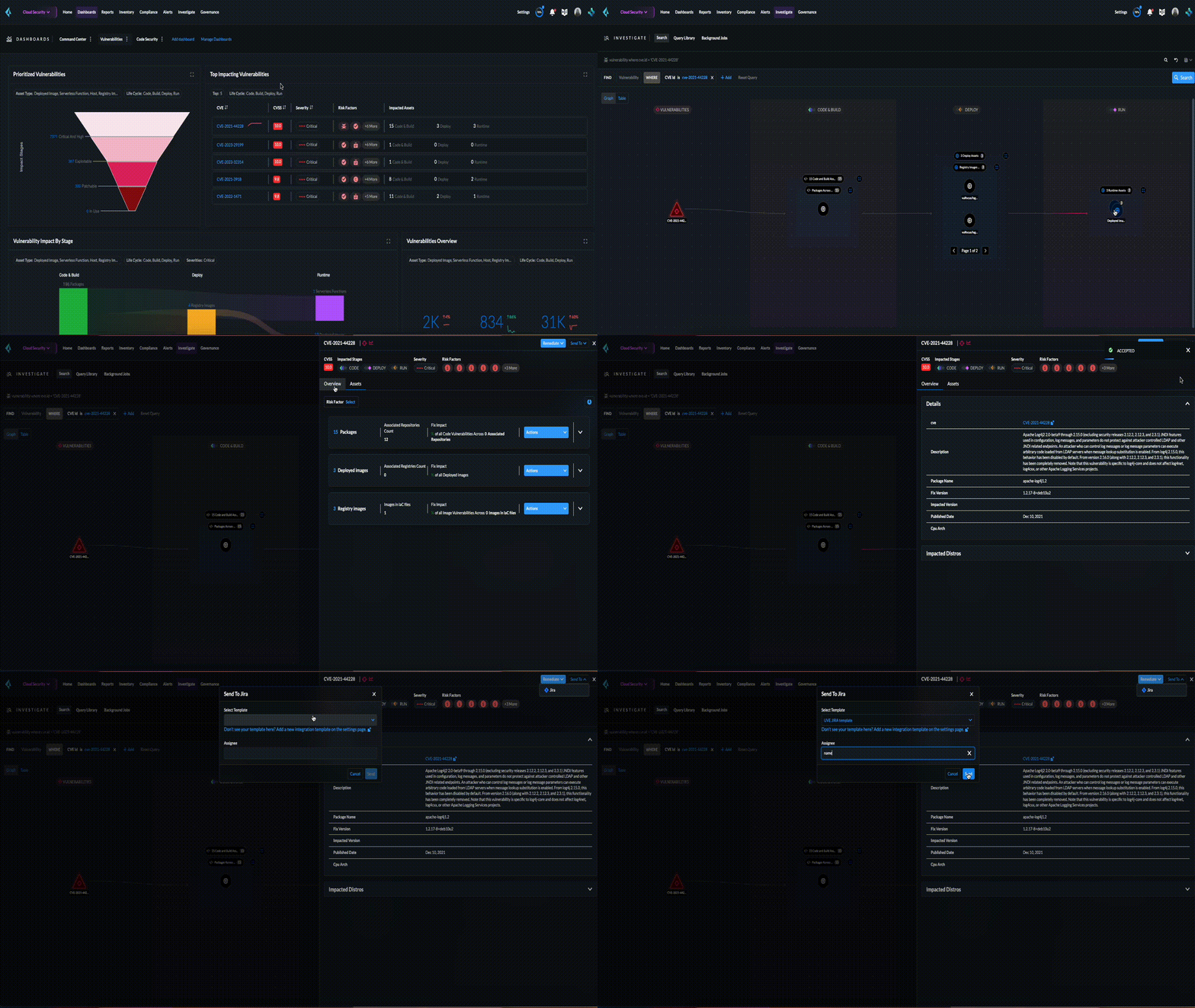
2. In the CBDR graph under **Investigate**, click on a vulnerable **CVE > View Details**.
The CVE side panel gives you an overview of the CVE with its CVSS score, the impacted stages, severity, risk factors, the package name, and the distros affected by this CVE.
3. **Remediate or Mitigate a CVE**
In the CVE side panel, you can either remediate or create a Jira ticket:
1. Select **Remediate > Submit Pull Request** for all packages and IaC files impacted by this vulnerability across all repositories.
2. **Send To > Jira** to create a Jira ticket with all the vulnerability details of the deployed images, registry images, and hosts.
**Select Template**\* from the available ones, or add a new integration template under **Settings > Integrations & Notifications**.
Select **Send**.
Note: **Dashboard > Vulnerabilities** shows a total count of all the vulnerabilities across all the distro releases in your workload, which is higher than the total count of only the CVEs affecting your assets shown under **Investigate > Search**.
For example, when multiple vulnerabilities are attached to a single CVE, the vulnerability search shows a total count of only the CVEs impacted by these vulnerabilities.
4. **Assess the impact on an Asset and take action**
1. In the CVE side panel select **Assets**.
This lists all the assets affected by this CVE from the packages and IaC files in code & build to the images in the registry that are being deployed to the runtime as Hosts, Containers, and Serverless functions.
You can filter the assets based on **Risk Factors**, download all asset configurations, or take mitigation actions per asset type.
Following are the actions available for each asset type:
* **Asset Type**: **How can you mitigate or what action can you take**
* CVE: **Remediate > Submit Pull Request Send To > Jira**
* Packages: **Actions > Submit Pull Request** and **Actions > Suppress**
* Images in IaC files: **Actions > Submit Pull Request** and **Actions > Suppress**
* Hosts: **Actions > Create Jira Ticket**
* Deployed Images: **Actions > Create Jira Ticket**
* Registry Images: **Actions > Create Jira Ticket**
* Serverless Functions: **Actions > Create Jira Ticket**
## Vulnerabilities Queries (RQL)
**Investigate** the vulnerable assets in Prisma Cloud with the `vulnerability where` RQL clause. Refer to the [Vulnerabilities Queries](https://github.com/PaloAltoNetworks/pc-docs-md/tree/main/enterprise-edition/content-collections/search-and-investigate/vulnerability-queries/vulnerability-queries.md).
---
# Agent Instructions
This documentation is published with GitBook. GitBook is the documentation platform designed so that both humans and AI agents can read, navigate, and reason over technical content effectively. Learn more at gitbook.com.
## Querying This Documentation
If you need additional information that is not directly available in this page, you can query the documentation by asking a question.
Perform an HTTP GET request on the following URL with the `ask` and `goal` query parameters:
```
GET https://docs.prismacloud.io/content-collections/dashboards/dashboards-vulnerabilities.md?ask=&goal=
```
`ask` is the immediate question: it should be specific, self-contained, and written in natural language.
`goal` is what the user is ultimately trying to achieve, the reason they need the answer. Sharing it helps GitBook give you a better, more relevant answer. A goal is most helpful when it describes the outcome the user wants rather than restating the question. For example, with `ask=how do I create an API token`, a goal like `automate deployments from our CI pipeline` lets GitBook tailor the answer to that use case.
The response will contain a direct answer to the question and relevant excerpts and sources from the documentation.
Use this mechanism when the answer is not explicitly present in the current page, you need clarification or additional context, or you want to retrieve related documentation sections.