> For the complete documentation index, see [llms.txt](https://docs.prismacloud.io/llms.txt). Markdown versions of documentation pages are available by appending `.md` to page URLs; this page is available as [Markdown](https://docs.prismacloud.io/content-collections/get-started/welcome-to-prisma-cloud.md).
# Welcome to Prisma Cloud
Prisma Cloud® is a Cloud Native Application Protection Platform (CNAPP), providing you with the industry’s broadest security and compliance coverage for applications, data, and infrastructure, helping you secure your entire technology stack, from Code to Cloud™.
Prisma Cloud’s SaaS based solution helps you detect attack paths prone to data exfiltration, internet exposed APIs, and vulnerable CI/CD pipelines across hybrid and multi-cloud environments. Leverage Prisma Cloud’s AI powered solution to proactively anticipate issues and stay ahead of increasingly sophisticated threats and attackers.
The Prisma Cloud platform meets you where you are in your cloud journey. Easily get started by adopting the capabilities that align with your phase of the cloud adoption:
* Start with **Cloud Security** for deeper visibility into your cloud posture, if you’re early in your cloud journey. Prisma Cloud offers the **Cloud Security Foundations** feature set offering agentless visibility and compliance of your multicloud resources across code, build, deploy and runtime phases of the application development lifecycle. Highlights include:
* Threat and misconfiguration detection for IaaS and PaaS
* Compliance management
* Workload vulnerability scanning
* Infrastructure as Code (IaC) misconfiguration detection
* Least-privileged access enforcement
* Next, get ready to shift left with **Application Security**. Ensure your applications are secure by design, by integrating Application Security into your Integrated Development Environment (IDE) and proactively block vulnerabilities from reaching production.
* Activate and configure **Runtime** security to protect K8s, serverless, container and VM environments in real-time and reduce the effort required for run time breach protection and incident response.
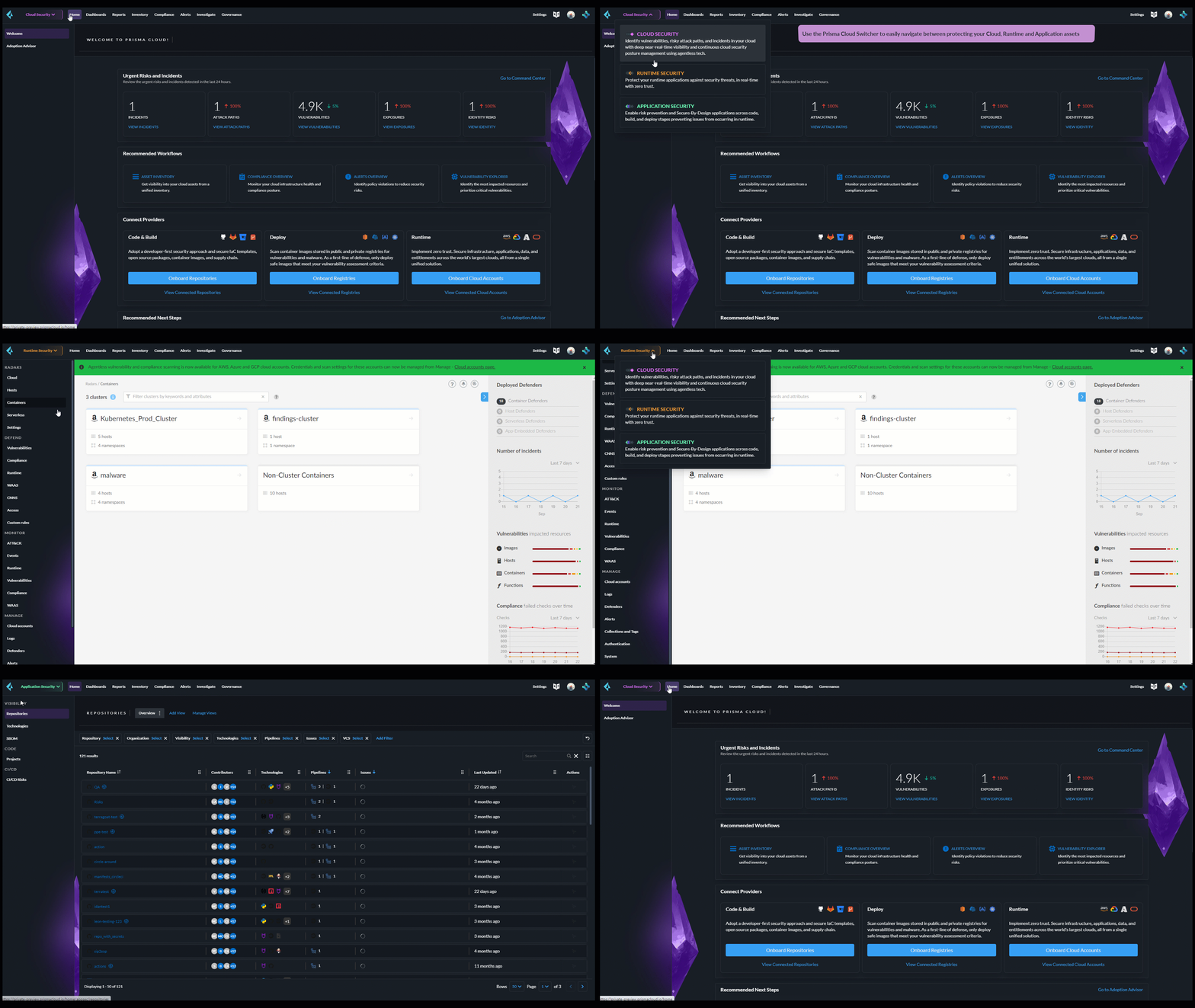
Select a persona from the Prisma Cloud switcher as shown below to efficiently navigate between the full set of features available for each phase of the cloud application lifecycle.
## Key Features
Prisma Cloud is a SaaS platform comprising several features providing wholistic security coverage and protection. Let’s take a closer at how you can proactively detect threats and protect your cloud resources with Prisma Cloud:
### Cloud Security
Prisma Cloud’s full breadth of Cloud Security capabilities helps you secure your cloud estate against attack vectors originating from identity issues, misconfigurations, and unaddressed vulnerabilities. Tracking vulnerabilities across your cloud environment, Cloud Security helps you contextualize risks across your cloud environment with features such as:
* 99% of cloud users, roles, services, and resources had excessive permissions that remained unused. Prisma Cloud’s **Cloud Identity and Entitelment Management (CIEM)** capabilities helps you detect privilege access risks. With Cloud Security, you can view urgent alerts trigerred by overly permissive access and review and remediate net-effective permissions for both users and machines.
* **Search and Investigate** helps you visualize your cloud estate to better understand the posture of your cloud assets. You can investigate all your security risks and incidents in one place contextually through an interactive graph and prioritize the most important vulnerabilites and identify root cases.
* **Discovery and Exposure Management** Dashboard helps you view shadow assets from an attacker perspective and bring these assets under governance. Double click on any vulnerable unmanaged asset to send an email to the asset owner to investigate further. Alternatively, you can also map the asset to an account owner and select **Convert to Managed** to instantly onboard the asset and start governance.
### Runtime Security
Runtime security helps secure microservices, hosts, containers and serverless functions across the application lifecycle. With Prisma Cloud, your development teams can adopt the architecture that fits their needs without worrying about security keeping pace with release cycles or protecting a variety of tech stacks.
* Prisma Cloud includes a comprehensive inventory list of all APIs without any additional configuration, helping you discover shadow APIs. Clicking into any API endpoint provides comprehensive details, including clients communicating with it, and sensitive PII data transmitted by users and returned by servers. A graphical representation is alo available to provide a broader application context helping you identify the location of API exposing workload or services.
* The [Vulnerabilites Dashboard](/content-collections/dashboards/dashboards-vulnerabilities.md) provides you a single pane of glass view into prioritized vulnerabilities, helping you move faster from finding to fixing. Vulnerability management teams can now see what engineers and DevOps are adding to the pipeline, while engineers and DevOps can see the impact of their contributions across code, deploy, and runtime assets.
Explore any vulnerability widget to further investigate the vulnerable assets identified across the lifecycle, from IaC files in code & build to registry images deployed to the runtime as Hosts, Containers and Serverless Functions. Remediation options are available at the source, including creating a PR fix for the vulnerable packages.
### Application Security
Application Security seamlessly integrates into your software delivery chain, capturing crucial information such as programming languages and frameworks, CI/CD pipelines and plugins. It then maps this information to their respective repositories, creating a comprehensive "Technical DNA" of your software engineering ecosystem, including robust Supply Chain security, providing a comprehensive inventory and visualization of application dependencies through a graphical interface designed to bridge developer, operations, and security workstreams. In addition, Application Security scans to detect Infrastructure-as-Code (IAC) resources, direct and indirect Software Composition Analysis (SCA) packages, and secrets declared in code.
This comprehensive visibility allows you to gain valuable insights into the various components of your engineering environment, enabling enhanced analysis, monitoring security and implementation of tailored security measures. It ensures that you can prioritize and address critical risks without disrupting your engineering processes. This ensures a complete understanding and security posture of your organization’s engineering ecosystem. On average it takes engineering teams more than 120 days (4 months) to fix and redeploy code after a vulnerability is identified.
## Key Concepts
New to cloud security and unsure where to start? Review a few concepts that are central to your understanding of cloud security in the [Cloud Security Glossary and FAQs](https://www.paloaltonetworks.com/cyberpedia/cloud-security-glossary-faqs). Here you will get a gist of the nuts and bolts of Cloud Security Posture Management as well as high-level overviews of concepts such as zero trust frameworks, vulnerability management etc.
## License and Credits
Prisma Cloud is available in two deployment models - SaaS (Prisma Cloud Enterprise Edition) and Self Hosted (Prisma Cloud Compute Edition). Each edition provides unique capabilities and coverage. Both editions are comprised of features offered to provide comprehensive security coverage for every stage of the application lifecycle. Review all the available [license options](https://www.paloaltonetworks.com/resources/guides/prisma-cloud-pricing-and-editions) in detail.
You can leverage all the rich functionality available in each feature set via Credits, a universal capacity unit utilized by all product features. Each product feature set requires a specific number of Credits. Overall usage of Prisma Cloud is measured based on the aggregate number of Credits used across the product. Credits are available for purchase in 100 unit increments.
### Cloud Security Plans
Prisma Cloud Enterprise offers plans based on recommended approaches for securing cloud environments. You have two options to purchase [licenses](/content-collections/administration/prisma-cloud-licenses.md) on Prisma Cloud, Standard (a la carte) or Bundles (Foundations or Advanced). After purchase, the corresponding features are automatically enabled on your tenants.
### Find your License
Navigate to **Settings > Licensing** from the Prisma Cloud console, to easily identify your active license type, monitor your average credit use, and view credit consumption rate by cloud account and cloud type.
On the Licensing page you can find answers to the following qustions:
* What type of Prisma Cloud license do I have?
The **License Information** section provides details on license type, current active license, and support plan. It also includes information on your Prisma Cloud tenant, such as the Tenant ID and purchased credits. Here you can also add filters to monitor your license and credit use by cloud account, account group, time range, and cloud type.
* How do I map usage trends in my accounts?
The **License Consumption** graph provides the overall view of your license consumption trends for the selected time period. Views can be filtered by cloud type. Here you can map your organization’s credit consumption against the average credit usage for a specified time period. Credit consumption is measured hourly and averaged to create daily samples. The credit usage for a specified time range uses the appropriate hourly, daily or monthly average. If there is less than 30 days of data available, the average is calculated using the days available. Monitor usage trends to identify and reduce usage spikes that can add up over time.
The **Usage Consumption Split** provides you with a breakdown of credit consumption per Prisma Cloud feature set. Compare credit use across features sets to further investigate the source of usage spikes in any given time period.
* How do I monitor my credit consumption?
The **Consumption Details Table** provides you with the average credit usage for monitored Run Time and Build Time assets. The Build Time view displays data only if the Application Security subscription is activated. Use this view to monitor credit usage across cloud accounts, and features sets grouped into Run Time and Build Time.
* How do I increase my purchased credits?
If the 90-day average of your credit usage exceeds the quantity of your purchased credits, Palo Alto Networks will contact you to increase your purchased credits in order to reflect your higher credit usage. You can also configure [Prisma Cloud Alarms](https://github.com/PaloAltoNetworks/pc-docs-md/tree/main/enterprise-edition/content-collections/administration/alarm-center/alarm-center.md) to receive notifications on your credit usage levels.
### License Expiration
Prisma Cloud licenses are valid for the period of time associated with the license purchase. After your Prisma Cloud license expires, your access to the Prisma Cloud administrative console is disabled until you initiate renewal.
If the license is not renewed within the first 120-days of your license expiration (“Grace Period”), your Prisma Cloud tenant is completely deleted. It may take up to 30 days after the Grace Period to permanently delete the data you provided and stored in the Prisma Cloud console and/or API, except in the case of the Cloud Application Security module, it will take up to 365 days from the last date of scan to permanently delete your data.
---
# Agent Instructions
This documentation is published with GitBook. GitBook is the documentation platform designed so that both humans and AI agents can read, navigate, and reason over technical content effectively. Learn more at gitbook.com.
## Querying This Documentation
If you need additional information that is not directly available in this page, you can query the documentation by asking a question.
Perform an HTTP GET request on the following URL with the `ask` and `goal` query parameters:
```
GET https://docs.prismacloud.io/content-collections/get-started/welcome-to-prisma-cloud.md?ask=&goal=
```
`ask` is the immediate question: it should be specific, self-contained, and written in natural language.
`goal` is what the user is ultimately trying to achieve, the reason they need the answer. Sharing it helps GitBook give you a better, more relevant answer. A goal is most helpful when it describes the outcome the user wants rather than restating the question. For example, with `ask=how do I create an API token`, a goal like `automate deployments from our CI pipeline` lets GitBook tailor the answer to that use case.
The response will contain a direct answer to the question and relevant excerpts and sources from the documentation.
Use this mechanism when the answer is not explicitly present in the current page, you need clarification or additional context, or you want to retrieve related documentation sections.