> For the complete documentation index, see [llms.txt](https://docs.prismacloud.io/llms.txt). Markdown versions of documentation pages are available by appending `.md` to page URLs; this page is available as [Markdown](https://docs.prismacloud.io/content-collections/governance/anomaly-policies.md).
# Anomaly Policies
Anomaly policies use audit logs and network flow logs to help you identify unusual network and user activity for all users, and are especially critical for privileged users and assumed roles where detecting unusual activity may indicate the first steps in a potential misuse or account compromise. These policies rely on threat feeds to resolve IP addresses to geo-locations and perform user entity behavior analysis (UEBA). When Prisma Cloud identifies a suspicious IP address, the threat feed enables you to classify and view more information on the malicious IP addresses with which the suspicious IP address is communicating, so you can quickly figure out which alerts to pay attention to and act on.
Before the service can detect unusual activity for your enterprise, you must [Define Prisma Cloud Enterprise and Anomaly Settings](/content-collections/administration/define-prisma-cloud-enterprise-settings.md#id5326b191-bf23-4545-bc05-620d113bf54d) to specify a training threshold and set the baseline for what are normal trends in your network. To set this baseline, Prisma Cloud gathers information about the user or identities used to access the monitored cloud accounts, the devices used for access, the IP addresses and locations they come from, the ports and protocols typically used, the cloud services they use and the frequency, the hours within which they access these applications, and the activities they perform within the cloud services.
Anomaly policies alert you to the following issues:
**Account hijacking attempts**—Detect potential account hijacking attempts discovered by identifying unusual login activities. These can happen if there are concurrent login attempts made in short duration from two different geographic locations, which is *impossible time travel* (ITT), or login from a previously unknown browser, operating system, or location. It includes one policy with the name **Account hijacking attempts**.
**Anomalous provisioning of cloud instances**—Detect unusual activity related to the provisioning of computing resources within a short time and involving a high number of instances created, the provisioning activity originating from TOR exit nodes, or the provisioning activities originating from multiple distant locations. This behavior typically indicates the creation of unauthorized loud instances for cryptojacking purposes. It includes one policy with the name **Anomalous compute provisioning activity**.
**Cryptomining domain request activity**—Detect when monitored resources attempt to contact a known cryptomining pool using DNS protocol to retrieve the IP address of the cryptominer.
**DGA domain request activity**—Detect when monitored resources attempt to resolve domain names in which domain names look like they are generated by an algorithm.
**DNS rebinding activity**-Detect when computing resources perform domain requests for rebinding domains. The policy identifies when a monitored resource is the target of a DNS rebinding attack and could expose HTTP services that are otherwise unreachable from the Internet.
**Excessive login failures**—Detect potential account hijacking attempts discovered by identifying brute force login attempts. Prisma Cloud dynamically evaluates excessive login failure attempts using the models observed with continuous learning. It includes one policy with the name **Excessive login failures**.
**Network evasion and resource misuse**—Detect unusual server port activity or unusual protocol activity from a client within or outside your cloud environment to an server host within or outside your network using a server port or an IP protocol that is not typical to your network traffic flows. The anomaly policies also detect potential resource misuse when a host inside your cloud environment with no prior mail-related network activity starts generating outbound SMTP traffic. It includes five policies- spambot activity, unusual server port—internal and external, unusual protocol—internal and external.
**Network reconnaissance**—Detect port scan or port sweep activities that probe a server or host for open ports. The port scanning policies identify when an attacker is performing a vertical scan to find any ports on a target, and the port sweep detects a horizontal scan where an attacker is scanning for a specific port on many targets hosts. These default policies identify whether the source of the attack originates from an instance within your cloud environment or the internet and targets the cloud environment that Prisma Cloud monitors. It includes four policies- Port scan activity—internal and external, port sweep activity—internal and external
**Suspicious network actors**—Exposes suspicious connections by inspecting the network traffic to and from your cloud environment and correlating it with AutoFocus, Palo Alto Networks threat intelligence feed. AutoFocus identifies IP addresses involved in suspicious or malicious activity and classifies them into one of eighteen categories. Some examples of the categories are Backdoor, Botnet, Cryptominer, DDoS, Ransomware, Rootkit, and Worm. There are thirty-six policies, two for each of the eighteen categories—internal and external.
**User activity from TOR network**—Detect suspicious activity from the TOR anonymity network, as subjects intend to hide their identity for a reason, most likely a malicious one. Identifying activity from the TOR network is of utmost importance for early attack detection. The different cloud services an attacker can access are aggregated into service groups to help customers identify suspicious events from the cloud services they want to monitor. There are sixteen service groups, including compute, containers, database, networking, and security services. It includes sixteen policies, one for each service group.
**Unusual user activity**—Discovers insider threats and account compromises using advanced data science. Prisma Cloud detects deviations from typical user behavior, by profiling users’ console and API activities to identify types of cloud services accessed and accessed locations. It includes one policy with the name **Unusual user activity**.
**Unusual usage of workload credentials**-Detect when a credential assigned to a workload resource is used from a different resource, which could be outside or inside the cloud service provider. It includes two policies which are triggered when the anomalous IP address is outside the IP address space of the cloud provider or when the anomalous IP address is inside the IP address space of the cloud provider. The policies severity is medium.
The following anomaly policies are enabled by default:
* Account hijacking attempts
* Excessive login failures
* Port scan activity (Internal)
* Port sweep activity (Internal)
* Spambot activity
* Unusual protocol activity (External)
* Unusual protocol activity (Internal)
* Unusual server port activity (External)
* Unusual server port activity (Internal)
* Unusual user activity
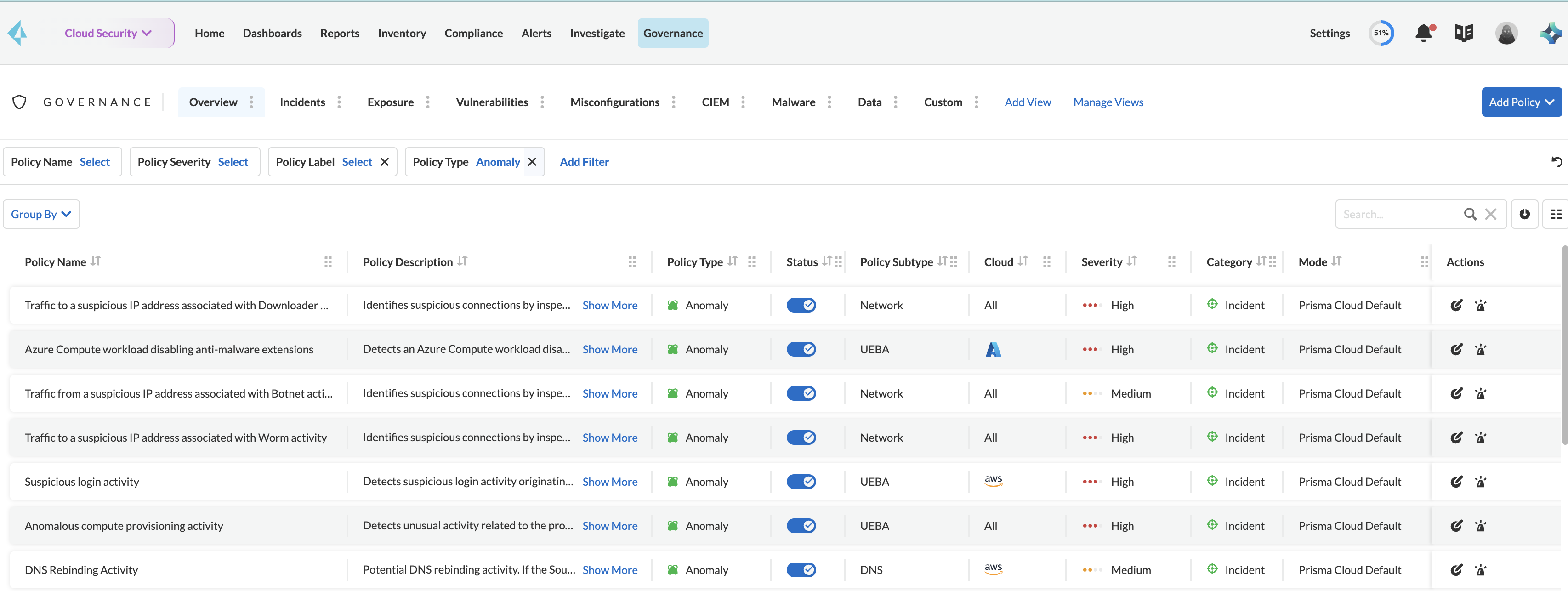
To find all anomaly policies on Prisma Cloud, go to **Governance** and filter the policies based on PolicyType as **Anomaly**.
The names of the network anomaly policies are self explanatory, which makes it easier to identify cloud resources involved in the alerts reported by these policies. The **Resource Name** column in the alert details for external network anomaly policies (except for *Port Sweep activity*) displays the internal resource (cloud instance) targeted or generating traffic. The *Port Sweep activity (External)* network anomaly policy involves multiple internal resources and selecting only one can create confusion, so it displays the public IP address in the **Resource Name** column.
Prisma Cloud recommends that you periodically review the list of Anomaly policies and assess the ones you would like to enable for your enterprise. For example, the **Anomalous compute provisioning activity** policy is not enabled by default. When enabled, this policy detects potential creation of an unauthorized network of compute instances either accidentally or for cryptojacking.
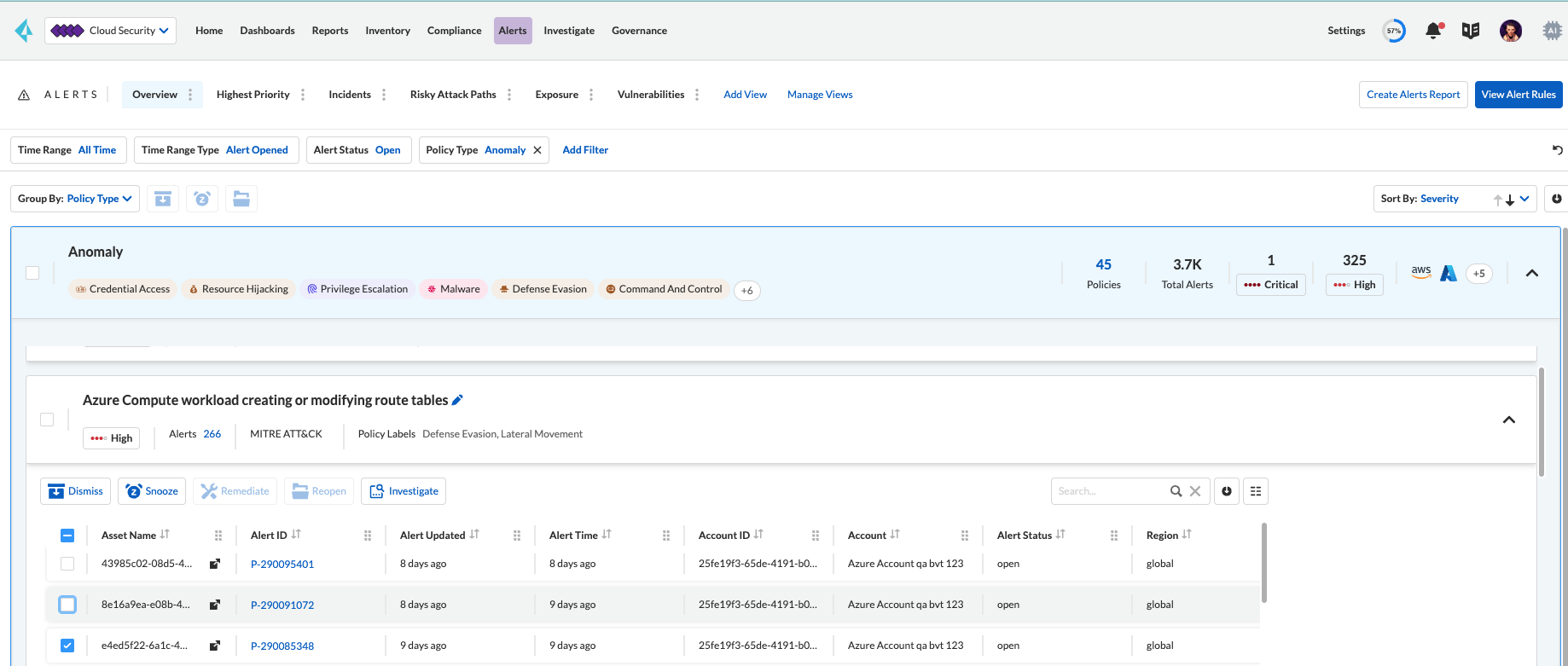
Alerts generated for anomaly policies are grouped by policy and then by user. Because the same IP address can resolve to different locations at different points in time, if there is an unusual user activity from a previously unseen location for an IP address that has been seen before, Prisma Cloud does not generate an anomaly alert (and reduces false positives). This does not talk about the network alerts. With the network alerts, you can see additional information like the ports scanned, the related attack vectors, and the host vulnerabilities related to the machines. These provide additional context that help make the prioritization and investigation easier.
If you want to add one or more IP addresses as trusted sources, see [Trusted IP Addresses on Prisma Cloud](https://github.com/PaloAltoNetworks/pc-docs-md/tree/main/enterprise-edition/content-collections/administration/trusted-ip-addresses-on-prisma-cloud.md). For adding other resource types, such as tags or cloud services in a trusted list to suppress alerts, see [Suppress Alerts for Prisma Cloud Anomaly Policies](/content-collections/alerts/suppress-alerts-for-prisma-cloud-anomaly-policies.md).
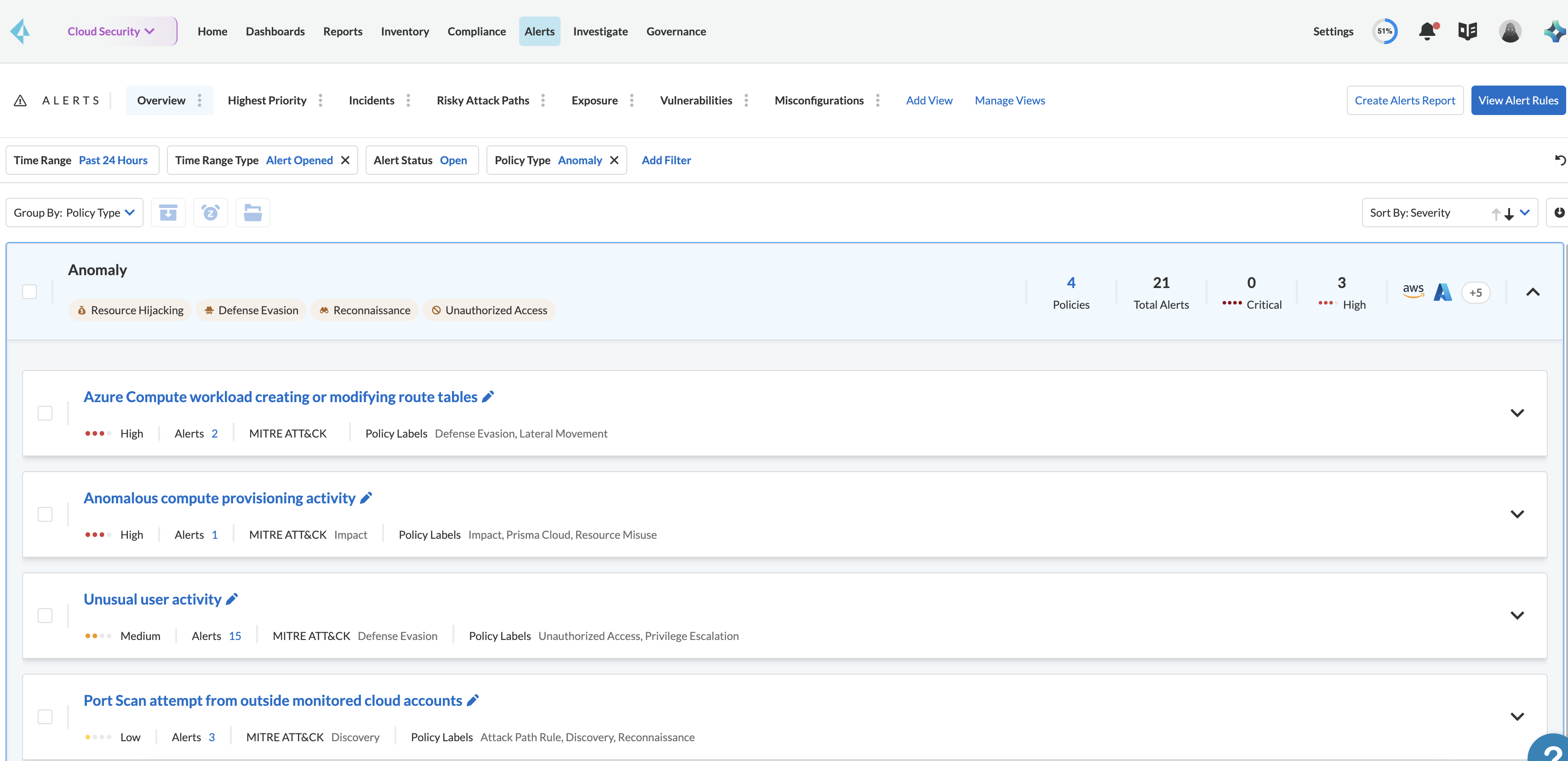
To view alerts generated for an anomaly policy, see **Alerts > Overview**, and filter for alerts generated against anomaly policies and get the details on what was identified as unusual or suspicious activity. Note that multiple alerts of the same type (when a user accesses a resource that is flagged as an anomaly), are logged as a single alert, while a distinct alert is generated if the same user accesses another type of resource.
Alerts generated against the anomaly policies also include additional context based on threat feed information from Autofocus and Facebook Threat Exchange. If you have an AutoFocus license, you can click the IP address link to launch the AutoFocus portal and search for a Suspicious IP address directly from the **Investigate** page, see [Prisma Cloud to Investigate Network Incidents](https://github.com/PaloAltoNetworks/pc-docs-md/tree/main/enterprise-edition/content-collections/search-and-investigate/network-queries/network-queries.md).
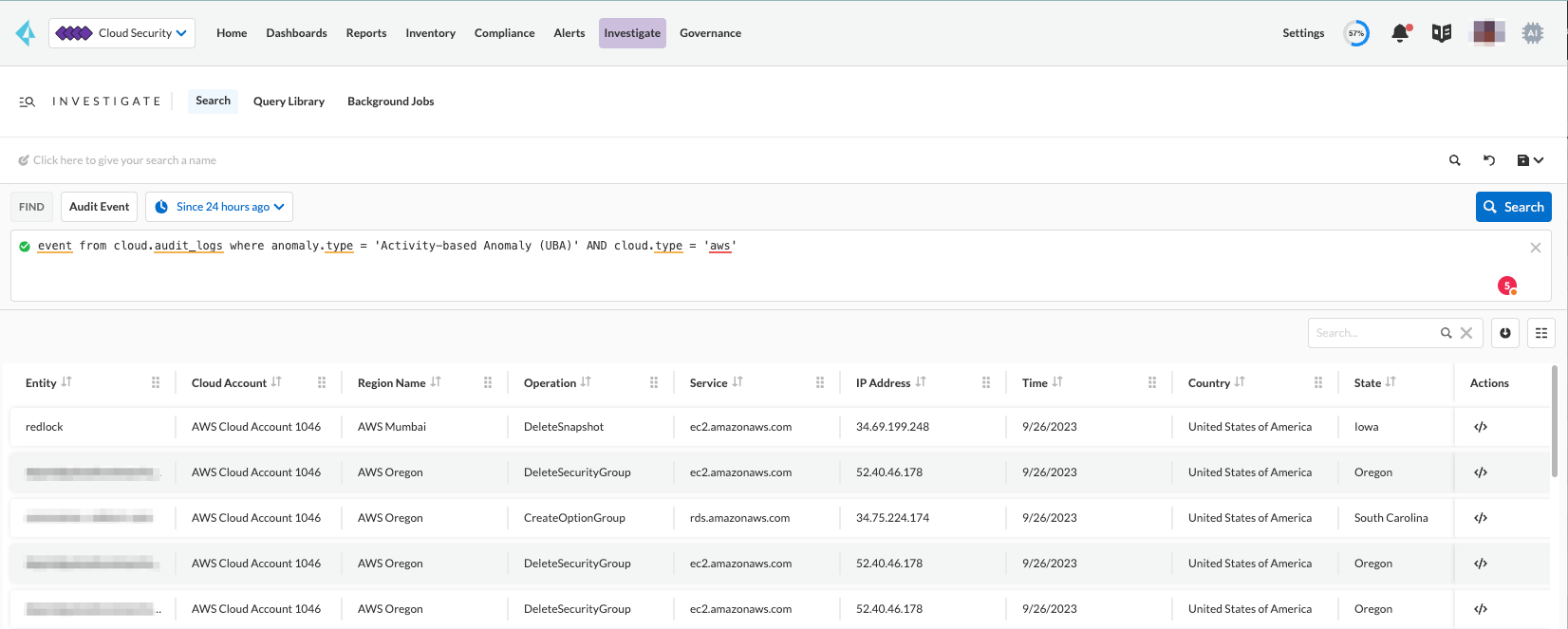
Go to **Investigate > Search** to search and investigate the audit events for UEBA anomaly policies.
## Cloud Service Providers Supported for Anomaly Policies
Anomaly policies are of four subtypes — Network, UEBA, DNS Analytics, and Identity. The network anomaly policies process network flow logs to identify attacks from the network activity observed; the UEBA anomaly policies detect attacks from the user activity recorded in the audit event logs.
The table below shows the services used by the Prisma Cloud to read the audit event and network flow logs from each of the cloud providers supported:
| Data from | AWS Services | Azure Services | GCP Services |
| ----------------- | -------------- | --------------------- | -------------------------- |
| Audit Event Logs | AWS CloudTrail | Azure Monitor | Google Stackdriver Logging |
| Network Flow Logs | AWS CloudWatch | Azure Network Watcher | Google Stackdriver Logging |
All the network anomaly policies are available for detecting potential issues on AWS, Azure, and GCP.
Most of the UEBA anomaly policies support all of the cloud providers for which Prisma Cloud ingests audit event logs. There are five policies for which there is partial support; Prisma Cloud only ingests AWS login activity, which restricts the coverage provided by the account hijacking attempts, excessive login activity, and suspicious login activity policies. Support in Azure and GCP for suspicious activity in IoT services and suspicious activity in media services policies is not available at present.
---
# Agent Instructions
This documentation is published with GitBook. GitBook is the documentation platform designed so that both humans and AI agents can read, navigate, and reason over technical content effectively. Learn more at gitbook.com.
## Querying This Documentation
If you need additional information that is not directly available in this page, you can query the documentation by asking a question.
Perform an HTTP GET request on the following URL with the `ask` and `goal` query parameters:
```
GET https://docs.prismacloud.io/content-collections/governance/anomaly-policies.md?ask=&goal=
```
`ask` is the immediate question: it should be specific, self-contained, and written in natural language.
`goal` is what the user is ultimately trying to achieve, the reason they need the answer. Sharing it helps GitBook give you a better, more relevant answer. A goal is most helpful when it describes the outcome the user wants rather than restating the question. For example, with `ask=how do I create an API token`, a goal like `automate deployments from our CI pipeline` lets GitBook tailor the answer to that use case.
The response will contain a direct answer to the question and relevant excerpts and sources from the documentation.
Use this mechanism when the answer is not explicitly present in the current page, you need clarification or additional context, or you want to retrieve related documentation sections.