> For the complete documentation index, see [llms.txt](https://docs.prismacloud.io/llms.txt). Markdown versions of documentation pages are available by appending `.md` to page URLs; this page is available as [Markdown](https://docs.prismacloud.io/content-collections/multitenant-management/multitenant-management-introduction.md).
# Multitenant Management Introduction
Effectively deliver security at scale with Prisma Cloud’s Multitenant Management service. Multitenant Management offers a rich set of features including a centralized dashboard for the efficient management of a large number of tenants. Tenants managed by the Multitenant Management console are called managed Prisma Cloud tenants.
With the Multitenant Management console you can streamline the following functions:
* Manage and operate a large number of tenants from a single console.
* Dynamically create and delete tenants on demand.
* Efficiently segment and manage customers into industry defined groups such as Healthcare, Finance, and more.
* Segment tenants by reallocating credits as needed, between tenants under management.
* Isolate your customer’s data in adherence with established security best practices.
* Get centralized visibility into security telemetry such as incidents, attack paths, and misconfigurations.
* Create policy groups from a set of out-of-the-box policies and custom policies. Map policy groups to tenant groups from the console.
* Manage modules by selectively enabling optional modules during tenant creation.
* Get visibility into credit usage across all managed Prisma Cloud tenants.
## Multitenant Management Console Features
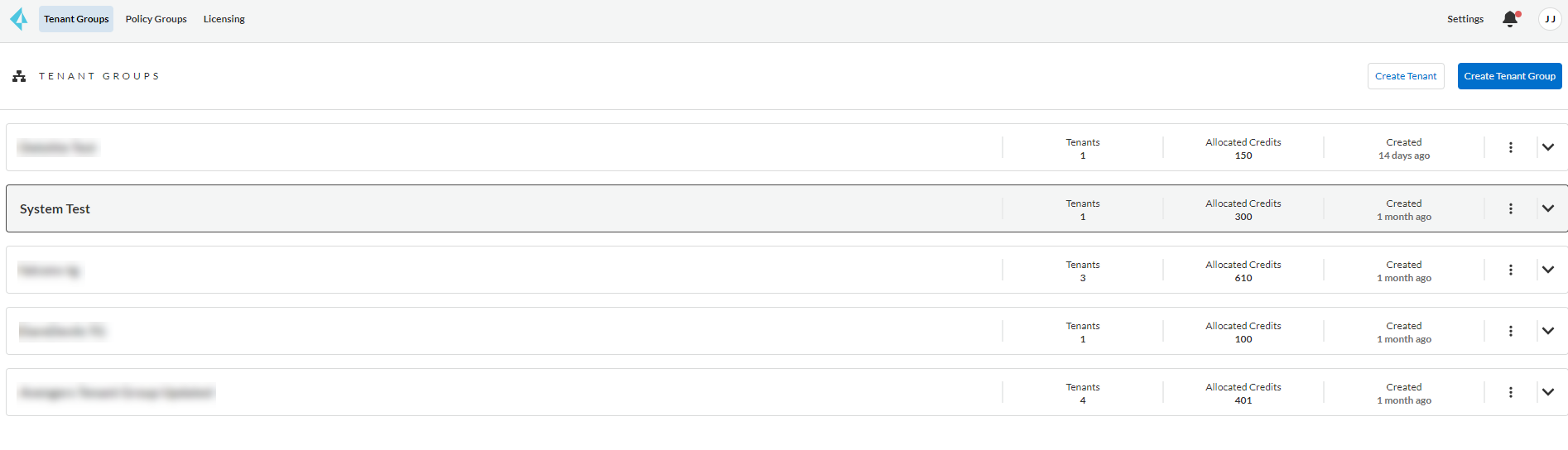
The Multitenant Management console features three dashboards that help you streamline the creation and management for tenants, policies and their related operations as shown below:
**Operation Alerts**
On the Multitenant Management console you can select the bell icon to view **Operation Alerts** for the status of all actions that are performed by a user on the Multitenant Management console. The following operations are displayed on the alarm center:
* Operation Name
* Operation Description
* Mapping Policy
* When a user ‘maps’ a policy group to a tenant group.
* Unmapping Policy
* When a user ‘unmaps’ a policy group from a tenant group.
* User Creation
* Creation of user on the Multitenant Management console
* Tenant Provisioning
* When a user creates a tenant
* Tenant Update
* When a user updates a tenant (such as, tenant group change, credit change)
Failed user initiated operations are listed as an entry on the **Operation Alerts** page. Additionally, users have the option to retry the failed operation. Click on the retry button available on the listing of each failed operation to retry a previous attempt.
**Licensing Dashboard**
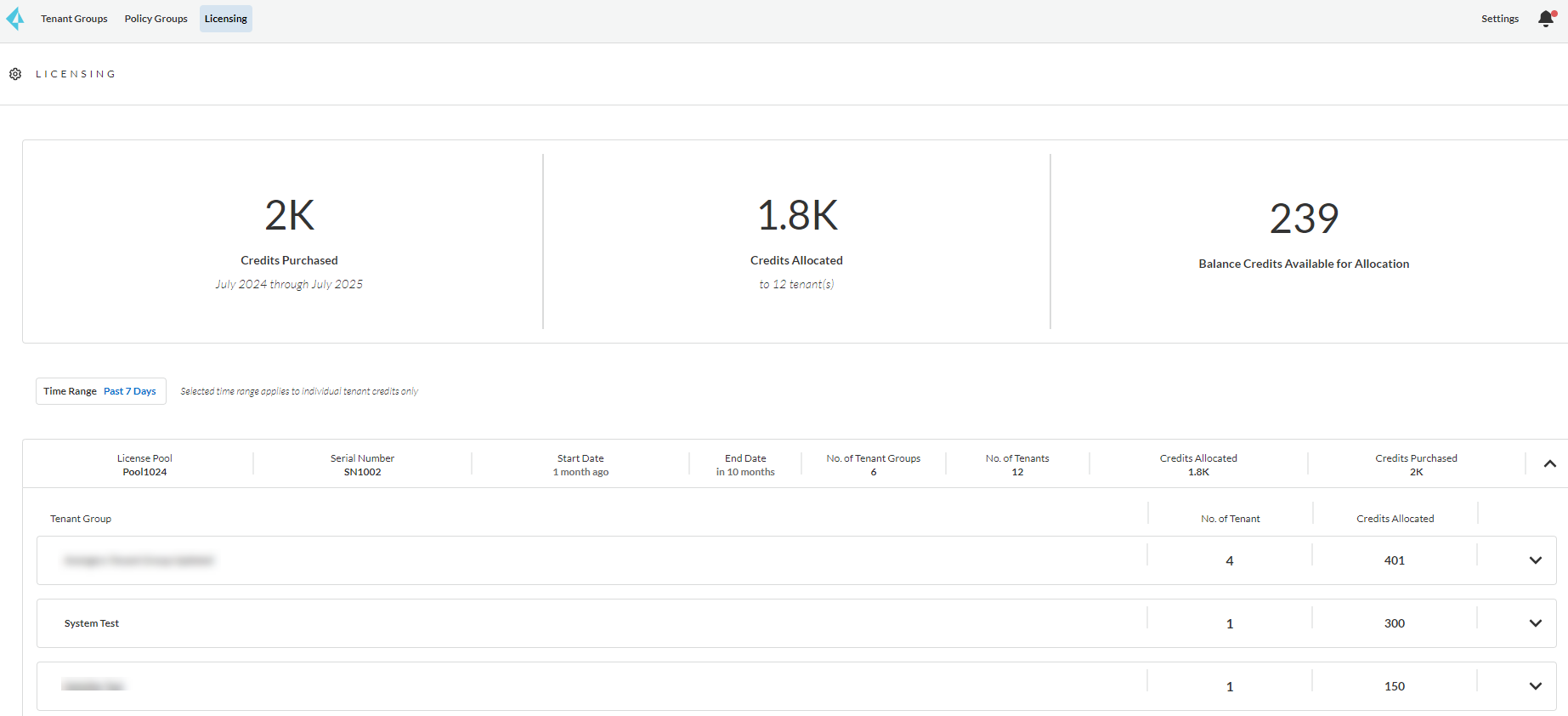
From the Multitenant Management console, select **Licensing** to view details about credits purchased, credits allocated, and the tenants groups that they are allocated to as shown below.
You may experience an issue on the licensing dashboard, where there is a mismatch between the credits reported on a tenant group and the credits reported on the dashboard, when a tenant fails to create successfully.
To resolve this issue, retry the failed tenant create operation from the **Operations Alerts** panel. Alternatively, create a new tenant from the tenant creation workflow.
This is a benign issue and only impacts the credits reported for the tenant on the tenant group on the licensing dashboard. It does not impact the accurate reporting of the quantity of credits purchased, credits allocated, or the balance.
## Key Concepts
See the table below to learn about the Multitenant Management concepts and terminology.
| Term | Definition |
| ---------------------------------------------------------- | ------------------------------------------------------------------------------------------------------------------------------------------------------------------------------------------------------------------------------------------------------------------------------------------------------------------------------------------ |
| Multitenant Management Console | A centralized dashboard that allows yous to manage and operate multiple Prisma Cloud Tenants (referred to as Managed Prisma Cloud Tenants). |
| Managed Prisma Cloud Tenant | A tenant managed by the Multitenant Management console. |
| Prisma Cloud Tenant for Policy Creation (Synthetic Tenant) | A tenant used to create custom policies and test RQL queries. This is a limited capability tenant with other capabilities disabled. |
| Tenant Groups | A logical grouping of managed Prisma Cloud tenants. |
| Policy Groups | A logical grouping of either out-of-the-box Prisma Cloud policies or custom Prisma Cloud policies (that maps to Tenant groups). |
| User |
An entity with access to the Multitenant Management console.
NOTE: All users created on the Prisma Cloud Multitenant Management console are admins on the console. Users created on the console are replicated and created as an Admin on all Prisma Cloud managed tenants.
|
| Policy Groups Mapping (to Tenant Group Mapping) | Process of mapping policies in a policy group to the tenants of the selected tenant group. |
| Licensing | Reporting framework for Prisma Cloud tenant credit usage. |
See the table below to learn more about the functions that the Multitenant Management console **System Administrator** role can perform.
| Function | Permission Status |
| ------------------------------------------------------------ | ----------------------- |
| Create Tenant | Allowed |
| Create Tenant Group | Allowed |
| Create Policy | Allowed |
| Create Policy Group | Allowed |
| Map Policy Group to Tenant Group | Allowed |
| View Tenants Groups | Allowed |
| View Policies and Policy Groups | Allowed |
| View Licensing | Allowed |
| Seamless login into Managed Prisma Cloud Tenant | Allowed |
| Prisma Cloud Tenant Operations (Managed Prisma Cloud Tenant) | System Admin Privileges |
---
# Agent Instructions
This documentation is published with GitBook. GitBook is the documentation platform designed so that both humans and AI agents can read, navigate, and reason over technical content effectively. Learn more at gitbook.com.
## Querying This Documentation
If you need additional information that is not directly available in this page, you can query the documentation by asking a question.
Perform an HTTP GET request on the following URL with the `ask` and `goal` query parameters:
```
GET https://docs.prismacloud.io/content-collections/multitenant-management/multitenant-management-introduction.md?ask=&goal=
```
`ask` is the immediate question: it should be specific, self-contained, and written in natural language.
`goal` is what the user is ultimately trying to achieve, the reason they need the answer. Sharing it helps GitBook give you a better, more relevant answer. A goal is most helpful when it describes the outcome the user wants rather than restating the question. For example, with `ask=how do I create an API token`, a goal like `automate deployments from our CI pipeline` lets GitBook tailor the answer to that use case.
The response will contain a direct answer to the question and relevant excerpts and sources from the documentation.
Use this mechanism when the answer is not explicitly present in the current page, you need clarification or additional context, or you want to retrieve related documentation sections.