> For the complete documentation index, see [llms.txt](https://docs.prismacloud.io/llms.txt). Markdown versions of documentation pages are available by appending `.md` to page URLs; this page is available as [Markdown](https://docs.prismacloud.io/content-collections/prisma-cloud-copilot/prisma-cloud-copilot-faqs.md).
# Prisma Cloud Copilot FAQs
Here are few frequently asked questions (FAQs) regarding Prisma Cloud Copilot.
* **What language models are used by Prisma Cloud Copilot?**
Prisma Cloud Copilot uses a large language model (LLM) provided by one of the leading LLM vendors. Prisma Cloud has an enterprise level agreement with the LLM provider ensuring that no data is used to further train those LLMs.
* **Does Prisma Cloud Copilot use any of my data for model training?**
Prisma Cloud Copilot **does not** use your data for training the models used in the Copilot. Prisma Cloud uses foundational models (LLMs trained with publicly available data) for two purposes:
* Natural language translation: Uses the LLM to understand the questions you ask.
* Summarization: Summarizes different pieces of information. For example, use of Prisma Cloud product documentation to answer your question. The LLM generates a response from those text chunks, which contains important information to provide the answer.
* **Where are my Prisma Cloud Copilot input prompts being processed?**
The ephemeral data processing functionality of Prisma Cloud Copilot is provided by an LLM vendor. Data is processed in memory by the LLM vendor for no longer than necessary to service the specific request in real-time and not retained in such a location.
The user prompt (what a Prisma Cloud user types in the Copilot) is sent to the LLM, which is hosted in a data center specified as per the table below. The LLM translates the user prompt into an API request or an RQL query, which is sent back to the Copilot. Either response (API request or RQL query) is executed locally within a Prisma Cloud stack and without LLM involvement. In cases of follow-up prompts, for example where the Copilot generates explanations about graphs, LLMs are used for summarization after masking out the sensitive information.
| **Prisma Cloud Stack Location** | **LLM Data Processing Location** |
| ------------------------------- | -------------------------------- |
| United States | United States |
| Canada | United States |
| Germany | EU |
| United Kingdom | EU |
| Ireland | EU |
| France | EU |
| Singapore | United States |
| India | United States |
| Australia | United States |
| Japan | United States |
| Indonesia | United States |
* **How does Prisma Cloud Copilot use my data to answer the questions it receives?**
Here’s how Prisma Cloud Copilot works and how it uses your data:
* **Step 1 (question contextualization)**
When you type a question in Prisma Cloud Copilot, the question is analyzed by the Copilot to determine if additional data is required to augment the question.
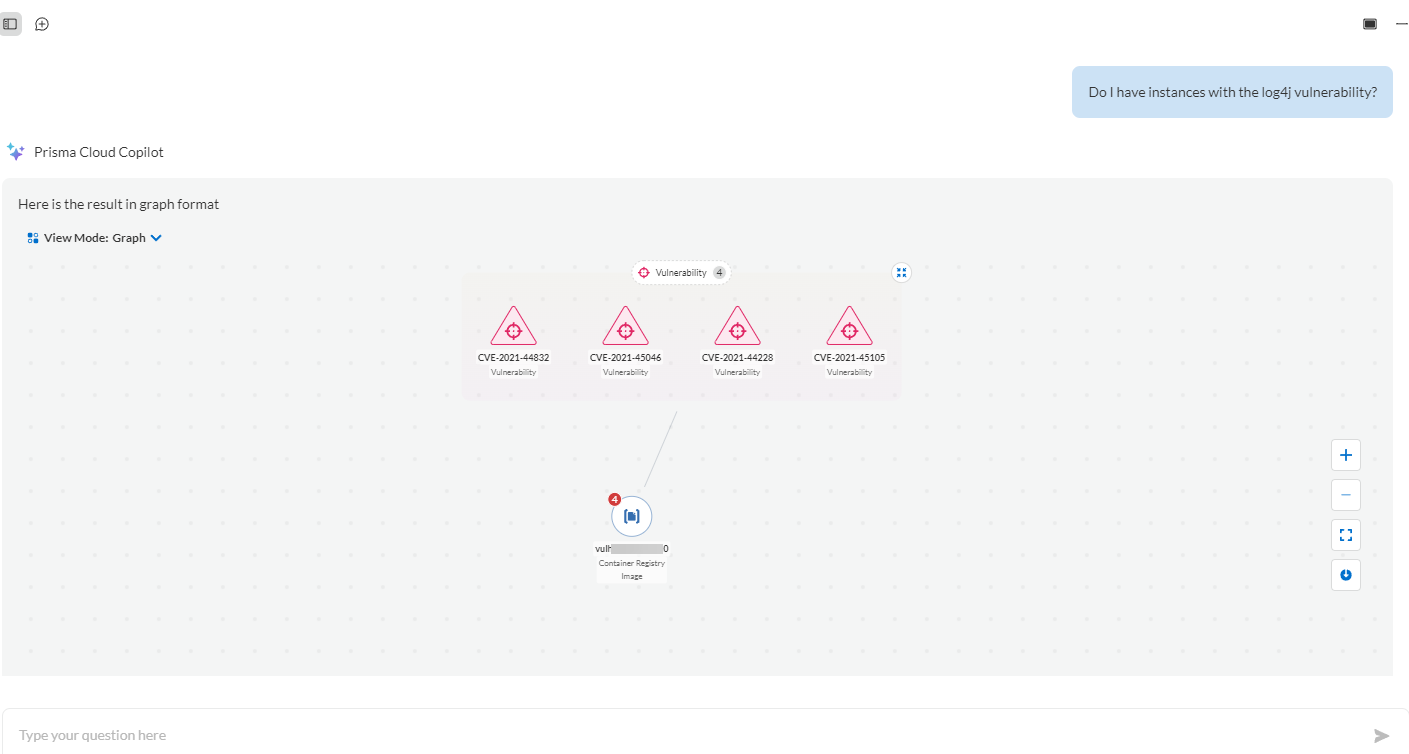
For example, when you type *Do I have instances with the log4j vulnerability?*, the Copilot identifies that log4j is a software package and adds to the question the list of CVE IDs associated with that software package.
* **Step 2 (question translation)**
The augmented question is sent to the LLM, which produces a representation of the question that can be used by the Copilot to programmatically answer the question.
For example, the *Do I have instances with the log4j vulnerability?* question, is transformed by the LLM in to the following RQL query:
`asset where asset.class = 'Compute' AND WITH : vuln where id IN ( 'CVE-2021-44228', 'CVE-2021-45046', 'CVE-2021-44832', 'CVE-2021-45105' )`
Your data is **not** sent to the LLM to generate the RQL statement.
* **Step 3 (local query)**
Prisma Cloud Copilot takes the response from the LLM and checks for accuracy. If the response is correct, the Copilot uses it to collect your data that is required to provide the final answer.
In the example used above, the RQL query is checked by a local language parser and then sent to the local API endpoint */search/asset* to identify the cloud instances with vulnerable log4j.
This step involving your data stays within Prisma Cloud. It is **not** sent to the LLM.
* **Step 4 (final answer)**
The answer from the API endpoint is received by Prisma Cloud Copilot, which is displayed as a graph.
In the example used above, the Copilot displays the list of instances with vulnerable log4j as a graph.
* **Can I disable Prisma Cloud Copilot?**
You can opt not to use the Copilot, however, you cannot disable it. The Copilot only works when you enter a prompt and it does not work in the background by itself.
---
# Agent Instructions
This documentation is published with GitBook. GitBook is the documentation platform designed so that both humans and AI agents can read, navigate, and reason over technical content effectively. Learn more at gitbook.com.
## Querying This Documentation
If you need additional information that is not directly available in this page, you can query the documentation by asking a question.
Perform an HTTP GET request on the following URL with the `ask` and `goal` query parameters:
```
GET https://docs.prismacloud.io/content-collections/prisma-cloud-copilot/prisma-cloud-copilot-faqs.md?ask=&goal=
```
`ask` is the immediate question: it should be specific, self-contained, and written in natural language.
`goal` is what the user is ultimately trying to achieve, the reason they need the answer. Sharing it helps GitBook give you a better, more relevant answer. A goal is most helpful when it describes the outcome the user wants rather than restating the question. For example, with `ask=how do I create an API token`, a goal like `automate deployments from our CI pipeline` lets GitBook tailor the answer to that use case.
The response will contain a direct answer to the question and relevant excerpts and sources from the documentation.
Use this mechanism when the answer is not explicitly present in the current page, you need clarification or additional context, or you want to retrieve related documentation sections.