> For the complete documentation index, see [llms.txt](https://docs.prismacloud.io/llms.txt). Markdown versions of documentation pages are available by appending `.md` to page URLs; this page is available as [Markdown](https://docs.prismacloud.io/content-collections/runtime-security/authentication/assign-roles.md).
# Assign Roles
After creating a user or group, you can assign roles to it. Roles determine the level of access to Prisma Cloud’s data and settings.
## Creating and Assigning roles to Compute Users in Prisma Cloud
There are a set of permissions that can be applied to a role while creating it.
### Permission Group and Advanced Options
Each of the permission groups in platform are mapped to Compute User roles. For more information see [Prisma Cloud User Roles mapping](/content-collections/runtime-security/authentication/user-roles.md).
### Account Groups
* You can assign onboarded cloud accounts in Prisma Cloud for RBAC access to Compute resources.
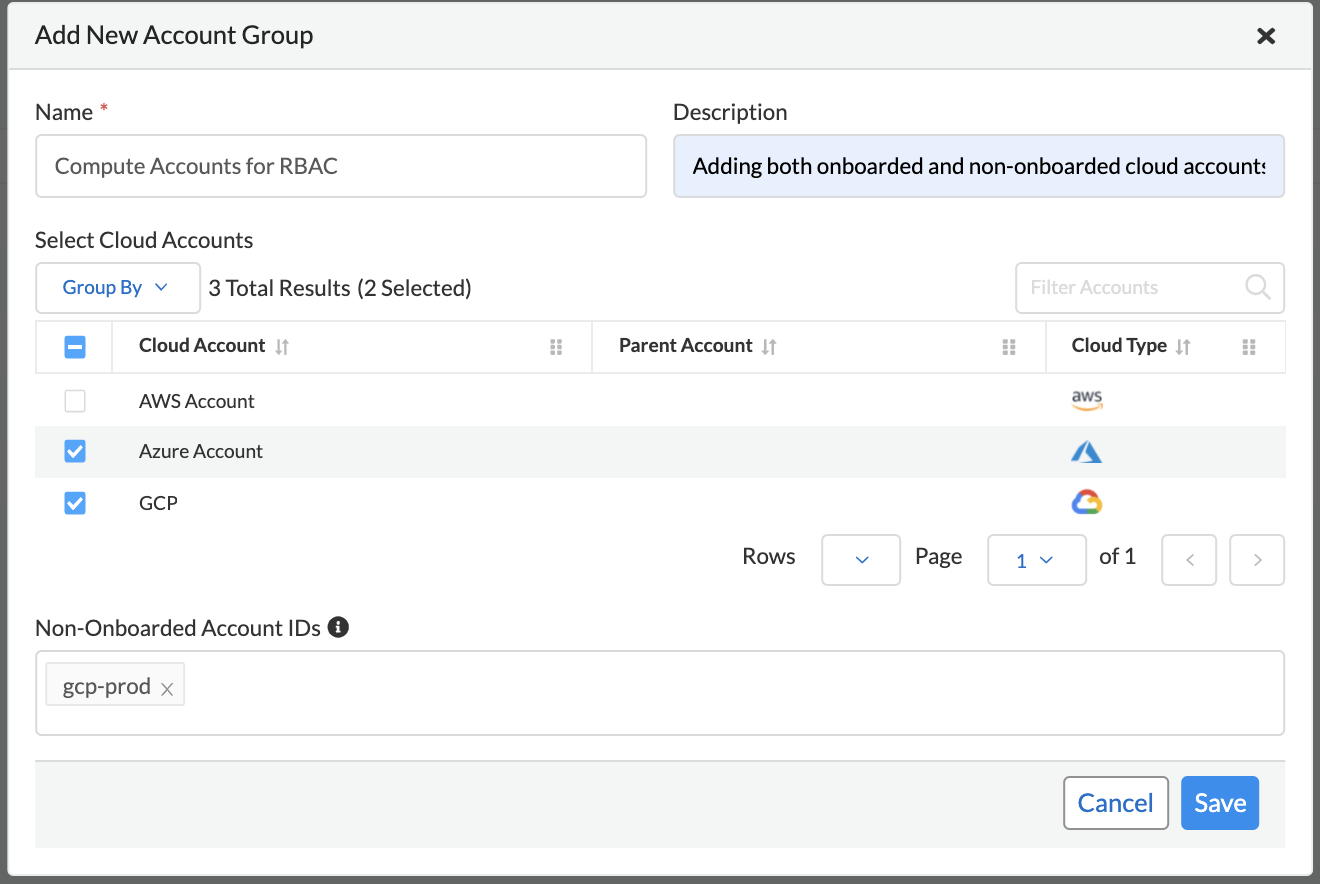
* Starting in Hamilton release, you can type "Account IDs" as string in the **Non-Onboarded Account IDs** field to give RBAC access to data in Compute from accounts that are not onboarded in Prisma Cloud.
* The following Account group consists of some onboarded cloud accounts and an additional account with ID "gcp-prod".
A wildcard for this textbox will be treated as "All" accounts regardless of onboarded or not, where account ID metadata is available. This doesn’t apply to Windows Defenders or other environments where cloud account metadata is not available.
### Resource Lists
Starting in Hamilton release, you can assign Resource lists with type **Compute Access Groups** in conjunction with Account Groups to Compute users.
These lists provide a light-weight mechanism to provision least-privilege access to the resources in your environment.
You can assign these to specific users and groups to limit their view of data and resources in the Compute Console.
Some entities like CI functions aren’t updated with new Compute Access group lists. Only the lists matched during the time of the scan.
These lists define an "and" relationship between resources, so creating a Compute access group with `functions: myfuncs*` and `images: myImages*` will match with nothing because a function doesn’t contain an image and an image doesn’t include a function.
1. Open Prisma Cloud Console, and log in with your admin credentials.
2. Go to **Settings > Resource Lists**.
3. Click **Add Resource List**.
1. Select **Compute Access Group**.
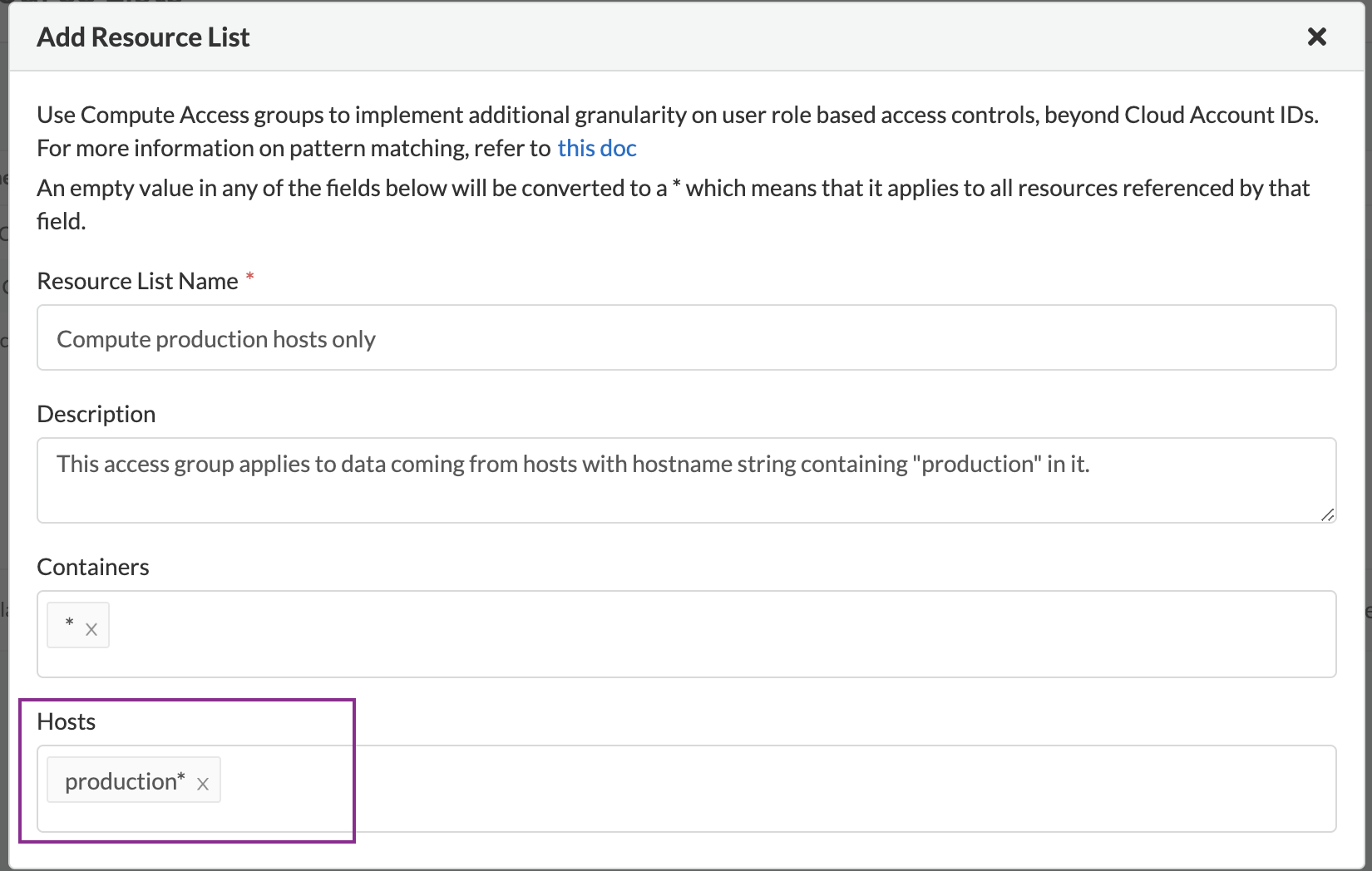
2. In the Add Resource List dialog, enter a name, description, and then specify a filter to target specific resources.
1. For example, the access group named 'Compute production hosts only' here gives access to Compute resources filtered on hosts where host name starts with 'production'.
For more information on syntax that can be used in the filter fields (e.g., containers, images, hosts, etc), see [Rule ordering and pattern matching](/content-collections/runtime-security/configure/rule-ordering-pattern-matching.md).
Individual filters on each field in Compute Access group aren’t applicable to all views. For example, a group created with only functions won’t include any resources when viewing hosts results. Similarly, a group created with hosts won’t filter images by hosts when viewing image results.
### Assigning Roles to User
Use a combination of the above fields to assign created roles to users
If a role allows access to policies, users with this role will be able to see all rules under the Defend section, even if the user’s view of the environment is restricted by assigned Compute Access Groups.
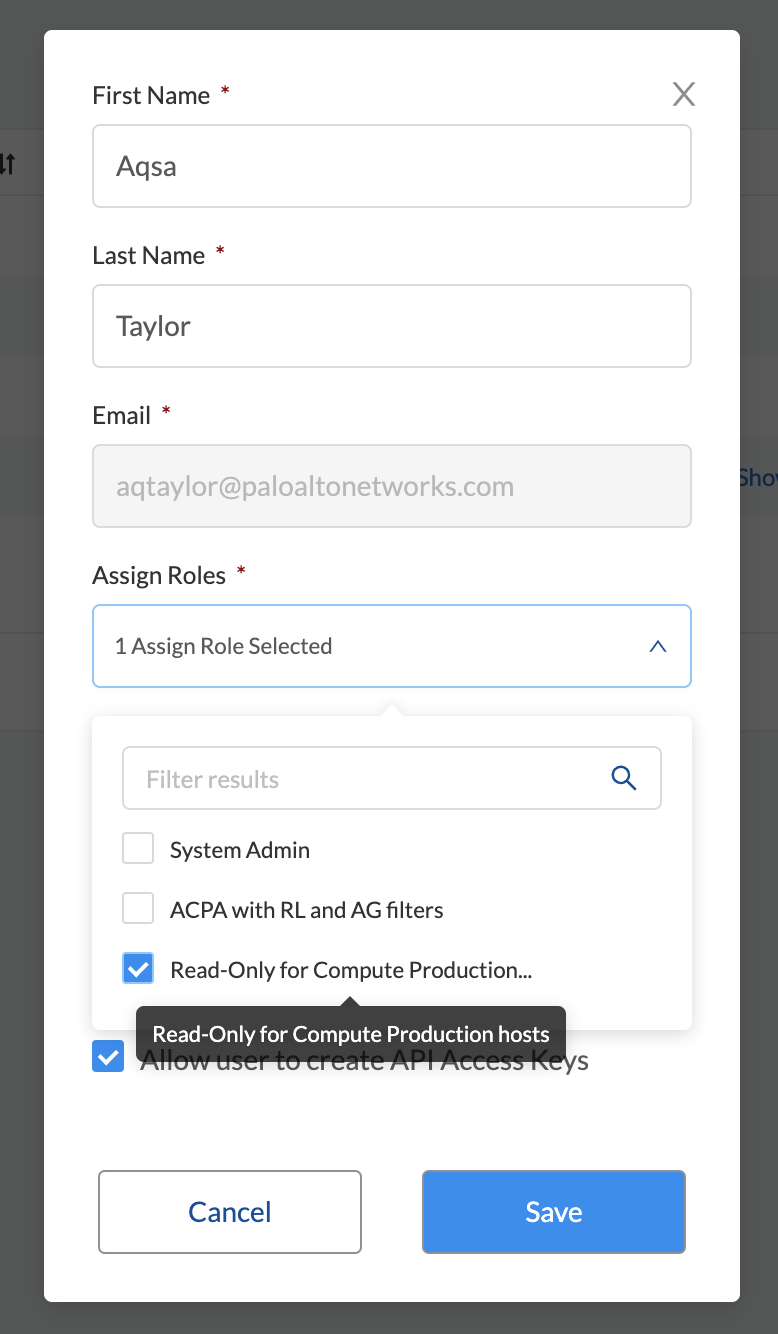
1. Navigate to **Settings > Users**.
2. Add new user or search for an existing user.
3. Assign role(s) to the user. When a role contains multiple Compute Access groups, the effective scope is the union of each individual query.
Changes to a user’s Compute access group takes affect at login. For an active session, newly created Compute Access groups are synced with Compute Console every 30 minutes.
## Limitations
Different views in Console are filtered by different resource types.
If a Compute Access group specifies resources that are unrelated to the view, Access by this list returns an empty result.
| Section | View | Supported resources in collection |
| ------------------------------------------------------- | ---------------------- | ------------------------------------------------------------------------------------------------------------------------------------------------------------------------------------------------------------------- |
|
| VM images | VM images (under Images), Cloud Account IDs |
|
Monitor/Vulnerabilities
Monitor/Compliance
| Functions | Functions, Cloud Account IDs, Labels |
| Monitor/Vulnerabilities | Code repositories | Code repositories |
| Monitor/Vulnerabilities | VMware Tanzu blobstore | Hosts (of the scanner host), Cloud Account IDs |
| Monitor/Vulnerabilities | Vulnerability Explorer | Images, Hosts, Clusters, Labels, Functions, Cloud Account IDs |
| Monitor/Compliance | Cloud Discovery | Cloud Account IDs |
| Monitor/Compliance | Compliance Explorer | Images, Hosts, Namespaces, Clusters, Labels, Cloud Account IDs |
| Monitor/Events | Container audits | Images, Containers, Namespaces, Clusters, Container Deployment Labels (under Labels), Cloud Account IDs. (Cluster collections are not currently able to filter some events such as container audits, specifically.) |
| Monitor/Events | WAAS for Containers | Images, Namespaces, Cloud Account IDs |
| Monitor/Events | Trust Audits | Images, Clusters, Cloud Account IDs |
| Monitor/Events | Admission Audits | Namespaces, Clusters, Cloud Account IDs |
| Monitor/Events | Docker Audits | Images, Containers, Hosts, Clusters, Cloud Account IDs |
| Monitor/Events | App Embedded audits | App IDs (App Embedded), Cloud Account IDs |
| Monitor/Events | WAAS for App-Embedded | App IDs (App Embedded), Cloud Account IDs |
| Monitor/Events | Host audits | Hosts, Clusters, Labels, Cloud Account IDs |
| Monitor/Events | WAAS for Hosts | Hosts, Cloud Account IDs |
| Monitor/Events | Host Log Inspection | Hosts, Clusters, Cloud Account IDs |
| Monitor/Events | Host File Integrity | Hosts, Clusters, Cloud Account IDs |
| Monitor/Events | Host Activities | Hosts, Clusters, Cloud Account IDs |
| Monitor/Events | Serverless audits | Functions, Labels |
| Monitor/Events | WAAS for Serverless | Functions, Labels |
| Monitor/Runtime | Container incidents | Images, Containers, Hosts, Namespaces, Clusters, Cloud Account IDs |
| Monitor/Runtime | Host incidents | Hosts, Clusters, Cloud Account IDs |
| Monitor/Runtime | Serverless incidents | Functions, Labels |
| Monitor/Runtime | App Embedded incidents | App IDs (App Embedded), Cloud Account IDs |
| Monitor/Runtime | Container models | Images, Namespaces, Clusters, Cloud Account IDs |
| Monitor/Runtime | Host Observations | Hosts, Clusters, AWS tags (under Labels), OS tags (under Labels), Cloud Account IDs |
| Monitor/Runtime | Image analysis sandbox | Images, Labels |
| Radar | Containers Radar | Images, Containers, Hosts, Namespaces, Clusters, Labels, Cloud Account IDs |
| Radar | Hosts Radar | Hosts, Clusters, AWS tags (under Labels), OS tags (under Labels), Cloud Account IDs |
| Radar | Serverless Radar | Functions, Cloud Account IDs, Labels |
| Manage | Defenders | Hosts, Clusters, Cloud Account IDs |
After Compute Access groups are created or updated, there are some views that require a rescan before you can see the change:
* Deployed Images vulnerabilities and compliance views
* Registry Images vulnerabilities and compliance views
* Code repositories vulnerabilities view
* Trusted images
* Cloud Discovery
* Vulnerability Explorer
* Compliance Explorer
After Compute Access groups are created or updated, there are some views that are affected by the change only for future records. These views include historical records that keep their collections from creation time:
* Images and Functions CI results view
* Events views
* Incidents view
* Image analysis sandbox results view
---
# Agent Instructions
This documentation is published with GitBook. GitBook is the documentation platform designed so that both humans and AI agents can read, navigate, and reason over technical content effectively. Learn more at gitbook.com.
## Querying This Documentation
If you need additional information that is not directly available in this page, you can query the documentation dynamically by asking a question.
Perform an HTTP GET request on the current page URL with the `ask` query parameter, and the optional `goal` query parameter:
```
GET https://docs.prismacloud.io/content-collections/runtime-security/authentication/assign-roles.md?ask=&goal=
```
`ask` is the immediate question: it should be specific, self-contained, and written in natural language.
`goal` is optional and describes the broader end goal you are ultimately trying to accomplish on behalf of the user. GitBook uses it to tailor the answer towards what is most useful for that goal.
The response will contain a direct answer to the question and relevant excerpts and sources from the documentation.
Use this mechanism when the answer is not explicitly present in the current page, you need clarification or additional context, or you want to retrieve related documentation sections.