> For the complete documentation index, see [llms.txt](https://docs.prismacloud.io/llms.txt). Markdown versions of documentation pages are available by appending `.md` to page URLs; this page is available as [Markdown](https://docs.prismacloud.io/content-collections/runtime-security/pcee-vs-pcce.md).
# Prisma Cloud Enterprise Edition vs Compute Edition
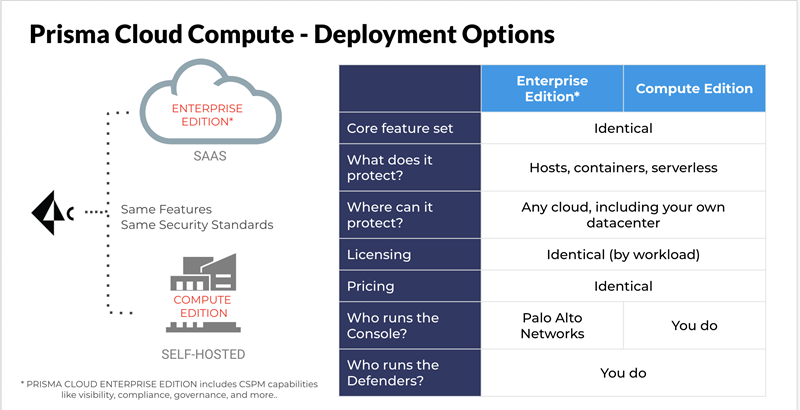
This article describes the key differences between Compute in Prisma Cloud Enterprise Edition and Prisma Cloud Compute Edition. Use this guide to determine which option is right for you.
## How is Compute delivered?
Compute is delivered in one of two packages:
* **Prisma Cloud Enterprise Edition (SaaS)** — Single pane of glass for both CSPM (Cloud Security Posture Management) & CWPP (Cloud Workload Protection Platform). Compute (formerly Twistlock, a CWPP solution) is delivered as part of the larger Prisma Cloud system. Palo Alto Networks runs, manages, and updates Compute Console for you. You deploy and manage Defenders in your environment. You access the Compute Console from a tab within the Prisma Cloud user interface.
* **Prisma Cloud Compute Edition (self-hosted)** — Stand-alone, self-operated version of Compute. Download the entire software suite, and run it in any environment. You deploy and manage both Console and Defenders.
## When Should You Use Enterprise Edition?
Prisma Cloud Enterprise Edition is a good choice when:
* You want a single platform that protects both the service plane (public cloud resource configuration) and the compute plane.
* You want convenience. We manage your Console for you. We update it for you. You get the Prisma Cloud uptime SLA.
## When Should You Use Compute Edition?
Prisma Cloud Compute Edition is a good choice when:
* You want full control over your data.
* You’re operating in an air-gapped environment.
* You want to implement enterprise-grade multi-tenancy with one Console per tenant. For multi-tenancy, Compute Edition offers a feature called Projects.
## What Are the Differences between Prisma Cloud Enterprise Edition and Compute Edition?
The following table summarizes the key differences between Enterprise Edition (SaaS) and Compute Edition (self-hosted). Consider these differences when deciding which edition is right for you.
| Capability | Compute SaaS support |
| ----------------------------------------------- | -------------------------------------------------------------------------------------------------------------------------------------------------------------------------------------------------------------------------------------------------------------------------------------------------------------------------------------------------------------------------------------------------------------------------------------------------------------------------------------------------------------------------------------------------------------------------- |
| Projects | If you need Projects, use Compute Edition. Projects will not be ported to Prisma Cloud Enterprise Edition. However, PCEE does offer alternatives that support Project’s primary use cases. The use case for projects is isolation, where each team has a dedicated Console so that other teams can’t see each other’s data. PCEE supports isolation with multiple independent Prisma Cloud tenants, one per team, with one Compute Console per tenant. Within a single PCEE tenant, Compute Console also offers isolation to data access based on cloud account filtering. |
| Syslog | Supported for Defenders only. For more details, see the article on [logging](/content-collections/runtime-security/audit/logging.md) |
| User management |
Available centrally in the platform for Prisma Cloud Enterprise Edition.
For more information about user role mapping in Prisma Cloud Enterprise Edition, see Prisma Cloud User Roles
|
| Assigned collections | Available via Resource Lists. Read more about [assigning roles](/content-collections/runtime-security/authentication/assign-roles.md). |
| Defender backward compatibility | Yes |
| Compute Edition to Enterprise Edition migration | Available - Must go through Customer Success team. |
## How do Defender upgrades work?
Upgrades work a little differently in each edition.
* **Prisma Cloud Enterprise Edition** — Console is automatically upgraded by PANW with notification posted in our status page at least 2 weeks in advance of upgrade. For more details, refer to [this article](/content-collections/runtime-security/upgrade/upgrade-process.md). Auto-upgrade function for Defenders is always turned ON ensuring that Defenders stay compatible with Console in each release.
* **Prisma Cloud Compute Edition (self-hosted)** — You fully control the upgrade process. When an upgrade is available, customers are notified via the bell icon in Console. Clicking on it directs you to the latest software download. Deploy the new version of Console first, then manually upgrade all of your deployed Defenders.
## Can you migrate from Compute Edition to Enterprise Edition (SaaS)?
Yes.
---
# Agent Instructions
This documentation is published with GitBook. GitBook is the documentation platform designed so that both humans and AI agents can read, navigate, and reason over technical content effectively. Learn more at gitbook.com.
## Querying This Documentation
If you need additional information that is not directly available in this page, you can query the documentation by asking a question.
Perform an HTTP GET request on the following URL with the `ask` and `goal` query parameters:
```
GET https://docs.prismacloud.io/content-collections/runtime-security/pcee-vs-pcce.md?ask=&goal=
```
`ask` is the immediate question: it should be specific, self-contained, and written in natural language.
`goal` is what the user is ultimately trying to achieve, the reason they need the answer. Sharing it helps GitBook give you a better, more relevant answer. A goal is most helpful when it describes the outcome the user wants rather than restating the question. For example, with `ask=how do I create an API token`, a goal like `automate deployments from our CI pipeline` lets GitBook tailor the answer to that use case.
The response will contain a direct answer to the question and relevant excerpts and sources from the documentation.
Use this mechanism when the answer is not explicitly present in the current page, you need clarification or additional context, or you want to retrieve related documentation sections.