AI-SPM provides a comprehensive overview of the AI assets within an organization. It is designed to ensure AI security by offering tools to review and prioritize AI risks effectively.
AI-SPM Overview Page
The AI-SPM Overview page serves as the central hub for information on the AI ecosystem within the organization. It provides a comprehensive overview of AI security posture and is designed to help users quickly access relevant information. The page’s layout and organization are tailored to guide users in understanding the AI environment and determining the next steps to take for effective AI management.
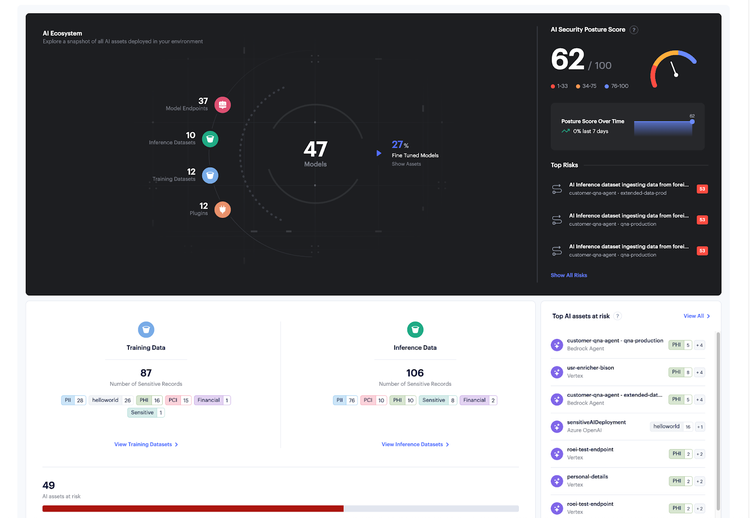
The icons on the left (Model Endpoints, Inference Datasets, Training Datasets, and Plugins), allow you to filter and view specific categories of assets and findings relating to different components of the AI ecosystem.
Clicking "View Training Datasets" reveals all training datasets and their data types, while "View Inference Datasets" displays all inference datasets and their data types. Additionally, selecting "View All" in the "Top AI Assets at Risk" section takes you to the AI Assets page sorted by risks.
The AI risk findings by severity section shows the number of findings categorized by their severity, giving you a clear understanding of the risk landscape in your AI environment.
AI Assets Inventory
The AI Asset Inventory page allows for viewing all AI assets in your environment, regardless of deployment mode or cloud provider. Connected assets are discovered, contextualized, and presented with detailed information. To dive deeper into the asset context, click on the asset name to navigate to the AI Asset page.
AI Risks
AI-SPM provides risk assessment for the supported AI assets, with risk rules crafted by the Prisma Cloud research team. These risk rules are designed to detect misconfigurations and security flaws in AI assets and alert on them. In addition to the default risk rules, AI-SPM also supports custom risk rule creation - allowing organizations to codify and integrate internal policies into the AI-SPM risk engine, streamlining remediation efforts. In order to create a custom risk rule, enter the rule definition as a query in the AI-SPM inventory, and click ‘Create custom risk’.